

Multimedia & graphics Windows
1by1 for Windows
Play music directly from folders with 1by1, a free Windows audio player with resume, gapless playback and file tools. Formats beyond MP3 need additional decoders.
- Operating system
- Windows; publisher also lists Linux with Wine
- Architecture
- 32-bit (x86)
- Download package
- EXE self-extracting ZIP installer
MP3 needs the Windows ACM codec or mpglib.dll. Other formats need optional decoders; use 32-bit DLLs. No installation or compatibility test performed.
Link checked · Download guidance
What is 1by1?
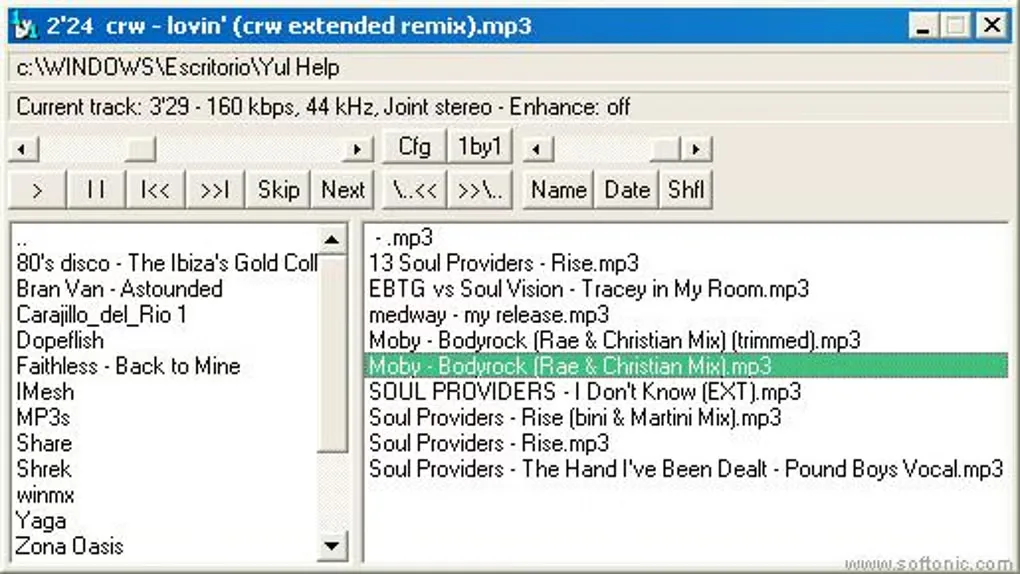
1by1 plays the audio files in a folder without first importing them into a library database or building a playlist. Its file-manager-style window lets you browse directories and choose tracks where they are stored. Resume remembers the track and playback position, while Multi Resume keeps positions for the ten most recently played folders.
Playback options include gapless play, transition mixing and audio enhancement. You can also use M3U playlists, cue sheets, bookmarks and global hotkeys. File tools let you copy, move or rename tracks and compare folders.
Format support depends on your decoder setup: the standalone player uses the Windows ACM decoder for MP3. FLAC, OGG, AAC and other formats require the optional BASS library and, where needed, add-ons or input plugins. Because 1by1 is a 32-bit application, added decoder DLLs must also be 32-bit.
The linked Windows 2.17 package is the publisher-described self-extracting ZIP installer, served by WinFuture, a mirror listed on the official website. The screenshot shows a historical Windows interface, not a verified view of version 2.17.
What it offers
- Browse folders and play their audio contents without a library database.
- Resume a track at its previous position, with Multi Resume for ten recently played folders.
- Choose gapless playback, transition mixing and audio enhancement.
- Use M3U playlists, cue sheets, bookmarks and global hotkeys.
- Copy, move and rename files, or use the folder comparison tool.
Good to know
- The standalone player plays MP3; additional formats require optional decoder libraries or input plugins. Decoder DLLs must be 32-bit.
- Portable settings require write access to the program folder; otherwise settings are stored in the user profile unless portable storage is forced in settings.
- The download uses a tokenized WinFuture mirror URL verified at the recorded time; continued availability is not guaranteed.
Product images
More in multimedia & graphics
View category ↗3DVista Virtual Tour Pro
Build interactive 360° virtual tours from panoramas, videos and 3D models with 3DVista Virtual Tour Pro for Windows. Commercial software with a 30-day trial.

4DDiG Video Repair
Repair corrupted or unplayable videos in batches with the Video Repair tool in 4DDiG File Repair for Windows. A free trial is available; advanced features require a paid license.
4DDiG Video Repair
Repair corrupted or unplayable videos on Mac with the Video Repair tools in 4DDiG File Repair, including batch processing and preview before saving.