

Multimedia & graphics macOS
Aegisub for macOS
Create, time and style subtitles with Aegisub, a free, open-source subtitle editor for Mac with audio timing tools and a real-time video preview.
- Operating system
- macOS; minimum version for this release not confirmed
- Architecture
- Apple Silicon (ARM64)
- Download package
- DMG disk image
This link selects the arm64 package. The official downloads page also offers a separate x64 DMG for Intel Macs. Softonic's macOS 10.15 listing accompanies an older 3.4.2 entry and is not treated as this release's minimum requirement.
Link checked · Download guidance
What is Aegisub?
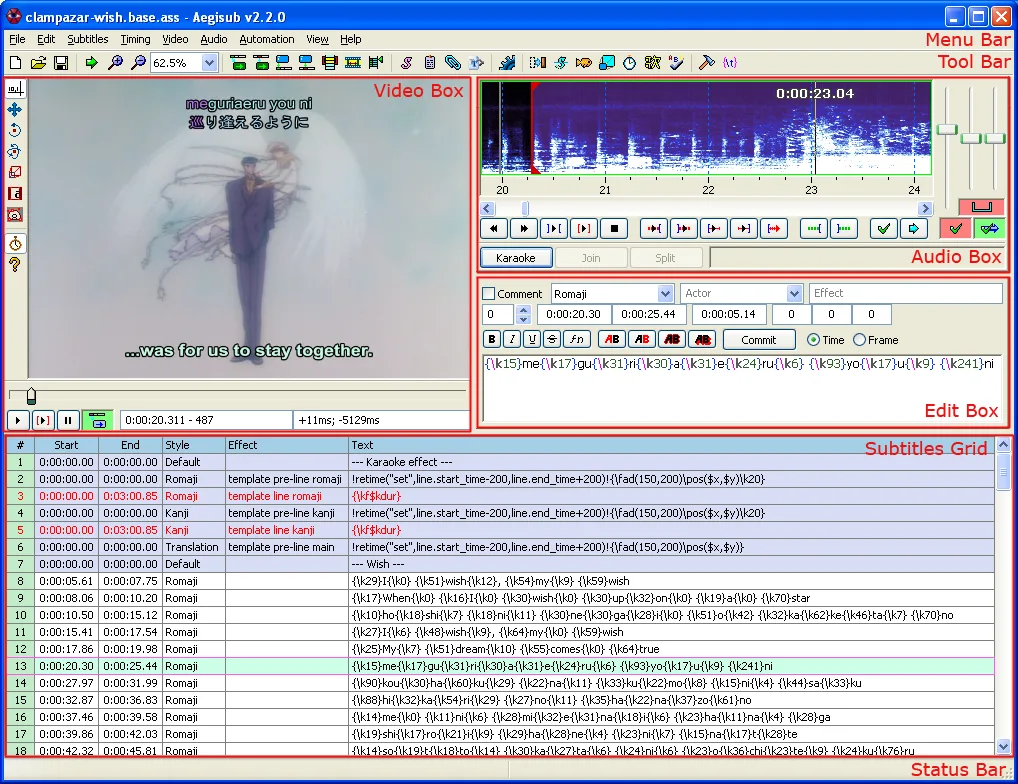
Aegisub is a subtitle editor for preparing dialogue, translations and styled on-screen text. Edit individual lines in the subtitle grid, align their start and end times against audio, and preview their placement over video. Waveform and spectrum views help with timing, while visual typesetting tools let you position, rotate and clip subtitle text. Automation scripts can extend the workflow with macros and karaoke effects.
The linked download is the publisher's Aegisub 3.5.1 DMG for Apple Silicon. Intel Macs use a separate x64 DMG listed on the official downloads page; these are separate packages, not a universal download. The documentation screenshot below is an older Windows reference image showing the editor's layout, not a capture of the current Mac release.
Styled subtitles also depend on the playback software and available fonts. The publisher warns that some built-in players display subtitle text without applying all ASS formatting and effects. Check the finished subtitles in the intended player and include the required fonts when distributing them.
What it offers
- Edit subtitle text, timing and line properties in a subtitle grid and edit box.
- Synchronize lines to audio using waveform or spectrum displays.
- Preview subtitles over video and adjust their position, rotation and clipping visually.
- Use Automation scripting for macros, export filters and karaoke effects.
Good to know
- Some players do not render all ASS subtitle formatting and effects; the required fonts must also be available for the intended appearance.
- The linked Apple Silicon DMG is separate from the publisher's Intel Mac package.
Product images
More in multimedia & graphics
View category ↗
1by1 2.17
Play music directly from folders with 1by1, a free Windows audio player with resume, gapless playback and file tools. Formats beyond MP3 need additional decoders.
3DVista Virtual Tour Pro
Build interactive 360° virtual tours from panoramas, videos and 3D models with 3DVista Virtual Tour Pro for Windows. Commercial software with a 30-day trial.

4DDiG Video Repair
Repair corrupted or unplayable videos in batches with the Video Repair tool in 4DDiG File Repair for Windows. A free trial is available; advanced features require a paid license.