

Multimedia & graphics Windows
AmoK Exif Sorter for Windows
Rename photos and organize them into folders using EXIF and IPTC metadata with AmoK Exif Sorter, a free Windows photo-sorting tool with filename previews.
- Operating system
- Windows; minimum release not specified by publisher
- Architecture
- x64
- Download package
- EXE installer
Publisher changelog documents a bundled Java runtime for Windows and its upgrade to Java 21 in 3.22. Separate ZIP option available. Version 3.31 is the catalog label; installer filename uses 3.3.1. Windows 10/11 runtime compatibility was not tested.
Link checked · Download guidance
What is AmoK Exif Sorter?
AmoK Exif Sorter turns camera filenames into names and folders based on the information stored in your photos. Build a rule from tags such as the capture year, month and day, preview the resulting filenames, then choose whether to rename the files in place, copy them or move them to a target directory. It suits organizing a camera folder by date without naming each photo manually.
You can process individual files or directories with subdirectories, inspect images and their metadata, and save different sorting rules as profiles. The publisher's Windows download is an x64 installer with a bundled Java runtime; a ZIP package is offered separately. The publisher lists version 3.31, released on July 11, 2025. Its download filename uses the spelling 3.3.1.
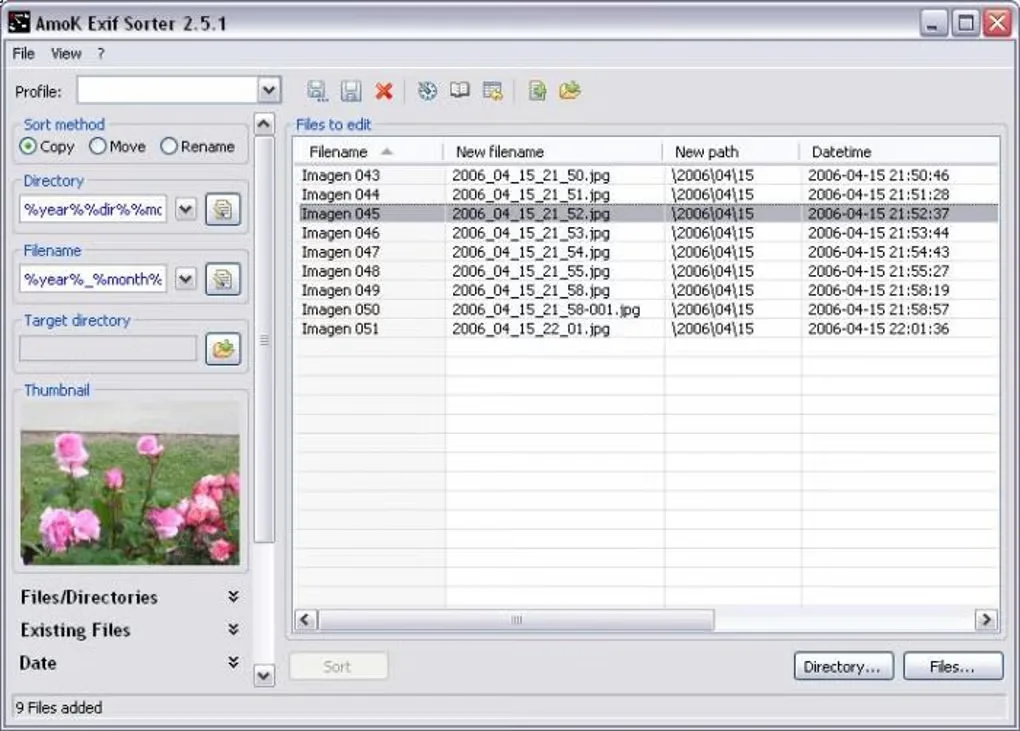
Metadata support does not always include an image preview: the publisher documents metadata-only handling for HEIC/HEIF and most supported RAW formats. Back up your files before a batch operation, as required by the software's license. The gallery image below shows the older 2.5.1 interface, not version 3.31.
What it offers
- Build photo filenames and destination folders from EXIF and IPTC tags, including capture dates and camera information.
- Preview new filenames before choosing Copy, Move or Rename.
- Process selected files or folders with subdirectories.
- Inspect photos and metadata in the integrated viewer, and save sorting rules as profiles.
- Use date adjustments to compensate for an incorrect camera clock.
Good to know
- HEIC/HEIF and most supported RAW formats provide metadata without image previews or thumbnails.
- The Windows package is x64; the publisher does not specify a minimum Windows release on the inspected product and download pages.
- Renaming and moving alter your files or their locations. The publisher's license requires a backup before using the software on files.
Product images
Sources
References used for this listing. Retrieval dates do not indicate hands-on testing.
More in multimedia & graphics
View category ↗
1by1 2.17
Play music directly from folders with 1by1, a free Windows audio player with resume, gapless playback and file tools. Formats beyond MP3 need additional decoders.
3DVista Virtual Tour Pro
Build interactive 360° virtual tours from panoramas, videos and 3D models with 3DVista Virtual Tour Pro for Windows. Commercial software with a 30-day trial.

4DDiG Video Repair
Repair corrupted or unplayable videos in batches with the Video Repair tool in 4DDiG File Repair for Windows. A free trial is available; advanced features require a paid license.