
Multimedia & graphics Windows
AnyEnhancer
Upscale, denoise and colorize videos with AnyEnhancer for Windows. Try AI enhancement models and preview results; exporting requires a paid subscription.
- Operating system
- Windows 10 (64-bit) and Windows 11
- Architecture
- 64-bit Windows; publisher lists Intel and AMD CPUs
- Download package
- EXE installer
Minimum listed GPU: NVIDIA GTX 1050 Ti; storage: 16 GB. Publisher recommends NVIDIA RTX 3xxx (8 GB) or higher and 32 GB storage.
Link checked · Download guidance
What is AnyEnhancer?
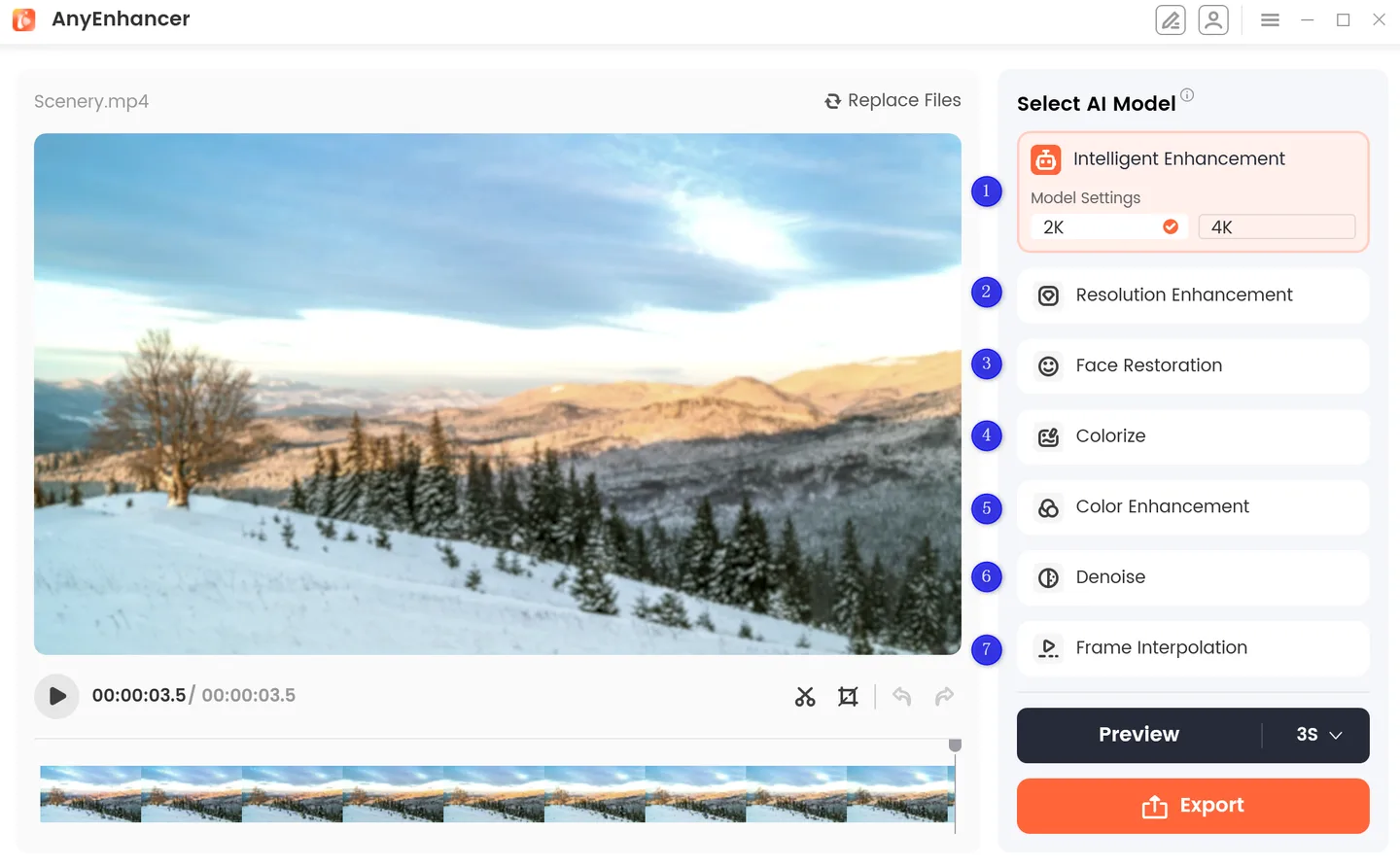
AnyEnhancer is an AI video enhancement application from iMobie for improving low-resolution, noisy or faded footage. Its models cover resolution enhancement to 2K or 4K, face restoration, black-and-white colorization, color enhancement, denoising and frame interpolation. The intelligent enhancement model combines resolution and face enhancement.
Import a supported video, select the model that fits the problem and preview a short sample before deciding whether to export. The publisher lists MP4, MOV, WEBM and FLV support. This focused workflow suits individual clips and old home recordings rather than processing a queue of videos.
The free version lets you try enhancement, but saving an enhanced video requires a subscription. AnyEnhancer processes one video at a time. Results vary with the source footage and computer configuration; the publisher lists an NVIDIA GTX 1050 Ti or higher among its minimum Windows requirements.
What it offers
- Upscale video with 2K and 4K resolution enhancement settings.
- Use intelligent enhancement, face restoration, colorization, color enhancement and denoising models.
- Increase frame rates with 2X or 4X frame interpolation.
- Preview the original and processed video side by side using a 3- or 5-second sample.
- Import and export supported MP4, MOV, WEBM and FLV videos.
Good to know
- Exporting enhanced videos requires a paid subscription; the free version is for trying enhancement and previews.
- Processes one video at a time; batch enhancement is not supported.
- Results depend on source footage and computer configuration. The publisher lists an NVIDIA GTX 1050 Ti or higher and 16 GB of storage as minimum Windows requirements.
Product images
Sources
References used for this listing. Retrieval dates do not indicate hands-on testing.
More in multimedia & graphics
View category ↗
1by1 2.17
Play music directly from folders with 1by1, a free Windows audio player with resume, gapless playback and file tools. Formats beyond MP3 need additional decoders.
3DVista Virtual Tour Pro
Build interactive 360° virtual tours from panoramas, videos and 3D models with 3DVista Virtual Tour Pro for Windows. Commercial software with a 30-day trial.

4DDiG Video Repair
Repair corrupted or unplayable videos in batches with the Video Repair tool in 4DDiG File Repair for Windows. A free trial is available; advanced features require a paid license.