
Multimedia & graphics Windows
Ashampoo Collage for Windows
Arrange photos in adjustable grids, add text and customize backgrounds with Ashampoo Photo Collage for Windows. A 30-day trial is available.
- Operating system
- Windows 11 and Windows 10
- Architecture
- x64 listed in publisher requirements
- Download package
- EXE installer
At least 8 GB RAM; Ashampoo app required for installation. Publisher metadata also lists ARM, but the exact installer architecture was not independently inspected.
Link checked · Download guidance
What is Ashampoo Collage?
Ashampoo Collage, named Ashampoo Photo Collage by its publisher, combines multiple photos into one layout. Start with a social-media, paper or photo-frame size, or set custom dimensions. Split or remove cells and move dividing lines to give particular photos more space, then drag photos into the grid and adjust their crops.
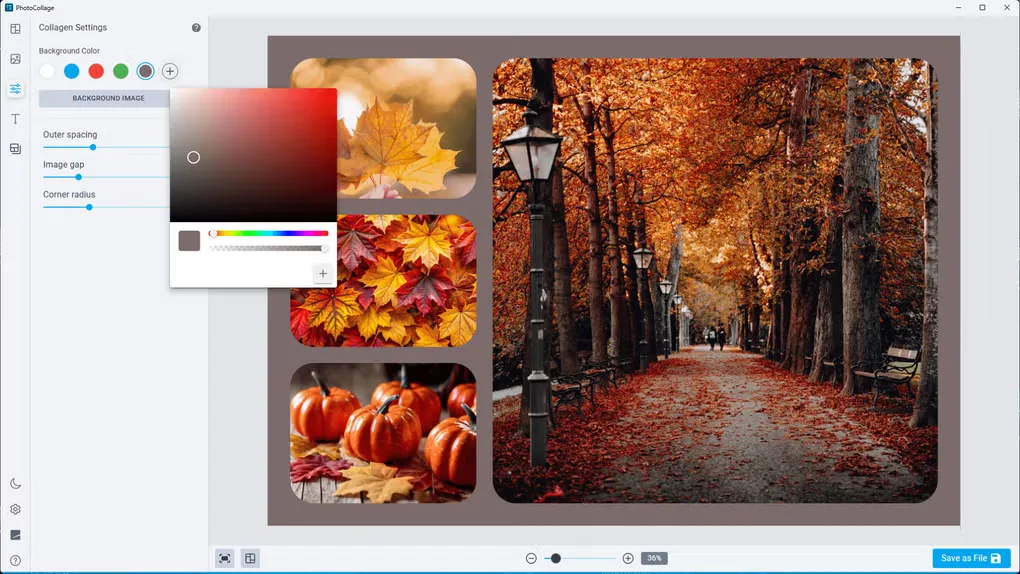
The editor includes spacing, border, color and rounded-corner controls, plus freely positioned text with adjustable shadows. You can save a complete collage project to revisit its photos, crops, styling and text later; automatic saving also preserves work in progress.
This is commercial software with a 30-day trial, not a permanently free collage maker. The publisher lists at least 8 GB of RAM and says the Ashampoo app is required for installation. The linked EXE is the publisher's Windows download; no installation or hands-on performance assessment was performed for this entry.
What it offers
- Choose preset social-media, A5, A4 and photo-frame sizes, or enter custom dimensions.
- Add, split or remove photo cells and move grid dividers independently of the output size.
- Drag photos into cells, swap images and adjust each crop with zoom and repositioning.
- Customize spacing, borders, rounded corners, background colors and patterns.
- Place text freely, adjust its shadows and save editable projects for later work.
Good to know
- The free trial lasts 30 days; continued use requires a paid license.
- The publisher requires at least 8 GB of RAM and the Ashampoo app for installation.
Product images
Sources
References used for this listing. Retrieval dates do not indicate hands-on testing.
More in multimedia & graphics
View category ↗
1by1 2.17
Play music directly from folders with 1by1, a free Windows audio player with resume, gapless playback and file tools. Formats beyond MP3 need additional decoders.
3DVista Virtual Tour Pro
Build interactive 360° virtual tours from panoramas, videos and 3D models with 3DVista Virtual Tour Pro for Windows. Commercial software with a 30-day trial.

4DDiG Video Repair
Repair corrupted or unplayable videos in batches with the Video Repair tool in 4DDiG File Repair for Windows. A free trial is available; advanced features require a paid license.