

Multimedia & graphics Windows
ASIO4ALL for Windows
Use WDM audio devices in ASIO-compatible Windows audio software with ASIO4ALL, a free-for-end-users driver with device selection and adjustable audio buffers.
- Operating system
- Windows 10 and Windows 11 officially supported
- Architecture
- Windows on ARM64 native and EC support confirmed by publisher
- Download package
- EXE installer, multi-language
Requires a WDM audio driver and an ASIO-compatible audio application. No installation or hardware compatibility testing performed.
Link checked · Download guidance
What is ASIO4ALL?
ASIO4ALL connects ASIO-compatible audio applications to Windows WDM audio devices. It uses WDM Kernel-Streaming rather than replacing your sound card's existing driver. For recording or playback in a DAW, select ASIO4ALL v2 in the application's audio settings, open its control panel and enable the device you want to use.
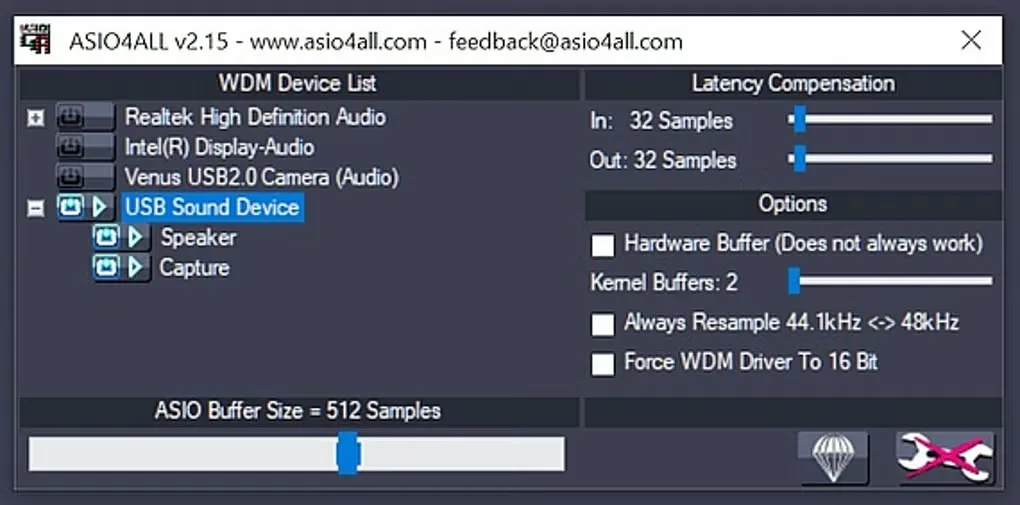
The control panel lets you choose audio devices and adjust the ASIO buffer size. A smaller buffer can reduce latency, but crackling or distortion means you need a larger buffer. A device already in use by another application may be unavailable, and some settings require restarting the audio application.
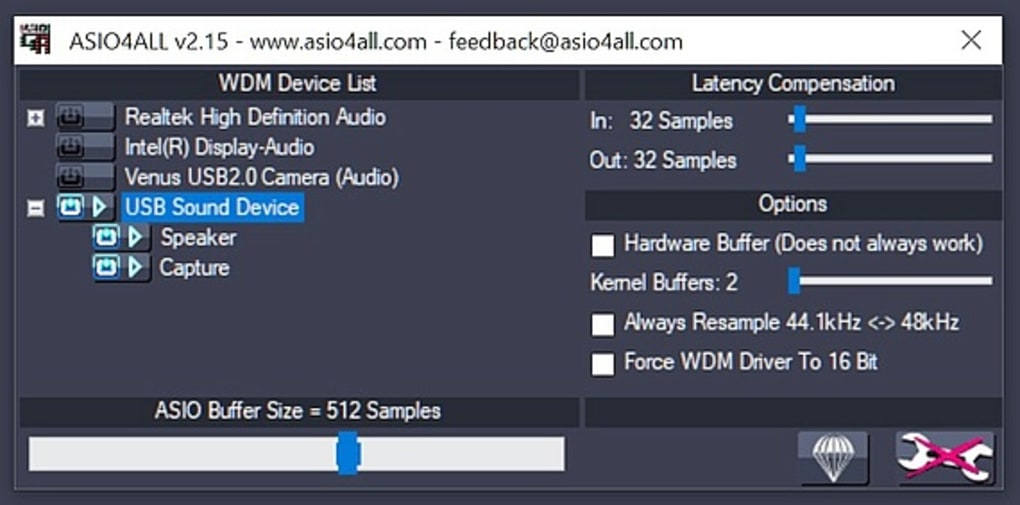
Version 2.22 officially supports Windows 10 and Windows 11 and adds native and EC support for Windows on ARM64. Native ARM64 applications share a global configuration rather than having individual per-app settings. The gallery image shows the older v2.15 control panel for reference, not the current release's exact appearance.
What it offers
- Use WDM Kernel-Streaming to connect WDM audio hardware to ASIO-compatible audio software.
- Enable audio devices through the control panel's WDM device list.
- Adjust the ASIO buffer size to balance latency against crackling or distortion.
- Open the control panel from the audio application or the system-tray icon while the driver is active.
- Version 2.22 adds Windows on ARM64 support for native and EC applications.
Good to know
- Requires an existing WDM driver for the audio hardware; it does not replace the sound card's driver.
- Devices used by another audio application may be unavailable to ASIO4ALL.
- Smaller buffers can cause crackling or distortion; some changes require restarting the audio application.
- Native ARM64 applications share the global configuration rather than storing individual per-app configurations.
Product images
Sources
References used for this listing. Retrieval dates do not indicate hands-on testing.
- ASIO4ALL - Download ↗Retrieved
- Overview – ASIO4ALL Official Home ↗Retrieved
- Download – ASIO4ALL Official Home ↗Retrieved
- Version 2.22 – ASIO4ALL Official Home ↗Retrieved
- Getting Started – ASIO4ALL Official Home ↗Retrieved
- WDM Device List – ASIO4ALL Official Home ↗Retrieved
- ASIO Buffer Size – ASIO4ALL Official Home ↗Retrieved
- ASIO4ALL Official Home – Universal Windows ASIO Driver ↗Retrieved
More in multimedia & graphics
View category ↗
1by1 2.17
Play music directly from folders with 1by1, a free Windows audio player with resume, gapless playback and file tools. Formats beyond MP3 need additional decoders.
3DVista Virtual Tour Pro
Build interactive 360° virtual tours from panoramas, videos and 3D models with 3DVista Virtual Tour Pro for Windows. Commercial software with a 30-day trial.

4DDiG Video Repair
Repair corrupted or unplayable videos in batches with the Video Repair tool in 4DDiG File Repair for Windows. A free trial is available; advanced features require a paid license.