

Multimedia & graphics Windows
Audio & Video to Text Transcriber for Windows
Turn recorded audio and video into searchable text on your Windows PC with SoftOrbits' offline transcriber, batch queues and editable timestamps. A free trial is available; continued unrestricted use requires a paid license.
- Operating system
- Windows 10 and Windows 11
- Architecture
- 64-bit Windows per publisher FAQ; installer architecture not independently inspected
- Download package
- EXE download (AudioVideoToText.exe)
Publisher FAQ does not guarantee older Windows versions. HEAD verification checks the download endpoint, not installation, model availability or software operation.
Link checked · Download guidance
What is Audio & Video to Text Transcriber?
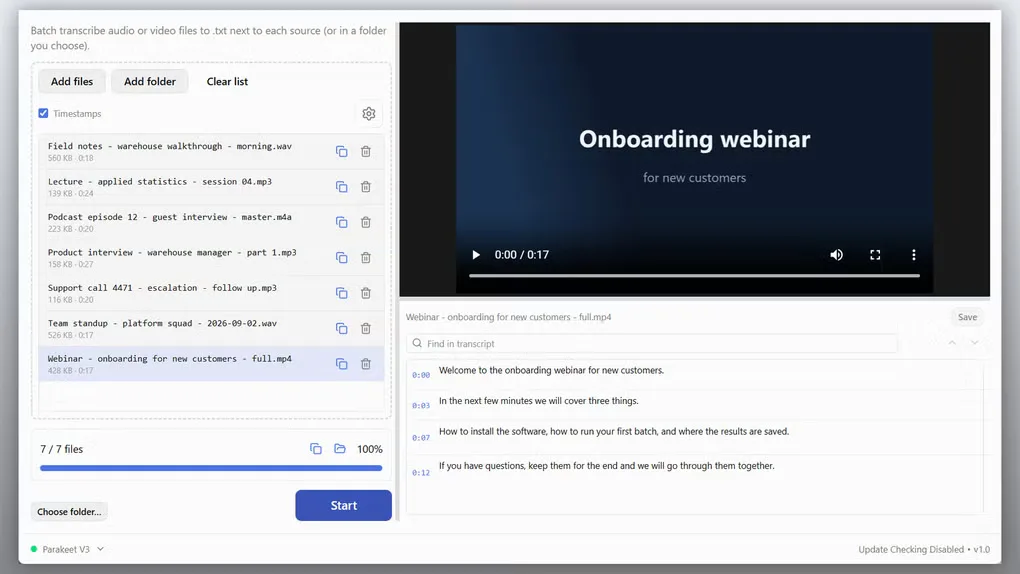
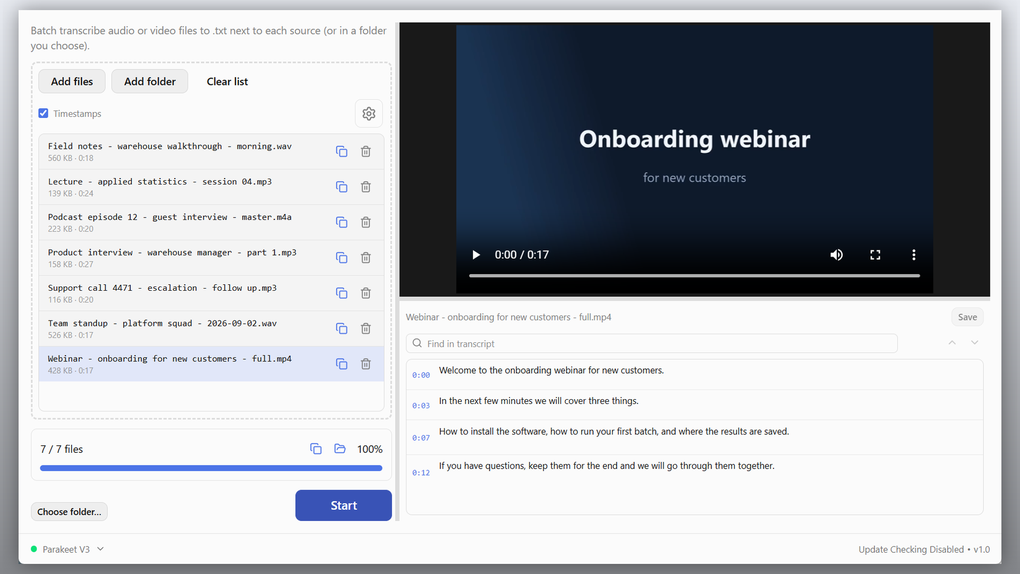
Audio & Video to Text Transcriber, called TranscribeIt on the SoftOrbits website, converts saved recordings into text locally on a Windows PC. It is aimed at interview recordings, lectures, podcasts and meeting files rather than live dictation. Add individual files or a folder, choose where the text should be saved, and process the queue in a batch.
The built-in player sits beside the transcript so you can check a line against the recording, correct words and navigate by timestamps. Output options include plain .txt files and .srt subtitles. The publisher lists common audio formats such as MP3, WAV and FLAC, plus video formats including MP4, MOV and MKV.
SoftOrbits describes recognition as local, with no recording uploaded to a cloud service. The Softonic author review notes that the speech model is downloaded once before offline use. These are source descriptions, not an independent privacy or accuracy audit. The app works with recorded files: an online video must first be saved separately, and live dictation is a different product. A free trial is offered, but the application is commercially licensed.
What it offers
- Queue individual recordings or an entire folder for batch transcription.
- Run speech recognition locally after the required model is downloaded, according to the source descriptions.
- Review and edit the transcript beside a built-in media player with clickable timestamps and transcript search.
- Save plain .txt transcripts and export timed .srt subtitle files.
- Read common audio and video formats, including MP3, WAV, FLAC, MP4, MOV and MKV.
- Recognize 25 languages according to SoftOrbits, with an additional multilingual model available to download.
Good to know
- Transcribes saved recordings, not live dictation; online videos must be obtained separately before transcription.
- A speech-model download is required before offline recognition, according to the Softonic author review.
- The free trial is restricted; a paid license is required to remove the trial's daily file limit. Softonic reports three files per day, while the publisher page does not specify a numeric cap.
Product images
Sources
References used for this listing. Retrieval dates do not indicate hands-on testing.
More in multimedia & graphics
View category ↗
1by1 2.17
Play music directly from folders with 1by1, a free Windows audio player with resume, gapless playback and file tools. Formats beyond MP3 need additional decoders.
3DVista Virtual Tour Pro
Build interactive 360° virtual tours from panoramas, videos and 3D models with 3DVista Virtual Tour Pro for Windows. Commercial software with a 30-day trial.

4DDiG Video Repair
Repair corrupted or unplayable videos in batches with the Video Repair tool in 4DDiG File Repair for Windows. A free trial is available; advanced features require a paid license.