
Multimedia & graphics macOS
Audio Hijack for macOS
Record Mac app audio, microphones and system sound with reusable block-based sessions. Audio Hijack also applies effects and sends live audio to streaming servers.
- Operating system
- macOS 14.4 through macOS 27
- Architecture
- Intel and Apple silicon Macs
- Download package
- ZIP archive containing the Mac application
The publisher provides separate legacy guidance for older macOS releases. Audio capture requires enabling the permissions requested by the app.
Link checked · Download guidance
What is Audio Hijack?
Audio Hijack captures audio from applications, input devices or the Mac's system output. It suits recording a web stream, saving a voice conversation or combining microphone and application audio for a podcast. Each session connects source, processing and output blocks, so you can see where the sound goes and reuse the setup later.
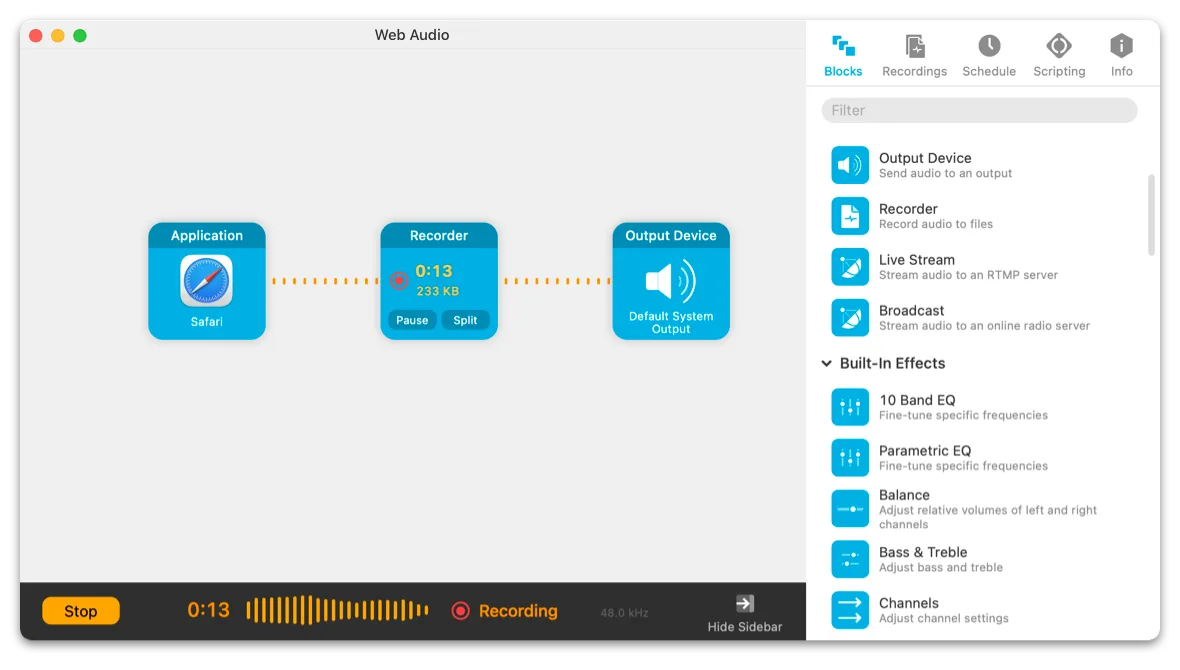
A simple web-audio session sends Safari into a Recorder block and then to an Output Device, letting you save the sound while hearing it. Built-in effects can adjust audio before it reaches an output. For broadcasting instead of saving a file, separate Live Stream and Broadcast blocks send audio to RTMP or internet-radio servers.
This is commercial software with a free trial, not a free unrestricted recorder. After 10 minutes of capture in trial mode, noise is added to audio passing through the app; the publisher warns that noise already recorded cannot be removed. A purchased license unlocks the full version. The publisher lists version 4.6.0 for macOS 14.4 through macOS 27; users on older systems should consult its legacy-download guidance.
What it offers
- Capture individual applications, microphone or other input devices, or system audio.
- Build reusable sessions by connecting source, effects and output blocks.
- Record to formats including MP3, AAC, AIFF, WAV, ALAC and FLAC.
- Apply built-in audio effects such as equalization and compression.
- Send live audio to RTMP servers or Shoutcast and Icecast internet-radio servers.
Good to know
- Trial mode adds noise after 10 minutes of audio capture. Noise already captured in a recording cannot be removed; purchase unlocks unrestricted use.
- The current release requires macOS 14.4 or later within the publisher's listed macOS 14.4–27 range; older systems need the publisher's legacy-version guidance.
Product images
Sources
References used for this listing. Retrieval dates do not indicate hands-on testing.
- Audio Hijack Pro for Mac - Download ↗Retrieved
- Rogue Amoeba | Audio Hijack: Record Any Audio on MacOS ↗Retrieved
- Downloading and trying Audio Hijack - Rogue Amoeba Support ↗Retrieved
- Rogue Amoeba | Audio Hijack Manual — Starting Simple ↗Retrieved
- Rogue Amoeba | Audio Hijack Manual — Session Basics ↗Retrieved
- Rogue Amoeba | Audio Hijack Release Notes ↗Retrieved
- Issues unzipping Audio Hijack - Rogue Amoeba Support ↗Retrieved
- Rogue Amoeba | Audio Hijack Manual — Installing & Uninstalling ↗Retrieved
- Homebrew Audio Hijack cask metadata ↗Retrieved
More in multimedia & graphics
View category ↗
1by1 2.17
Play music directly from folders with 1by1, a free Windows audio player with resume, gapless playback and file tools. Formats beyond MP3 need additional decoders.
3DVista Virtual Tour Pro
Build interactive 360° virtual tours from panoramas, videos and 3D models with 3DVista Virtual Tour Pro for Windows. Commercial software with a 30-day trial.


4DDiG Video Repair
Repair corrupted or unplayable videos in batches with the Video Repair tool in 4DDiG File Repair for Windows. A free trial is available; advanced features require a paid license.