
Multimedia & graphics Windows
AudioRetoucher
Change a song's key or tempo with AudioRetoucher for Windows. Preview pitch and speed adjustments during playback, detect BPM and save the processed audio.
What is AudioRetoucher?
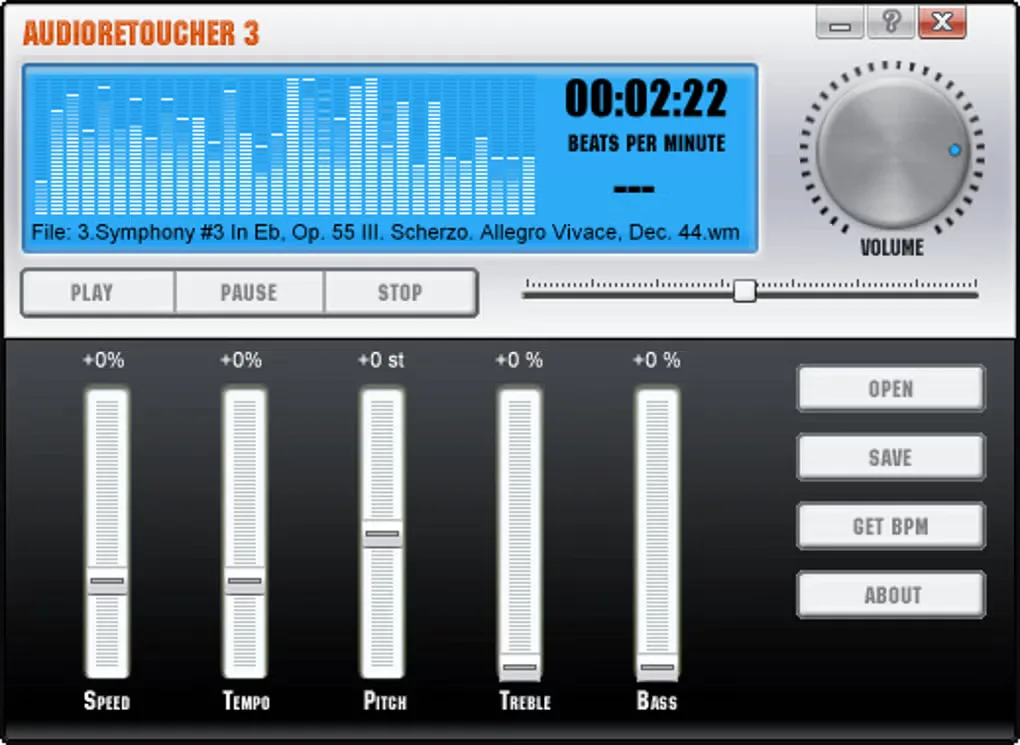
AudioRetoucher changes the pitch and tempo of audio files for tasks such as moving a backing track into a singer's range or slowing music for practice. Pitch and tempo can be adjusted independently, and playback lets you hear the settings before saving the result. The publisher lists pitch shifting from -12 to +12 semitones, plus separate speed, bass and treble controls.
The application reads formats including MP3, M4A, FLAC, WAV and AIFF. Its specifications list MP3, WAV, FLAC and M4A output, so the input and output format lists are not interchangeable. BPM detection helps identify a track's tempo, while MP3+G support keeps accompanying CDG lyrics synchronized when tempo or speed changes.
The linked Windows download is a trial of commercial software, not an unrestricted freeware license. The gallery image is a historical AudioRetoucher 3 interface supplied by the source listing; it is not evidence of the exact appearance of version 5.6.1.0.
What it offers
- Adjust pitch from -12 to +12 semitones without requiring a matching tempo change.
- Change tempo or playback speed and preview adjustments during playback.
- Detect a track's BPM and adjust bass and treble.
- Open audio formats including MP3, M4A, FLAC, WAV and AIFF; export to MP3, WAV, FLAC or M4A according to the publisher's specifications.
- Keep accompanying CDG karaoke lyrics synchronized when changing the tempo or speed of MP3+G tracks.
Good to know
- The download is a trial of commercial software; it is not offered as unrestricted freeware.
- Supported input formats are broader than the published output list of MP3, WAV, FLAC and M4A.
Product images
Sources
References used for this listing. Retrieval dates do not indicate hands-on testing.
More in multimedia & graphics
View category ↗
1by1 2.17
Play music directly from folders with 1by1, a free Windows audio player with resume, gapless playback and file tools. Formats beyond MP3 need additional decoders.
3DVista Virtual Tour Pro
Build interactive 360° virtual tours from panoramas, videos and 3D models with 3DVista Virtual Tour Pro for Windows. Commercial software with a 30-day trial.

4DDiG Video Repair
Repair corrupted or unplayable videos in batches with the Video Repair tool in 4DDiG File Repair for Windows. A free trial is available; advanced features require a paid license.