

Multimedia & graphics Windows
AutoStakkert! for Windows
Align and stack telescope recordings of planets, the Moon and the Sun with AutoStakkert! for Windows, with frame-quality analysis and multiple alignment points.
- Operating system
- Windows; exact minimum Windows version not specified on the publisher download page
- Architecture
- x64 (64-bit)
- Download package
- ZIP archive containing the executable; no installer
Extract the ZIP and run the executable. The publisher reports Wine use on Linux and macOS, but provides no native versions for those systems.
Link checked · Download guidance
What is AutoStakkert!?
AutoStakkert! combines frames from telescope recordings into an aligned image stack. It is built for planetary, lunar and solar imaging: analyze a sequence, inspect frames ranked by quality, place alignment points and choose how many frames to combine. Multiple alignment points help track different areas of a planet or a wider lunar or solar scene. Batch processing is available for working through several recordings.
This download is the publisher’s 64-bit Windows ZIP for version 4.0.11, dated January 21, 2024. The publisher describes it as reasonably stable and separately offers 4.0.13 as a potentially less stable beta. Extract the ZIP into a folder and open the AutoStakkert executable; the package is not an installer.
Stacking is one stage of the imaging workflow, not a substitute for full post-processing. Further sharpening and color work may require another image editor. MOV and other compressed formats require an FFmpeg executable available to AutoStakkert!. The software is free for private non-commercial, educational and charity use; business or commercial use requires registration and purchase.
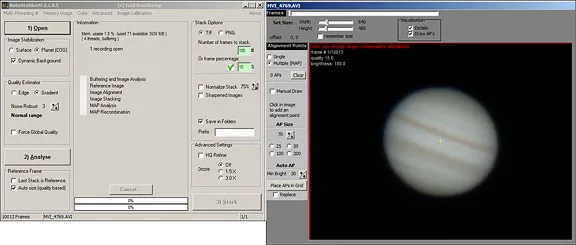
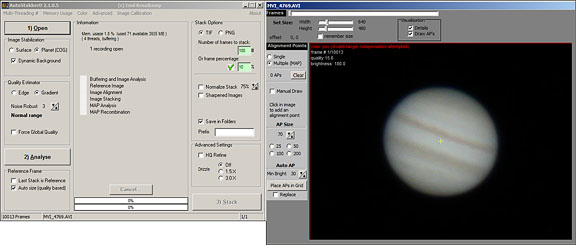
The screenshot shows the older AutoStakkert!2 interface from a publisher-hosted tutorial, not version 4.0.11. It illustrates the operations panel and Jupiter frame viewer.
What it offers
- Analyze recordings and inspect frames sorted by quality.
- Align image sequences using multiple alignment points.
- Stack selected frames from planetary, lunar and solar recordings.
- Read uncompressed AVI, SER, TIFF, FIT and BMP files, including monochrome and color recordings.
- Batch-process multiple recordings.
Good to know
- Advanced sharpening and other post-processing may require separate image-editing software.
- MOV and other compressed file formats require an FFmpeg executable available to the application.
- Business or commercial use requires registration and purchase; freeware terms do not cover those uses.
Product images
Sources
References used for this listing. Retrieval dates do not indicate hands-on testing.
More in multimedia & graphics
View category ↗
1by1 2.17
Play music directly from folders with 1by1, a free Windows audio player with resume, gapless playback and file tools. Formats beyond MP3 need additional decoders.
3DVista Virtual Tour Pro
Build interactive 360° virtual tours from panoramas, videos and 3D models with 3DVista Virtual Tour Pro for Windows. Commercial software with a 30-day trial.

4DDiG Video Repair
Repair corrupted or unplayable videos in batches with the Video Repair tool in 4DDiG File Repair for Windows. A free trial is available; advanced features require a paid license.