

Multimedia & graphics Windows
AVS Video Converter for Windows
Convert video between MP4, MOV, MKV and other formats on Windows, with device presets and batch processing. Conversion is free; editing requires the paid full version.
- Operating system
- Windows 11, 10, 8.1, 8, 7, Vista and XP, as listed by the publisher
- Architecture
- Not specified on the publisher product page
- Download package
- EXE installer
Publisher recommends Windows 7 or newer; installation requires administrative permissions. Hardware acceleration depends on compatible graphics hardware and codecs.
Link checked · Download guidance
What is AVS Video Converter?
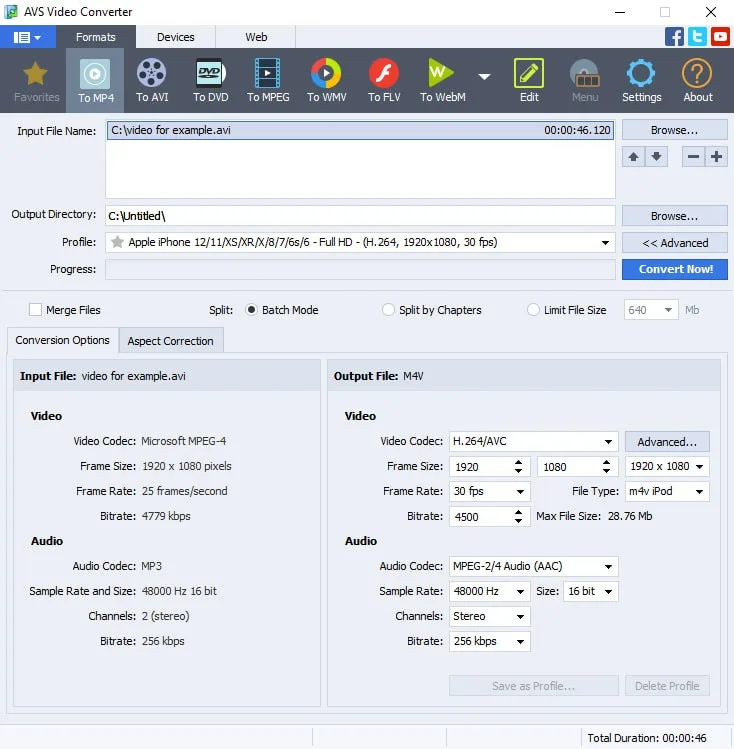
AVS Video Converter changes video files into formats suited to a device, a sharing service or another application. Choose a preset for a phone or tablet, or adjust frame size, frame rate, bitrate and codecs yourself. Batch mode handles multiple input files, while command-line mode can automate conversions using templates.
The publisher lists HD, Full HD and 4K conversion, along with hardware-assisted decoding on supported Intel and NVIDIA hardware. Acceleration depends on the hardware and codec; a software decoder is also available.
Free conversion is separate from the paid editing tools. Cutting, merging, effects and audio export are among the functions the publisher reserves for the full version. AVS4YOU also states that its programs cannot copy protected material. This is a Windows application, not a native macOS or Linux converter.
What it offers
- Convert between common video formats including MP4, MOV, MKV, WebM, AVI and WMV.
- Choose device and web presets, or adjust frame size, frame rate, bitrate and audio/video codecs.
- Process multiple videos in batch mode or automate conversions with command-line templates.
- Convert HD, Full HD and 4K video with suitable output presets.
- Use hardware-assisted decoding on supported Intel or NVIDIA hardware, or select a software decoder.
Good to know
- Editing functions such as cutting, merging, effects and audio export require the paid full version.
- No native macOS or Linux version is listed by the publisher.
- The publisher states that AVS4YOU programs do not copy protected material.
Product images
Sources
References used for this listing. Retrieval dates do not indicate hands-on testing.
More in multimedia & graphics
View category ↗
1by1 2.17
Play music directly from folders with 1by1, a free Windows audio player with resume, gapless playback and file tools. Formats beyond MP3 need additional decoders.
3DVista Virtual Tour Pro
Build interactive 360° virtual tours from panoramas, videos and 3D models with 3DVista Virtual Tour Pro for Windows. Commercial software with a 30-day trial.


4DDiG Video Repair
Repair corrupted or unplayable videos in batches with the Video Repair tool in 4DDiG File Repair for Windows. A free trial is available; advanced features require a paid license.