
Multimedia & graphics Windows
Backbeat Forge
Turn full mixes, isolated drum stems or percussion MIDI into five-line drum notation on Windows. Community includes detection and score viewing; editing and PDF/MIDI export require a paid license.
- Operating system
- Windows; minimum version for the publisher's 0.1.9 build is not specified on its download page
- Architecture
- x86_64 (64-bit)
- Download package
- NSIS EXE setup installer
This entry links to the Windows x64 website edition. The publisher lists Linux packages separately; Store purchases and activation use a separate distribution channel.
Link checked · Download guidance
What is Backbeat Forge?
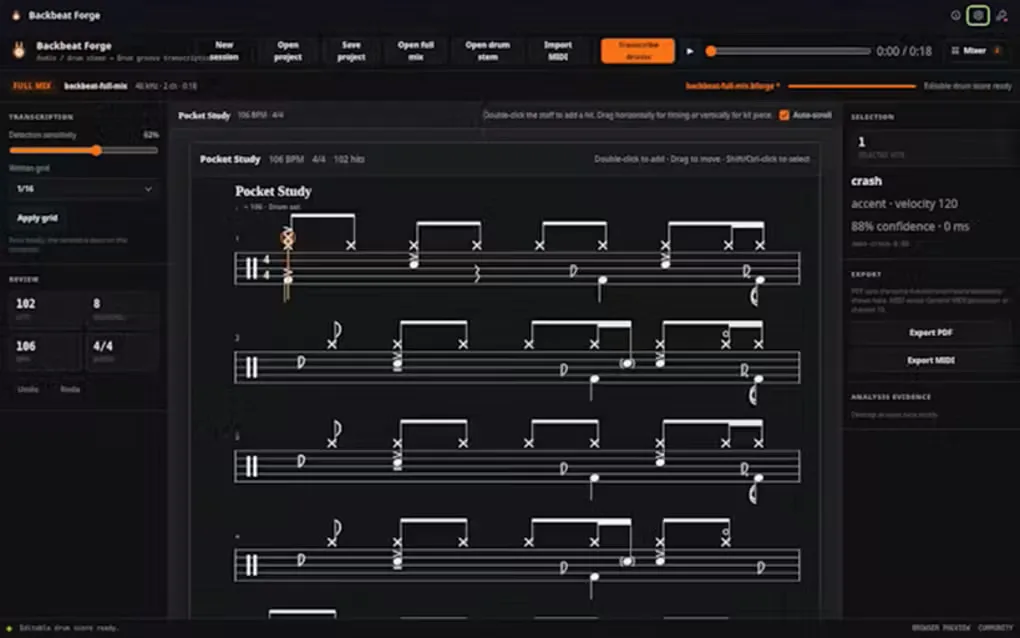
Backbeat Forge is a desktop drum-transcription workbench for reviewing a performance as five-line drum notation. Open a full song mix for local drum separation, analyze an isolated drum stem directly, or import percussion MIDI into the score workspace. Playback and confidence information help you compare the detected part with the recording rather than treat the first pass as a finished chart.
The free Community edition includes drum detection and score viewing. Professional adds advanced editing, quantization, and export of the current edited draft as printable PDF or channel-10 General MIDI. Editing tools can add missing hits, delete false positives, change kit pieces, and adjust timing, velocity and articulation. Save a .bforge project to preserve the working score and analysis choices.
Automatic results need review: separation quality, timing and kit-piece classification can affect the transcription. Editing and export are paid capabilities, and the website edition requires online activation with an email address and license key. The linked download is the publisher's Windows x64 NSIS setup for version 0.1.9, not the older 0.1.6 listed on Softonic at retrieval.
What it offers
- Analyze a full mix with local drum separation or process an isolated drum stem without separation.
- Import WAV, MP3, FLAC, OGG, M4A or AAC audio, plus percussion MIDI in .mid or .midi files.
- Review five-line percussion notation with playback and confidence information; save work in .bforge projects.
- With Professional, edit and quantize hits, kit pieces, velocity and articulation.
- With Professional, export the current edited score as a printable PDF drum chart or channel-10 General MIDI.
Good to know
- Community includes detection and score viewing, but advanced editing, quantization, PDF export and MIDI export require a paid license.
- Automatic transcription can contain missing hits, false positives or incorrect kit assignments; review the score against the recording.
- The website Professional license uses one machine-bound activation for one user and requires online activation with an email address and license key.
Product images
Sources
References used for this listing. Retrieval dates do not indicate hands-on testing.
More in multimedia & graphics
View category ↗
1by1 2.17
Play music directly from folders with 1by1, a free Windows audio player with resume, gapless playback and file tools. Formats beyond MP3 need additional decoders.
3DVista Virtual Tour Pro
Build interactive 360° virtual tours from panoramas, videos and 3D models with 3DVista Virtual Tour Pro for Windows. Commercial software with a 30-day trial.

4DDiG Video Repair
Repair corrupted or unplayable videos in batches with the Video Repair tool in 4DDiG File Repair for Windows. A free trial is available; advanced features require a paid license.