

Multimedia & graphics Windows
Bandicam Screen Recorder for Windows
Record your Windows desktop, games, webcam or audio with Bandicam. The free edition limits each recording to five minutes; paid activation removes the time limit.
- Operating system
- Windows 10 or Windows 11 (64-bit)
- Architecture
- 64-bit Windows
- Download package
- EXE installer
Publisher's version-specific guide requires Windows 10/11 for Bandicam 2027; Windows 7/8 support ends with Bandicam 2025 and 32-bit support with 5.1.1.
Link checked · Download guidance
What is Bandicam Screen Recorder?
Bandicam records desktop activity, games and webcam input on Windows. Use it for a short software demonstration, a narrated lesson or a gameplay clip. Screen, game and webcam recording modes save video as AVI or MP4, while audio-only recording captures speaker or microphone sound. Built-in editing lets you preview and trim recordings before export.
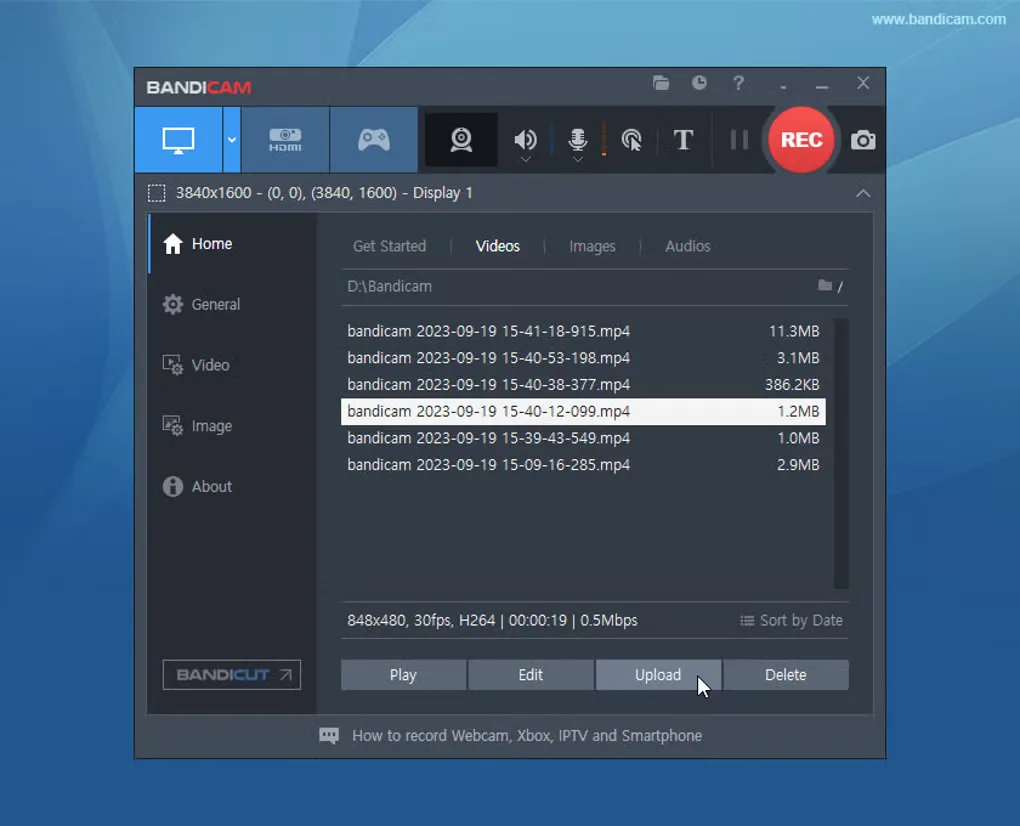
The linked Windows installer is for the publisher's Bandicam 2027 line. Its detailed requirements specify Windows 10 or 11, 64-bit; older Windows systems need an older release. The screenshot shows an earlier Bandicam interface and illustrates the recording library, not the exact layout of the current version.
The free edition is a trial rather than unrestricted freeware. Each video or audio-only recording is limited to five minutes. Recorded videos have no watermark, but edited video exports do. Paid activation removes the recording time limit and export watermark. The publisher requires a Business License for work or commercial use. Protected videos and services may prevent capture.
What it offers
- Record desktop activity, games and webcam or HDMI input to AVI or MP4.
- Capture speaker or microphone sound with audio-only recording.
- Preview recordings and trim video or audio inside Bandicam.
- Save still screenshots as BMP, PNG or JPG.
- Blur up to three screen areas to hide sensitive details while recording.
Good to know
- The free Bandicam 2027 edition limits each video or audio-only recording to five minutes; edited video exports carry a watermark.
- The publisher requires a Business License for work or commercial use.
- Protected videos or services may block recording.
Product images
Sources
References used for this listing. Retrieval dates do not indicate hands-on testing.
More in multimedia & graphics
View category ↗
1by1 2.17
Play music directly from folders with 1by1, a free Windows audio player with resume, gapless playback and file tools. Formats beyond MP3 need additional decoders.
3DVista Virtual Tour Pro
Build interactive 360° virtual tours from panoramas, videos and 3D models with 3DVista Virtual Tour Pro for Windows. Commercial software with a 30-day trial.

4DDiG Video Repair
Repair corrupted or unplayable videos in batches with the Video Repair tool in 4DDiG File Repair for Windows. A free trial is available; advanced features require a paid license.