
Multimedia & graphics Windows
Beat Link Trigger
Automate MIDI events and synchronize lighting, visuals or Ableton Link sessions with Pioneer DJ players using Beat Link Trigger, a free, open-source performance tool.
- Operating system
- 64-bit Windows; Softonic lists Windows 11
- Architecture
- x64 (Win64)
- Download package
- MSI installer with bundled Java runtime
The publisher does not specify a minimum Windows release in the cited release notes. Separate version 8.0.0 JAR requires Java 21 or newer. Compatible DJ hardware and wired networking are needed for live triggers.
Link checked · Download guidance
What is Beat Link Trigger?
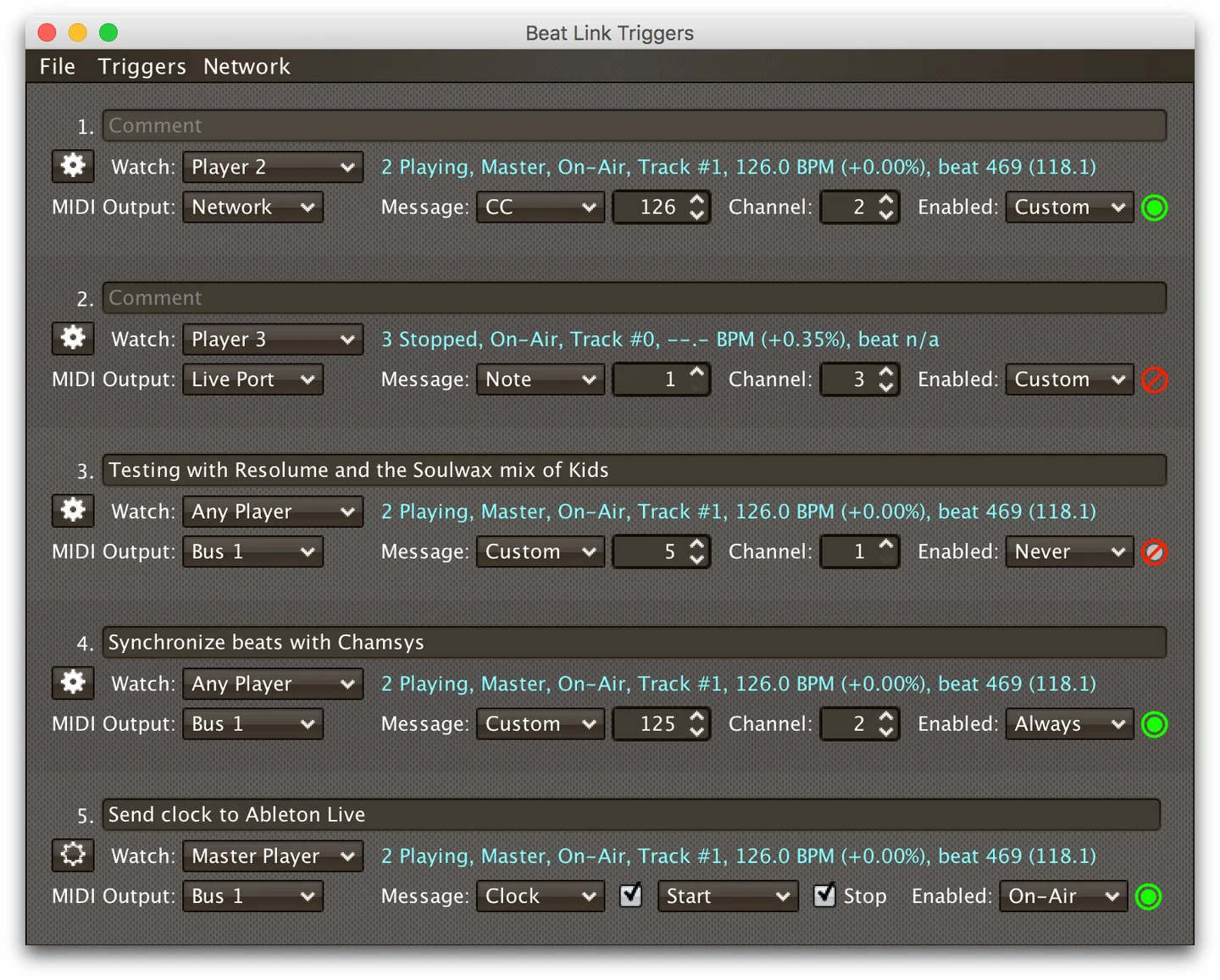
Beat Link Trigger connects events on compatible Pioneer DJ equipment to other parts of a live show. Its trigger window lets you select a player, MIDI output, message type and conditions for enabling each trigger. It can react to playback, beats and track phrases, helping coordinate lighting, video, lasers or digital audio workstation software with a DJ performance.
For more detailed arrangements, the Show interface places cues on track beat grids. Player Status displays information about players on the network, while expressions let experienced users customize behavior. Ableton Link integration provides another route for connecting a supported DJ setup to music software. The selected Windows 64-bit MSI includes its Java runtime; the separate cross-platform JAR for version 8.0.0 requires Java 21 or newer.
Hardware and networking matter. Use compatible equipment on a wired local network; the publisher warns against Wi-Fi for Pro DJ Link. Do not use BLT with an XDJ-RX or XDJ-RX2 on the network because the publisher reports crashes. It also conflicts with rekordbox when both need the same network adapter. Offline mode supports configuration and editing, but triggers do not actually fire there. The illustrated trigger window is the publisher's cross-platform example with macOS window controls, not a Windows installation capture.
What it offers
- Configure player-based triggers with MIDI outputs, message types and enable conditions.
- Automate show events from playback, beats and track phrases on supported DJ equipment.
- Place cues on track beat grids in the Show interface.
- Monitor network players through the Player Status interface.
- Connect supported setups to Ableton Link and customize behavior with expressions.
Good to know
- The publisher reports XDJ-RX and XDJ-RX2 crashes when BLT starts and warns not to use it with those devices on the network.
- BLT and rekordbox compete for Pro DJ Link network ports; do not run both against the same network adapter.
- Pro DJ Link needs a suitable wired network; the publisher advises against Wi-Fi.
- Offline mode allows editing and configuration, but triggers do not actually fire.
Product images
Sources
References used for this listing. Retrieval dates do not indicate hands-on testing.
More in multimedia & graphics
View category ↗
1by1 2.17
Play music directly from folders with 1by1, a free Windows audio player with resume, gapless playback and file tools. Formats beyond MP3 need additional decoders.
3DVista Virtual Tour Pro
Build interactive 360° virtual tours from panoramas, videos and 3D models with 3DVista Virtual Tour Pro for Windows. Commercial software with a 30-day trial.

4DDiG Video Repair
Repair corrupted or unplayable videos in batches with the Video Repair tool in 4DDiG File Repair for Windows. A free trial is available; advanced features require a paid license.