
Multimedia & graphics Windows
Beauty Box Video
Retouch skin in video with automatic skin-tone masks, smoothing and shine reduction. This Windows download is the Beauty Box Video plug-in for Premiere Pro and After Effects, with a watermarked demo.
Version 6.5 · Direct publisher file
Link checked · Download guidance
What is Beauty Box Video?
Beauty Box Video is Digital Anarchy's skin-retouching plug-in for video post-production, not a standalone editor. It identifies skin tones to limit smoothing to skin areas, helping reduce the appearance of wrinkles and blemishes while retaining facial detail. It also provides shine reduction and color correction; the publisher's 6.5 tutorials describe AI-powered teeth and eye whitening.
For a basic retouch, apply the effect in your host editor, use Analyze Frame to establish skin tones, and adjust the smoothing controls. Check the mask rather than assuming that automatic selection is exact: hair, clothing or backgrounds with colors similar to skin can also be affected. Digital Anarchy recommends inspecting Show Mask and narrowing the hue, saturation and value ranges when needed.
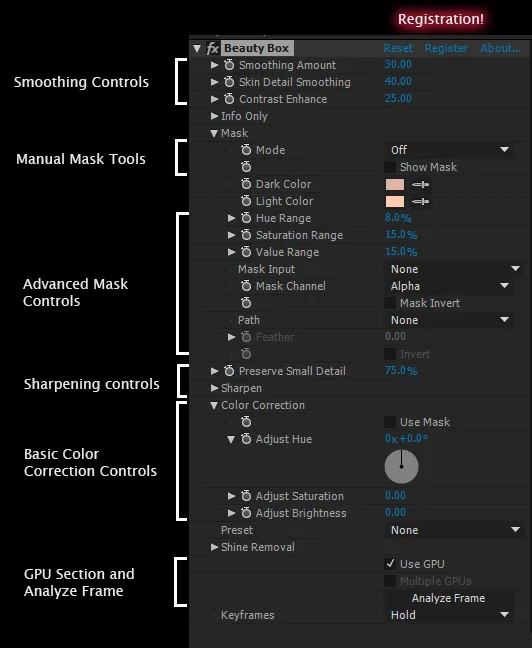
The linked Windows ZIP is the publisher's Premiere Pro and After Effects package from its Beauty Box Video 6.5 download section. The same download runs as a watermarked demo until activated with a purchased serial number. Close host applications before running the installer; the publisher places the effect under Video Effects > Digital Anarchy. Other hosts use separate packages. The screenshot is a publisher-manual illustration of the Beauty Box controls, not a capture of this package running or proof of the exact 6.5 interface.
What it offers
- Analyze Frame identifies skin tones for an automatically generated retouching mask.
- Adjust skin smoothing and detail controls for subtle or stronger retouching.
- Reduce skin shine and adjust skin color within a video workflow.
- Beauty Box 6.5 adds AI-powered teeth and eye whitening, according to the publisher's tutorials.
Good to know
- Requires a compatible host application; this download is for Premiere Pro and After Effects, not a standalone video editor or the separate Beauty Box Photo product.
- The demo adds a watermark. A purchased license and matching serial number are required to activate the paid version.
- Automatic skin masks can include similarly colored hair, clothing or backgrounds; inspect Show Mask and adjust the color ranges.
- The publisher lists Windows 10 and later, but the sources read do not specify an exact Windows build, CPU architecture or numbered Creative Cloud compatibility range for this package.
Product images
Sources
References used for this listing. Retrieval dates do not indicate hands-on testing.
- Beauty Box - Download ↗Retrieved
- Beauty Box Video – Digital Anarchy ↗Retrieved
- Premiere Pro and AE – Beauty Box Video – Digital Anarchy ↗Retrieved
- Beauty Box Frequent Questions – Digital Anarchy ↗Retrieved
- Beauty Box Video Tutorials – Digital Anarchy ↗Retrieved
- Beauty Box Video 6.0 — publisher manual ↗Retrieved
More in multimedia & graphics
View category ↗
1by1 2.17
Play music directly from folders with 1by1, a free Windows audio player with resume, gapless playback and file tools. Formats beyond MP3 need additional decoders.
3DVista Virtual Tour Pro
Build interactive 360° virtual tours from panoramas, videos and 3D models with 3DVista Virtual Tour Pro for Windows. Commercial software with a 30-day trial.

4DDiG Video Repair
Repair corrupted or unplayable videos in batches with the Video Repair tool in 4DDiG File Repair for Windows. A free trial is available; advanced features require a paid license.