
Multimedia & graphics Windows
Better JPEG
Rotate, crop and annotate JPEG photos with Better JPEG for Windows. Its block-based editing avoids recompressing untouched image areas; a 30-day trial is available.
- Operating system
- Windows; specific supported versions not established
- Architecture
- Not specified in inspected publisher sources
- Download package
- EXE package
Publisher lists build March 22, 2020. This entry covers the standalone editor, not the Photoshop plug-in. No installation or Windows compatibility test performed.
Link checked · Download guidance
What is Better JPEG?
Better JPEG is a dedicated JPEG photo editor for rotating pictures, adjusting crops, removing red-eye and adding dates or captions. Rather than treating every save as a reason to recompress the entire image, it works with JPEG blocks and preserves blocks that do not need to change. This makes it useful for preparing camera photos while limiting additional compression damage. It is the standalone editor, not the separate Better JPEG Photoshop plug-in or developer library.
Cropping supports preset and custom aspect ratios, with composition guides such as the rule of thirds. The publisher explains that lossless cropping follows JPEG block boundaries; this is not a promise of arbitrary pixel-perfect crop edges without constraints. Local text or retouching also does not mean every pixel in the edited area remains unchanged: the advantage is avoiding full-image recompression.
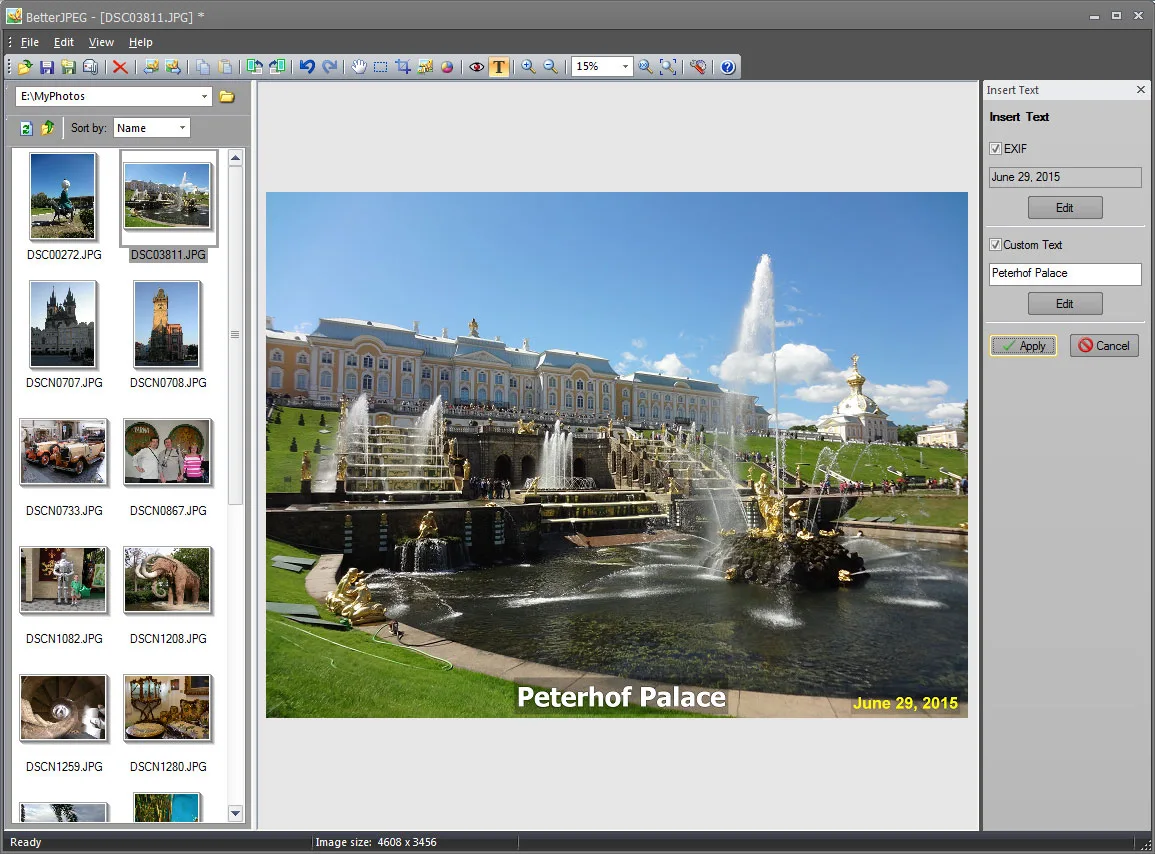
For a group of photos, select thumbnails in the browser pane and apply the operation to the selection. Shift selects a continuous range; Ctrl adds or removes individual images. Keep originals and edit copies: the documentation warns that batch operations can only be undone for the current image. For an individual picture, File > Save As saves under a different name or location.
The publisher offers a commercial 30-day trial and lists version 3.0.4.0, built March 22, 2020. The linked download is the editor's EXE package. The inspected publisher pages do not establish specific supported Windows releases or processor architecture; Windows 10, Windows 11 and ARM compatibility have not been verified here.
What it offers
- Rotate and flip JPEG photos without recompressing the image blocks.
- Crop using preset or custom aspect ratios and composition guides; add margins through canvas enlargement.
- Insert dates, EXIF information or custom text, and remove red-eye without recompressing untouched image areas.
- Process selected photos in batches and combine operations with macro actions.
- Preserve metadata and use Save As to keep a separately named edited copy.
Good to know
- Commercial software with a 30-day trial, not unrestricted freeware.
- Batch operations can only be undone for the current image; the publisher recommends working on copies.
- Lossless cropping follows JPEG block boundaries. Local editing avoids full-image recompression, not all changes to the edited region.
- Specific Windows versions and package architecture are not stated in the inspected publisher sources; modern Windows compatibility was not tested.
Product images
Sources
References used for this listing. Retrieval dates do not indicate hands-on testing.
- Edit JPEG photos without recompression loss - Better JPEG ↗Retrieved
- Download - Better JPEG ↗Retrieved
- Lossless - Better JPEG ↗Retrieved
- Lossless crop of JPEG photos - Better JPEG ↗Retrieved
- Batch operations - Better JPEG Editor Documentation ↗Retrieved
- Saving the image - Better JPEG Editor Documentation ↗Retrieved
More in multimedia & graphics
View category ↗
1by1 2.17
Play music directly from folders with 1by1, a free Windows audio player with resume, gapless playback and file tools. Formats beyond MP3 need additional decoders.
3DVista Virtual Tour Pro
Build interactive 360° virtual tours from panoramas, videos and 3D models with 3DVista Virtual Tour Pro for Windows. Commercial software with a 30-day trial.


4DDiG Video Repair
Repair corrupted or unplayable videos in batches with the Video Repair tool in 4DDiG File Repair for Windows. A free trial is available; advanced features require a paid license.