

Multimedia & graphics macOS
Camtasia for macOS
Record your Mac screen and edit tutorials, training videos and software demos with Camtasia Editor. The free desktop edition exports videos with a watermark.
- Operating system
- macOS 14.0 or later
- Architecture
- Universal: Intel and Apple silicon
- Download package
- DMG disk image
Mac desktop download; 8GB RAM and 4GB free storage minimum. Free exports are watermarked; trial requires internet and a TechSmith account.
Link checked · Download guidance
What is Camtasia?
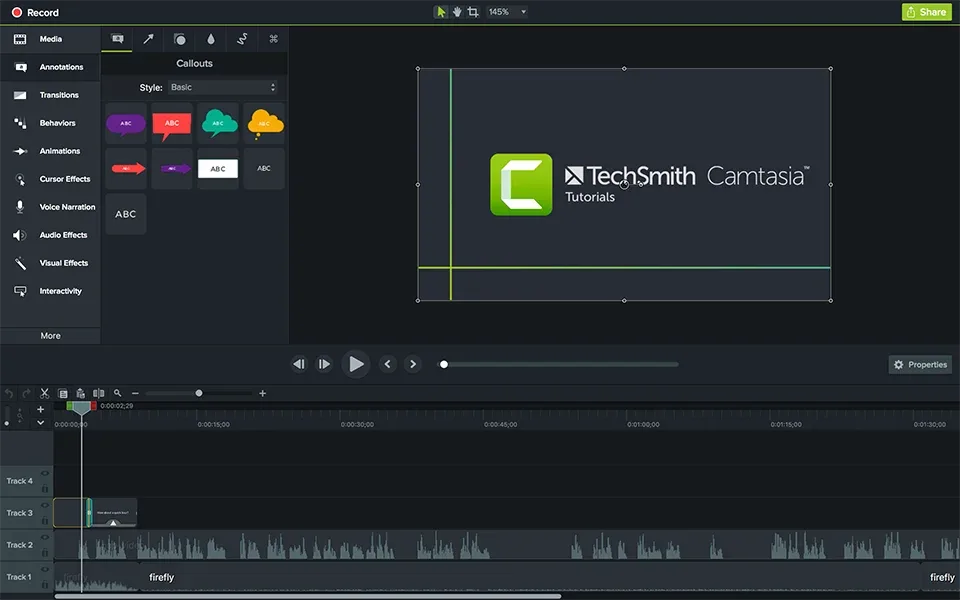
Camtasia Editor combines screen recording with timeline-based video editing for explaining a process on your Mac. Record the screen, camera, microphone and system audio as separate layers, then arrange your footage and add zooms, callouts or cursor effects to make each step easier to follow. Themes and templates help keep a series of training videos visually consistent.
This entry links to the desktop Mac DMG, not the separate Camtasia Online browser recorder. TechSmith lists macOS 14.0 as the minimum, with 8GB RAM and 4GB available storage; 16GB RAM or more is recommended. Intel Macs and Apple silicon are supported. Keep active recording and editing media on a local drive: TechSmith does not support working directly in iCloud, Dropbox or similar synced storage.
The free desktop edition includes a watermark on exported videos. Paid plans offer additional benefits; do not confuse the desktop edition's export restriction with the separate online recorder's terms. Internet access and a TechSmith account are required for the trial. Text-based project editing uses the separate Audiate application rather than being a standalone feature of this Mac download.
What it offers
- Record screen, camera, system audio and microphone on independent layers.
- Arrange video on a timeline and add zooms or callouts with drag-and-drop editing.
- Use annotations and customizable cursor effects to highlight steps in a tutorial.
- Apply customizable themes and templates for consistent video styling.
Good to know
- The free desktop edition places a watermark on exported videos.
- Active recording and editing require local media; cloud-synced storage such as iCloud or Dropbox is not supported for that workflow.
- Text-based editing of Camtasia Editor projects requires the separate Audiate application.
Product images
Sources
References used for this listing. Retrieval dates do not indicate hands-on testing.
- TechSmith — Camtasia download and free-edition terms ↗Retrieved
- TechSmith — Camtasia Editor versus Camtasia Online ↗Retrieved
- TechSmith — Camtasia Mac system requirements ↗Retrieved
- TechSmith — Camtasia recording and editing features ↗Retrieved
- TechSmith — Mac DMG download confirmation ↗Retrieved
- TechSmith Support — Apple silicon compatibility ↗Retrieved
More in multimedia & graphics
View category ↗
1by1 2.17
Play music directly from folders with 1by1, a free Windows audio player with resume, gapless playback and file tools. Formats beyond MP3 need additional decoders.
3DVista Virtual Tour Pro
Build interactive 360° virtual tours from panoramas, videos and 3D models with 3DVista Virtual Tour Pro for Windows. Commercial software with a 30-day trial.

4DDiG Video Repair
Repair corrupted or unplayable videos in batches with the Video Repair tool in 4DDiG File Repair for Windows. A free trial is available; advanced features require a paid license.