

Multimedia & graphics Windows
CapCut for Windows
Cut and arrange video clips, add text and effects, and adjust color with CapCut for Windows, a desktop editor with free tools and paid premium services.
What is CapCut?
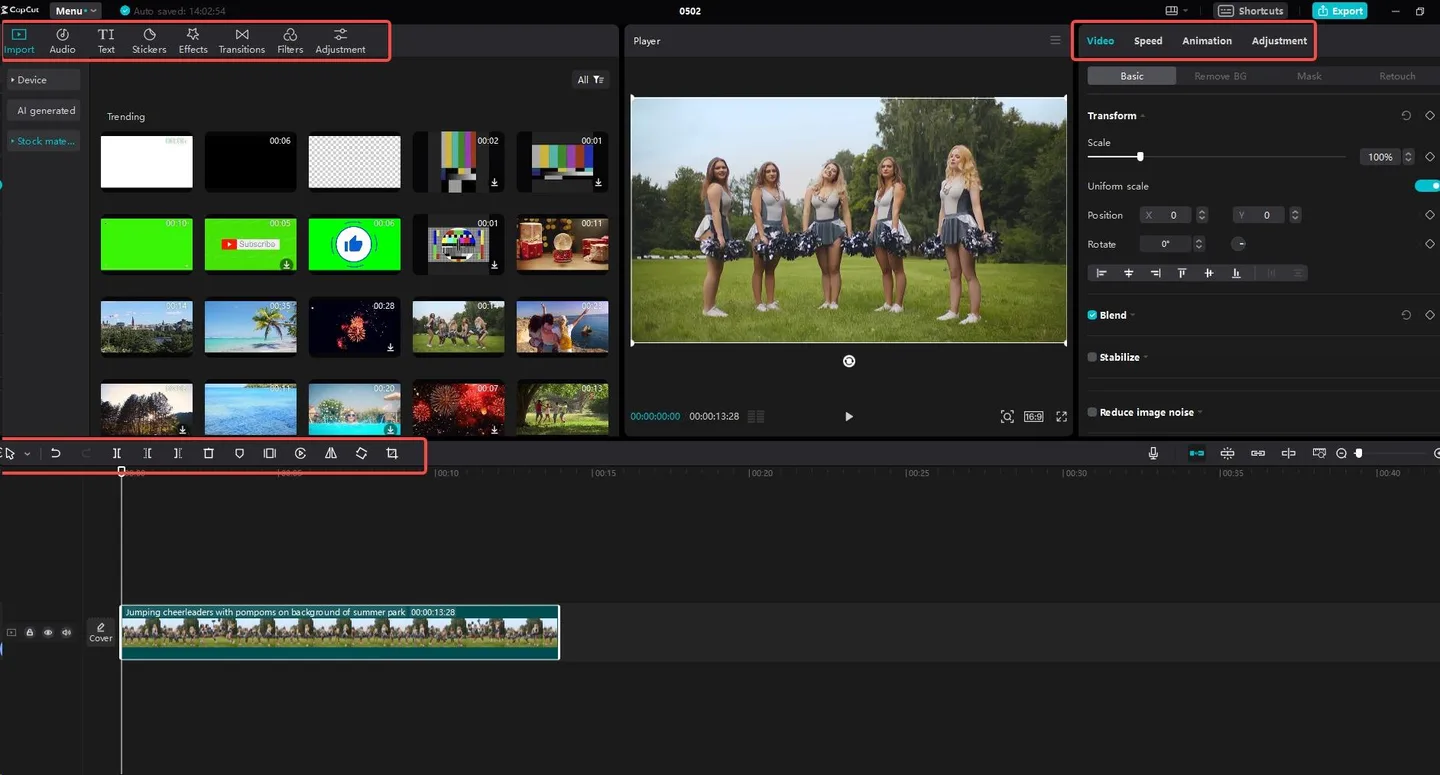
CapCut for Windows brings clip editing, effects and animation into a desktop workspace. Import footage, trim it on the timeline, add text or transitions, and export the finished video. It is a practical option for assembling social posts or editing footage for YouTube without limiting the page to one video format or release.
The desktop toolset includes keyframes and curves for animation, a color wheel with automatic adjustment, and media search based on objects, dialogue or people. The publisher also describes automatic captions and tools for changing a video's aspect ratio. These are publisher-described capabilities, not results of hands-on software testing.
CapCut offers free services alongside paid premium plans. Some services require an account, and available features can vary by device and region. Check the current plan before relying on a particular effect, AI tool or cloud feature. The download linked here is the Windows EXE installer observed on the publisher's download page; its installed application version and processor architecture have not been confirmed.
What it offers
- Import footage, trim clips on a timeline, add text and effects, and export the edited video.
- Animate edits with keyframes and curves.
- Adjust video color with a color wheel and automatic adjustment.
- Search media by objects, dialogue or people.
- Generate captions from video or audio and change the video's aspect ratio.
Good to know
- Free services do not include every capability: premium services require payment, and some services require an account.
- Features and service availability can differ by device, language and region.
Product images
Sources
References used for this listing. Retrieval dates do not indicate hands-on testing.
- CapCut - Download — Windows product page, observed in normal browser ↗Retrieved
- CapCut Desktop | Powerful AI Photo & Video Editor with Dreamina Seedance 2.5 ↗Retrieved
- How to Cut and Edit Video Clips in a Flash | 4 Simple Steps ↗Retrieved
- CapCut Terms of Service — last updated April 15, 2026 ↗Retrieved
- Publisher Windows download entry point and observed CDN installer ↗Retrieved
More in multimedia & graphics
View category ↗
1by1 2.17
Play music directly from folders with 1by1, a free Windows audio player with resume, gapless playback and file tools. Formats beyond MP3 need additional decoders.
3DVista Virtual Tour Pro
Build interactive 360° virtual tours from panoramas, videos and 3D models with 3DVista Virtual Tour Pro for Windows. Commercial software with a 30-day trial.

4DDiG Video Repair
Repair corrupted or unplayable videos in batches with the Video Repair tool in 4DDiG File Repair for Windows. A free trial is available; advanced features require a paid license.