
Multimedia & graphics Windows
Cok Free MP3 Recorder
Record microphone audio, computer sound or both to MP3 on Windows, with optional separate channels for input and output. Free use is limited to personal, non-commercial purposes.
What is Cok Free MP3 Recorder?
Cok Free MP3 Recorder captures audio from a microphone, the computer sound card or both sources together and saves it as MP3. It suits recording your own voice or audio playing on the computer without switching between separate recording tools. When capturing both sources, its channel option puts microphone input on the left and computer output on the right.
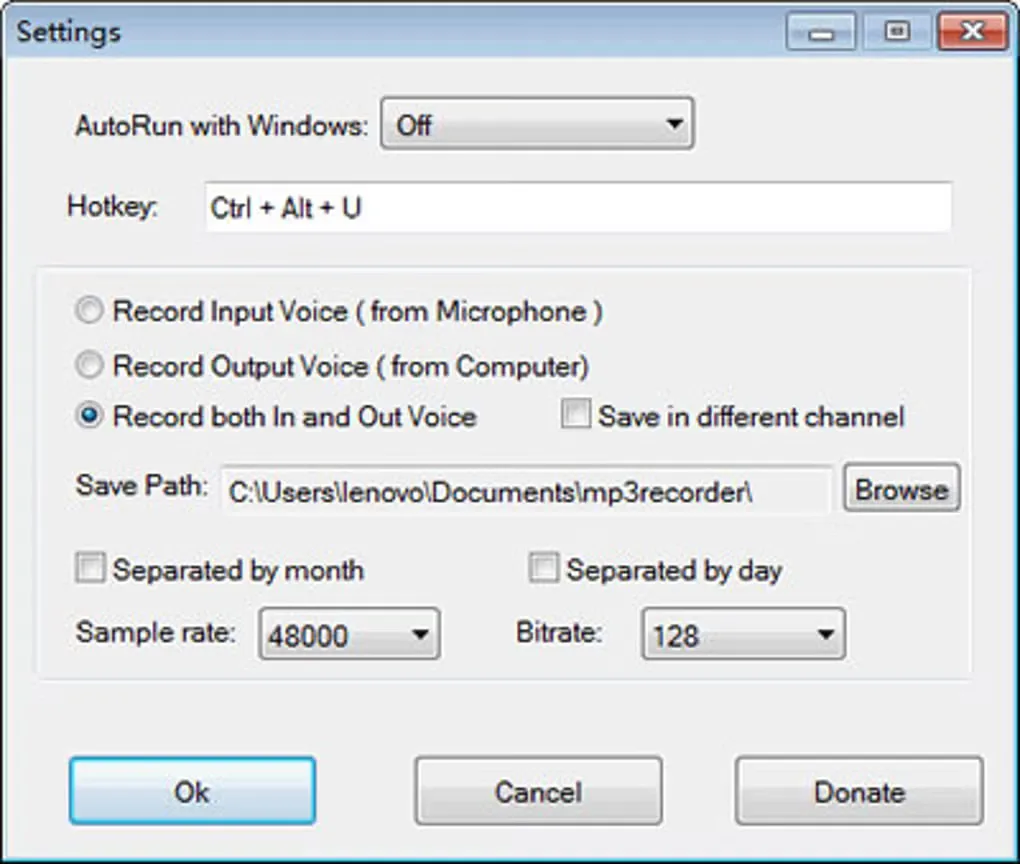
The settings let you choose the recording folder, organize files into month or day subfolders, and adjust sample rate and bitrate. Lower settings reduce file size at the cost of audio quality, according to the publisher. Free use is restricted to personal, non-commercial purposes; do not assume the free terms cover business recording.
What it offers
- Record microphone input, computer sound or both sources together to MP3.
- Optionally save microphone input and computer output in separate left and right channels.
- Choose a recording folder and group saved files into month or day subfolders.
- Adjust sample rate and bitrate in the recording settings.
- Set Windows startup behavior and a hotkey to reveal the recorder window.
Good to know
- The publisher permits free use only for personal, non-commercial purposes.
- Reducing sample rate or bitrate to make smaller recordings reduces audio quality.
Product images
Sources
References used for this listing. Retrieval dates do not indicate hands-on testing.
- Cok Free MP3 Recorder Software Download ↗Retrieved
- Cok Free MP3 Recorder - Download ↗Retrieved
More in multimedia & graphics
View category ↗
1by1 2.17
Play music directly from folders with 1by1, a free Windows audio player with resume, gapless playback and file tools. Formats beyond MP3 need additional decoders.
3DVista Virtual Tour Pro
Build interactive 360° virtual tours from panoramas, videos and 3D models with 3DVista Virtual Tour Pro for Windows. Commercial software with a 30-day trial.

4DDiG Video Repair
Repair corrupted or unplayable videos in batches with the Video Repair tool in 4DDiG File Repair for Windows. A free trial is available; advanced features require a paid license.