
Multimedia & graphics Windows
CopyTrans Photo
Transfer photos and videos between an iPhone or iPad and a Windows PC, back up albums, and convert HEIC to JPEG. The free trial starts with 50 actions; unlimited use requires a paid license.
- Operating system
- Windows 11, 10, 8.1 and 7, as listed by the publisher
- Architecture
- Not specified by the publisher sources consulted
- Download package
- Standalone ZIP containing the application EXE
Windows desktop software for managing photos on iPhone and iPad. Selected ZIP is the publisher’s advanced-user option, not the Control Center installer.
Link checked · Download guidance
What is CopyTrans Photo?
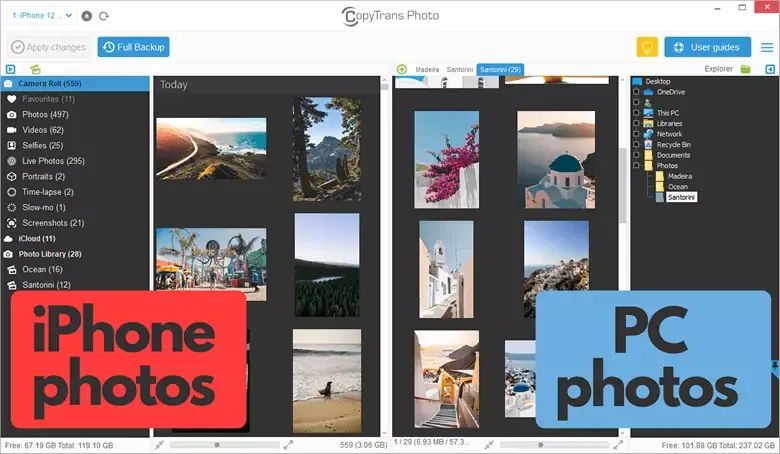
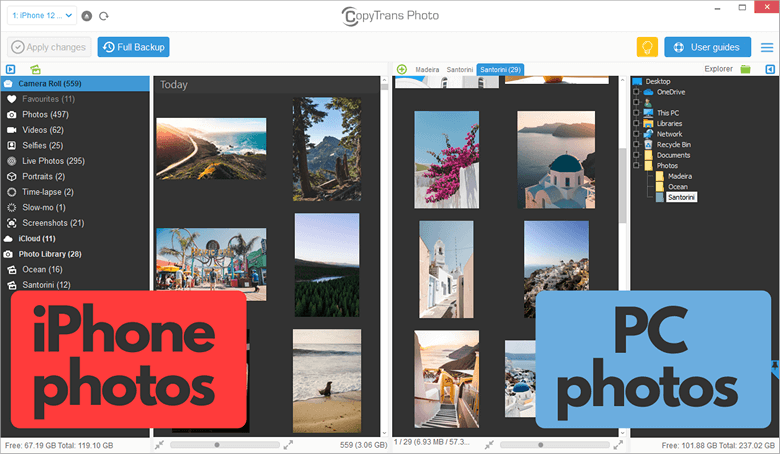
CopyTrans Photo puts an iPhone or iPad photo library beside folders on your Windows computer. It is intended for choosing pictures to copy, exporting organized albums, or making a local backup without managing the transfer through iTunes. The device library appears on the left and PC folders on the right, so you can select pictures and drag them toward the destination. Click Apply changes to commit pending modifications.
For larger exports, the Full Backup control copies the device photo library to the computer. HEIC export settings let you keep HEIC files, convert to JPEG, or save both. The publisher also documents preservation of embedded photo metadata and transfer of Live Photos as an image paired with a MOV video; retain both files if you intend to import the Live Photo back.
This is paid software with a limited trial, not an unrestricted free photo-transfer utility. Its initial trial allowance is 50 actions. PC-imported pictures appear in the device’s From My Mac area rather than Camera Roll. CopyTrans Photo works with media available on the device: when iCloud Photos has left only optimized thumbnails locally, it cannot retrieve the cloud-only originals in full quality.
The download here is the publisher’s standalone ZIP package for advanced users, not the shared CopyTrans Control Center installer. The publisher documents extracting the application EXE from the ZIP and launching it. The link was checked using HEAD only; the archive was not downloaded, inspected, installed or run.
What it offers
- Transfer selected photos and videos between an iPhone or iPad and PC using a two-pane drag-and-drop interface.
- Export albums or use Full Backup to copy the device photo library to a Windows folder.
- Keep HEIC images, convert them to JPEG during export, or save both formats.
- Preserve embedded photo metadata and transfer Live Photos as paired image and MOV files.
Good to know
- The free trial starts with 50 actions; unlimited use requires a purchased license.
- Cloud-only originals are not available for full-quality export when the device holds only iCloud-optimized thumbnails.
- Pictures imported from PC appear under From My Mac, not in Camera Roll.
Product images
Sources
References used for this listing. Retrieval dates do not indicate hands-on testing.
- CopyTrans Photo - Download — discovery and conflicting catalog facts ↗Retrieved
- Transfer your iPhone photos to PC and back | CopyTrans Photo ↗Retrieved
- Easy backup and transfer of iPhone, iPad, iPod and iTunes to PCs ↗Retrieved
- What is the difference between the trial and the full version? ↗Retrieved
- Getting Started with CopyTrans Photo ↗Retrieved
- How iCloud Photos affects CopyTrans Photo ↗Retrieved
- How to install any CopyTrans program on a USB flash drive? ↗Retrieved
- Terms and Conditions ↗Retrieved
- CopyTrans Store ↗Retrieved
More in multimedia & graphics
View category ↗
1by1 2.17
Play music directly from folders with 1by1, a free Windows audio player with resume, gapless playback and file tools. Formats beyond MP3 need additional decoders.
3DVista Virtual Tour Pro
Build interactive 360° virtual tours from panoramas, videos and 3D models with 3DVista Virtual Tour Pro for Windows. Commercial software with a 30-day trial.

4DDiG Video Repair
Repair corrupted or unplayable videos in batches with the Video Repair tool in 4DDiG File Repair for Windows. A free trial is available; advanced features require a paid license.