
Multimedia & graphics Windows
Corel Painter
Paint, sketch and turn photos into artwork with Corel Painter for Windows. Its customizable brushes emulate traditional media; the publisher offers a 15-day trial.
- Operating system
- Windows 10 or Windows 11 (64-bit), with current updates
- Architecture
- 64-bit Intel or AMD multicore processor with SSSE3 or higher
- Download package
- EXE trial installer
Minimum 8 GB RAM, 3.6 GB application storage and 1280 × 800 display at 100%. Mouse or Wintab-compatible tablet. Internet connection and registration required for activation.
Link checked · Download guidance
What is Corel Painter?
Corel Painter is a digital painting application for illustrators, concept artists and people creating photo art. Start from a blank canvas with brushes that emulate oils, watercolor and other traditional materials, or use cloning and auto-painting tools to develop a photograph into a painting. Brush, texture and palette customization lets you adapt the tools to your own drawing process.
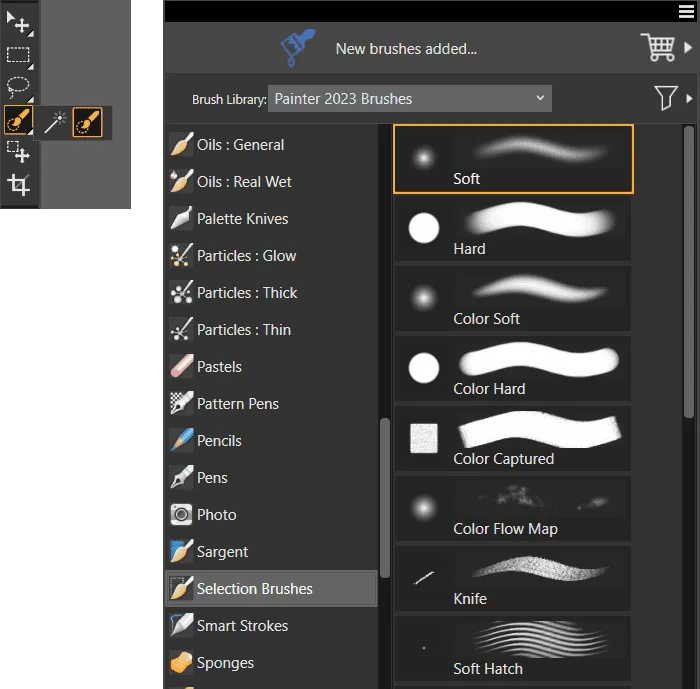
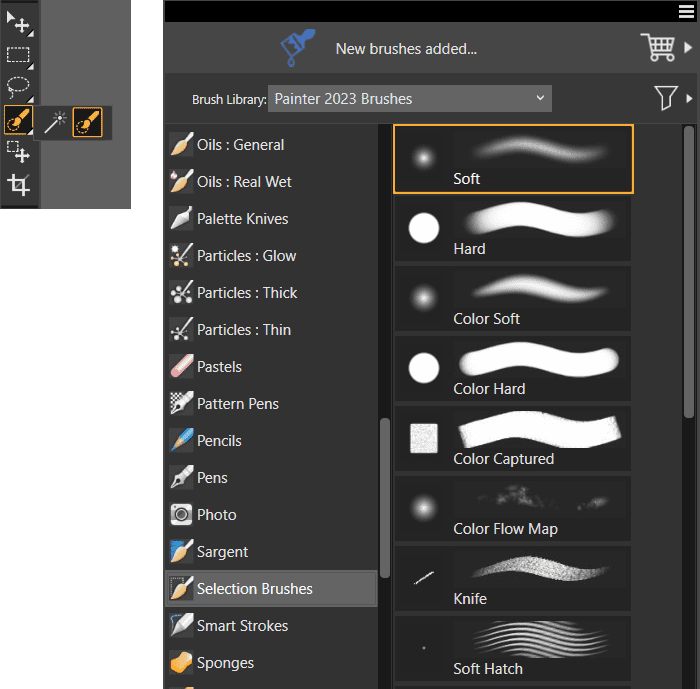
Painter 2023 adds Fluid Paint controls for building and blending strokes, a dedicated Selection panel and color-based selection brushes. These selection tools help isolate areas before changing their color, lighting or texture. The screenshot shows the actual Painter 2023 brush selector and Selection Brushes category from a publisher tutorial, rather than a sample painting alone.
The linked Windows EXE is the publisher's Painter 2023 trial download. This is commercial software, not an unrestricted free edition: the trial lasts 15 days, and product activation requires an internet connection and registration. Check the Windows and hardware requirements before downloading; an HTTP link check does not establish that the application has been installed or tested.
What it offers
- Paint with natural-media brushes including oils, watercolor, chalk and pastels.
- Customize brushes, textures, patterns and palettes for your workflow.
- Use Fluid Paint brushes to build up strokes, blend and control opacity.
- Refine selected areas with the Selection panel, overlay display and color-based selection brushes.
- Create photo art with cloning and auto-painting tools.
Good to know
- The free trial lasts 15 days; continued use requires a paid license or subscription.
- Product activation requires an internet connection and registration.
- The Windows version requires 64-bit Windows 10 or 11, at least 8 GB RAM and 3.6 GB of application disk space; additional space may be needed for Microsoft .NET Framework 4.7.
Product images
Sources
References used for this listing. Retrieval dates do not indicate hands-on testing.
More in multimedia & graphics
View category ↗
1by1 2.17
Play music directly from folders with 1by1, a free Windows audio player with resume, gapless playback and file tools. Formats beyond MP3 need additional decoders.
3DVista Virtual Tour Pro
Build interactive 360° virtual tours from panoramas, videos and 3D models with 3DVista Virtual Tour Pro for Windows. Commercial software with a 30-day trial.

4DDiG Video Repair
Repair corrupted or unplayable videos in batches with the Video Repair tool in 4DDiG File Repair for Windows. A free trial is available; advanced features require a paid license.