

Multimedia & graphics Windows
CorelDRAW Standard for Windows
Create vector illustrations, flyers and multi-page layouts with CorelDRAW Standard for Windows, with Corel PHOTO-PAINT Standard included for layer-based photo editing.
- Operating system
- Windows 11 or Windows 10 version 21H2 or later, with current updates
- Architecture
- 64-bit; publisher lists Intel Core and AMD Ryzen/Threadripper/EPYC processors
- Download package
- EXE trial installer (CDSTD2024.exe)
Publisher lists 8 GB RAM, 3 GB disk space and an OpenCL 1.2 video card with 3+ GB VRAM. Internet required for installation and authentication.
Link checked · Download guidance
What is CorelDRAW Standard?
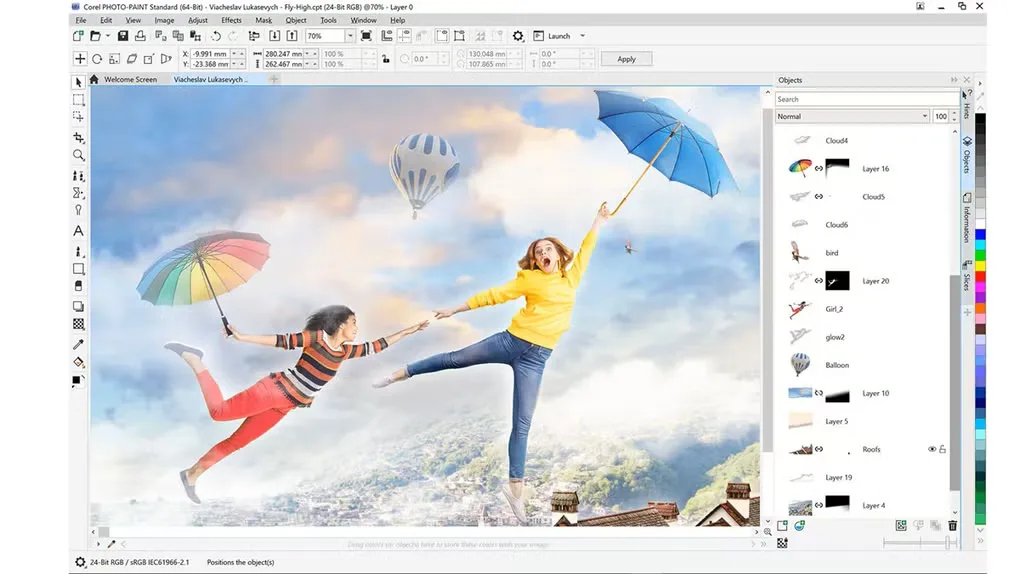
CorelDRAW Standard combines vector illustration and page layout with a separate photo editor for home projects and small-business graphics. Use it to draw shapes and curves, arrange text and images in brochures, or build flyers and web graphics. The included Corel PHOTO-PAINT Standard handles photo adjustments, retouching and layer-based image editing.
PowerTRACE converts bitmap artwork into scalable vector graphics, while templates and the Objects docker help organize a design. The publisher lists WebP support and enhanced PDF import for the 2024 edition.
This is the Windows-only Standard edition, not CorelDRAW Graphics Suite. The publisher offers a 15-day trial; continued use requires a paid license. Some Graphics Suite tutorials demonstrate tools that Standard does not include. Installation and authentication require an internet connection.
What it offers
- Draw vector artwork with shaping and drawing tools, then arrange it in single- or multi-page layouts.
- Edit photos with layers, color and tone adjustments, effects and retouching in Corel PHOTO-PAINT Standard.
- Convert scanned sketches or bitmap images to scalable vector graphics with PowerTRACE.
- Organize objects and their stacking order in the Objects docker; start designs from included templates.
- Import and export supported formats, including WebP, with enhanced PDF import in the 2024 edition.
Good to know
- The free trial lasts 15 days; continued use requires a paid license.
- Standard is Windows-only; it is not the Windows, Mac and Web Graphics Suite offering.
- Graphics Suite learning resources may demonstrate tools and features unavailable in Standard.
- Internet access is required for installation and authentication, and for some components, online features and content.
Product images
Sources
References used for this listing. Retrieval dates do not indicate hands-on testing.
More in multimedia & graphics
View category ↗
1by1 2.17
Play music directly from folders with 1by1, a free Windows audio player with resume, gapless playback and file tools. Formats beyond MP3 need additional decoders.
3DVista Virtual Tour Pro
Build interactive 360° virtual tours from panoramas, videos and 3D models with 3DVista Virtual Tour Pro for Windows. Commercial software with a 30-day trial.

4DDiG Video Repair
Repair corrupted or unplayable videos in batches with the Video Repair tool in 4DDiG File Repair for Windows. A free trial is available; advanced features require a paid license.