
Multimedia & graphics Windows
DroidCam OBS Plugin
Use an Android phone or iPhone as a camera source directly in OBS Studio on Windows, with WiFi or USB connections and support for multiple phones.
- Operating system
- Windows; requires OBS Studio 32 or newer
- Architecture
- x64 and ARM64 binaries included
- Download package
- EXE installer
Requires the DroidCam app on an Android phone or iPhone. The cited publisher download section does not specify a minimum Windows release.
Link checked · Download guidance
What is DroidCam OBS Plugin?
DroidCam OBS Plugin adds a phone-camera source to OBS Studio rather than acting as a standalone Windows webcam client. It suits a recording or streaming setup where you want to place a phone camera in an OBS scene. Install the plugin on the computer and use the DroidCam app on the phone; the selected Windows installer includes x64 and ARM64 binaries and requires OBS Studio 32 or newer.
For a WiFi connection, restart OBS after installation, add a DroidCam source to a scene and select Use WiFi in its properties. Enter the IP address displayed in the phone app, with both devices on the same network, then activate the source. Each additional phone can have its own source. USB is another connection option, but Android requires USB Debugging and may need phone drivers; an iPhone connection on Windows requires Apple USB drivers.
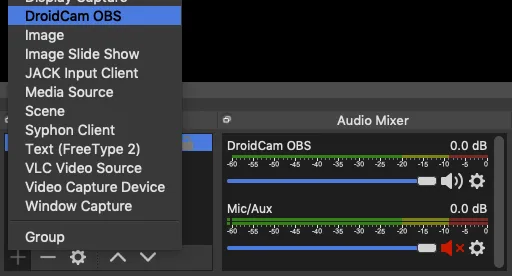
The plugin's source code is GPL-2.0, but that does not make every phone-app feature free: standard-definition use is free, while removing HD watermarks requires the paid pro upgrade. This is an OBS Studio plugin, not a directly compatible Streamlabs Desktop plugin. The publisher's source-menu illustration shows where DroidCam appears in OBS; it is not a capture of the selected Windows build.
What it offers
- Add an Android phone or iPhone as a camera source inside an OBS Studio scene.
- Connect through WiFi or USB using the publisher's phone-specific setup steps.
- Use multiple phones as separate DroidCam sources.
- Activate or deactivate the connection from the source properties.
Good to know
- The selected Windows package requires OBS Studio 32 or newer and a separate DroidCam phone app.
- Standard-definition use is free; removing watermarks from HD video requires the phone app's paid pro upgrade.
- Streamlabs Desktop does not support this external plugin directly.
- USB setup can require phone drivers; Android also requires USB Debugging, while iOS on Windows requires Apple USB drivers.
Product images
Sources
References used for this listing. Retrieval dates do not indicate hands-on testing.
- DroidCam OBS Plugin | Dev47Apps ↗Retrieved
- DroidCam OBS Usage ↗Retrieved
- GitHub - dev47apps/droidcam-obs-plugin: DroidCam OBS Source ↗Retrieved
- DroidCam OBS Plugin - Download ↗Retrieved
More in multimedia & graphics
View category ↗
1by1 2.17
Play music directly from folders with 1by1, a free Windows audio player with resume, gapless playback and file tools. Formats beyond MP3 need additional decoders.
3DVista Virtual Tour Pro
Build interactive 360° virtual tours from panoramas, videos and 3D models with 3DVista Virtual Tour Pro for Windows. Commercial software with a 30-day trial.

4DDiG Video Repair
Repair corrupted or unplayable videos in batches with the Video Repair tool in 4DDiG File Repair for Windows. A free trial is available; advanced features require a paid license.