
Multimedia & graphics Windows
DroidCam
Use your Android phone or iPhone as a Windows webcam over WiFi or USB with DroidCam, with optional phone audio for video calls.
- Operating system
- Windows 10 and 11
- Architecture
- x64 or ARM64
- Download package
- EXE installer
Current v7 client; requires the matching Android app or the publisher’s iOS app. Not the Classic v6 client.
Link checked · Download guidance
What is DroidCam?
DroidCam connects a phone camera to your Windows PC so you can select it as a webcam in Zoom, Teams, Discord and other compatible programs. Install the Windows client and the matching DroidCam phone app, add the phone as a source, then select “DroidCam Video” in your calling application. WiFi setup uses the same network for both devices; USB is another connection option.
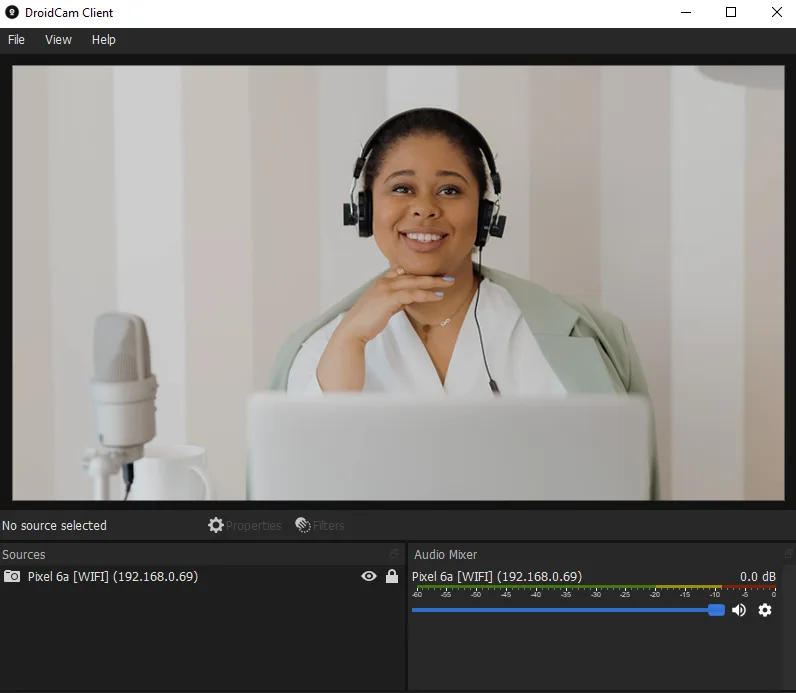
The current client includes a video preview, sources and an audio mixer. You can rotate, flip or mirror the picture and apply color-correction filters. Audio capture is optional, and the publisher recommends using a separate microphone when possible because phone-audio quality and latency can vary.
Core use is free at standard definition. The phone app’s Pro upgrade removes HD watermarks and unlocks additional options, including remote camera controls. Webcam output supports up to 1080p; the publisher’s 4K support refers to the separate OBS plugin integration, not the Windows webcam output.
This entry covers the current v7 Windows client, not DroidCam Classic v6. On Android, the current and Classic phone apps are separate, so choose the matching app. The publisher says its iOS app works with both clients.
What it offers
- Connect a phone camera to Windows over WiFi or USB.
- Select DroidCam Video as the camera in compatible calling programs such as Zoom, Teams and Discord.
- Capture phone audio optionally through the DroidCam Audio microphone input.
- Rotate, flip and mirror sources or adjust their picture with color-correction filters.
- Use webcam output up to 1080p; HD watermark removal and remote camera controls require the phone app’s Pro upgrade.
Good to know
- Requires the companion phone app as well as the Windows client; Android current and Classic apps are separate.
- Free core use is standard definition; HD video has a watermark unless the phone app is upgraded to Pro.
- WiFi interference can cause lag or disconnections, and phone-audio quality and latency may vary.
- The v7 client requires Windows 10 or 11 on x64 or ARM64; webcam output is limited to 1080p, with 4K reserved for the separate OBS integration.
Product images
Sources
References used for this listing. Retrieval dates do not indicate hands-on testing.
- DroidCam - Download — protected browser observation ↗Retrieved
- DroidCam by Dev47Apps - Official Website ↗Retrieved
- Windows Client | DroidCam ↗Retrieved
- Help & FAQs | DroidCam ↗Retrieved
- DroidCam Client 7.2.1 — publisher release ↗Retrieved
- DroidCam Privacy Policy and Terms of Use ↗Retrieved
More in multimedia & graphics
View category ↗
1by1 2.17
Play music directly from folders with 1by1, a free Windows audio player with resume, gapless playback and file tools. Formats beyond MP3 need additional decoders.
3DVista Virtual Tour Pro
Build interactive 360° virtual tours from panoramas, videos and 3D models with 3DVista Virtual Tour Pro for Windows. Commercial software with a 30-day trial.

4DDiG Video Repair
Repair corrupted or unplayable videos in batches with the Video Repair tool in 4DDiG File Repair for Windows. A free trial is available; advanced features require a paid license.