

Multimedia & graphics Windows
DWG FastView for Windows
View DWG and DXF drawings on Windows with DWG FastView. Browse CAD files, manage layers and print drawings; advanced tools require a paid account.
Version 10.6.0 · Direct publisher file
Link checked · Download guidance
What is DWG FastView?
DWG FastView opens CAD drawings on Windows for reviewing plans and sharing design work. It supports DWG and DXF files, with pan and zoom controls for inspecting details and a multi-drawing workspace for moving between files. Layer management and printing help when reviewing a drawing before passing it to a colleague.
The publisher also offers drawing and annotation tools, plus cloud access across Windows, mobile and web editions. These are separate applications linked through an account, not a reason to install the mobile or browser edition on a Windows PC.
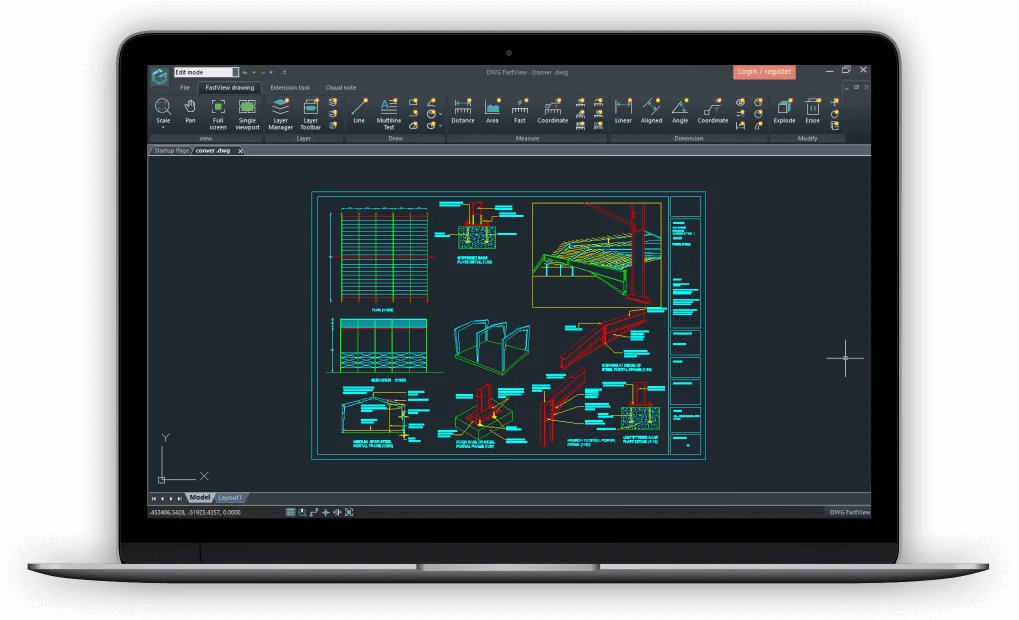
Free download does not mean every tool is included free. The publisher lists Windows text annotation, dimension tools and external references among Premium privileges, while 3D drawing viewing is listed under Super. Check the plan against the tools you need rather than assuming the full feature list is available without a subscription. The screenshot is a publisher illustration of the Windows interface and may show an earlier layout.
What it offers
- Open DWG and DXF CAD drawings for review on Windows.
- Work with multiple drawings and inspect details using pan and zoom.
- Manage layers and print drawings from the desktop application.
- Access cloud drawings across Windows, mobile and web editions through an account.
Good to know
- Windows text annotation, dimension tools and external references are listed as paid Premium privileges; 3D drawing viewing is listed under Super.
- Cross-device cloud access requires a DWG FastView account.
Product images
Sources
References used for this listing. Retrieval dates do not indicate hands-on testing.
More in multimedia & graphics
View category ↗
1by1 2.17
Play music directly from folders with 1by1, a free Windows audio player with resume, gapless playback and file tools. Formats beyond MP3 need additional decoders.
3DVista Virtual Tour Pro
Build interactive 360° virtual tours from panoramas, videos and 3D models with 3DVista Virtual Tour Pro for Windows. Commercial software with a 30-day trial.

4DDiG Video Repair
Repair corrupted or unplayable videos in batches with the Video Repair tool in 4DDiG File Repair for Windows. A free trial is available; advanced features require a paid license.