
Multimedia & graphics Windows
Dynamic Photo HDR
Merge bracketed exposures or tone-map a single photo with Dynamic Photo HDR, a commercial Windows editor with alignment, anti-ghosting and layered effects.
- Operating system
- Windows; specific supported Windows releases not established by the official pages checked
- Architecture
- x64 (64-bit)
- Download package
- EXE trial installer
Publisher lists version 6.1, build 14/11/2017, and a separate 32-bit download. Windows 10/11 compatibility has not been established; software was not installed or run.
Link checked · Download guidance
What is Dynamic Photo HDR?
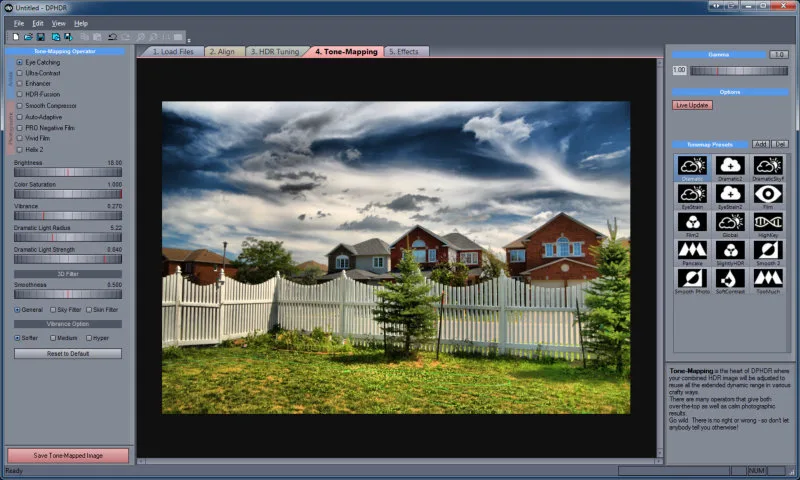
Dynamic Photo HDR is a Windows photo editor for combining different exposures and adjusting the result with tone mapping or HDR fusion. It also processes a single image for an HDR-style look. Its step-based workspace separates loading, alignment, HDR tuning, tone mapping and effects, so you can revisit an earlier stage without reloading the source files.
For bracketed shots, automatic, manual and assisted alignment help line up the images before processing. Anti-ghosting masks address objects that moved between exposures. Tone-mapping operators range from restrained photographic adjustments to stronger stylized effects; adjustment layers, masks and textures provide further control. Batch processing can apply alignment, HDR processing and effects across queued images.
The linked package is the publisher's 64-bit Windows trial, not a free full license. The publisher identifies version 6.1 with build date 14 November 2017. The official pages checked do not establish Windows 10 or Windows 11 support, and this entry does not claim tested compatibility. The editor's documented purpose is HDR processing, not restoring lost focus in a blurry photograph.
What it offers
- Process bracketed exposures or apply tone mapping to a single image.
- Align images automatically, manually or with assisted alignment.
- Use anti-ghosting masks for objects that moved between exposures.
- Combine tone-mapping operators, HDR fusion and layered effects with masks and textures.
- Batch-process queued images with alignment, HDR adjustments and effects.
Good to know
- Commercial software with a trial download; the publisher reserves the Live HDR anti-ghosting preview for the full version.
- The published build date is 14 November 2017; Windows 10/11 support is not established by the official pages checked.
- HDR processing and alignment should not be mistaken for a documented ability to restore lost focus in blurry photos.
Product images
Sources
References used for this listing. Retrieval dates do not indicate hands-on testing.
- Dynamic Photo-HDR - Download ↗Retrieved
- Enhance your photos with Dynamic Photo HDR ↗Retrieved
- Dynamic Photo HDR Features ↗Retrieved
- Dynamic Photo HDR How it Works ↗Retrieved
- DPHDR Screen-shots ↗Retrieved
More in multimedia & graphics
View category ↗
1by1 2.17
Play music directly from folders with 1by1, a free Windows audio player with resume, gapless playback and file tools. Formats beyond MP3 need additional decoders.
3DVista Virtual Tour Pro
Build interactive 360° virtual tours from panoramas, videos and 3D models with 3DVista Virtual Tour Pro for Windows. Commercial software with a 30-day trial.

4DDiG Video Repair
Repair corrupted or unplayable videos in batches with the Video Repair tool in 4DDiG File Repair for Windows. A free trial is available; advanced features require a paid license.