
Multimedia & graphics Windows
Easy Thumbnails
Create thumbnails and batch-resized image copies on Windows with Easy Thumbnails, Fookes Software's freeware utility with previews and adjustable resampling.
- Operating system
- Windows 95 through Windows 10, as listed by the publisher
- Architecture
- Not specified on the current official product page
- Download package
- EXE installer
Windows 11 compatibility is not established. Installer link verified with HEAD only; software not installed or tested.
Link checked · Download guidance
What is Easy Thumbnails?
Easy Thumbnails creates smaller previews or resized copies of image collections. Select individual pictures, a group of files or a whole folder, then adjust the output dimensions and inspect the result before making the copies. It suits preparing a set of consistently sized pictures without opening each image separately.
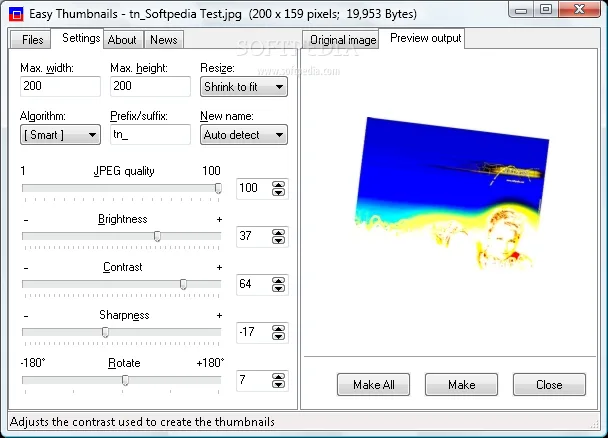
The Settings tab combines maximum width and height, resizing mode, filename prefix or suffix, JPEG quality and image adjustments. Eleven resampling filters include Bicubic and Lanczos3. Brightness, contrast, sharpness and rotation controls let you change the output while comparing it with the original in the preview area. A destination folder and naming prefix help keep generated images separate from the source files.
Input support is broader than output-format choice. The publisher's manual says PNG input stays PNG by default, while other supported image types are saved as JPEG; PNG can also be saved as JPEG through a preview shortcut-menu option. Small thumbnails discard EXIF metadata, so this is not a metadata-preserving workflow for every output size.
The publisher offers Easy Thumbnails free for home and professional use and lists Windows 95 through Windows 10. Windows 11 compatibility, a current release number and the selected installer's architecture are not established by the current official product page. The download here points to the publisher's EXE installer; it was checked with HEAD only, not downloaded, installed or tested.
What it offers
- Process selected images, batches or every image listed in a folder.
- Set maximum dimensions and choose aspect-ratio-preserving fit modes or stretch-to-fit resizing.
- Choose from eleven resampling filters and preview changes to JPEG quality, brightness, contrast, sharpness and rotation.
- Name output copies with a prefix or suffix and choose a destination folder.
- Use command-line switches or customizable HTML templates for repeatable thumbnail and image-page workflows.
Good to know
- The current publisher page lists Windows 95 through 10; Windows 11 support is unconfirmed.
- The publisher's manual documents PNG output for PNG input by default and JPEG output for other supported inputs, not arbitrary output-format conversion.
- Small thumbnails lose EXIF metadata; do not assume all resized JPEG copies retain it.
Product images
Sources
References used for this listing. Retrieval dates do not indicate hands-on testing.
More in multimedia & graphics
View category ↗
1by1 2.17
Play music directly from folders with 1by1, a free Windows audio player with resume, gapless playback and file tools. Formats beyond MP3 need additional decoders.
3DVista Virtual Tour Pro
Build interactive 360° virtual tours from panoramas, videos and 3D models with 3DVista Virtual Tour Pro for Windows. Commercial software with a 30-day trial.

4DDiG Video Repair
Repair corrupted or unplayable videos in batches with the Video Repair tool in 4DDiG File Repair for Windows. A free trial is available; advanced features require a paid license.