
Multimedia & graphics macOS
FamiStudio for macOS
Compose NES and Famicom chiptunes on Mac with a piano roll, pattern sequencer and editable instruments. Export audio or music files for NES projects.
- Operating system
- macOS 10.15 Catalina or newer
- Architecture
- Intel x64 or Apple Silicon ARM64; install the matching .NET runtime
- Download package
- ZIP archive containing the macOS application bundle
Publisher requires .NET Runtime 8.0 and OpenGL 3.0 support. The app is unsigned; compatibility is documented, not locally tested.
Link checked · Download guidance
What is FamiStudio?
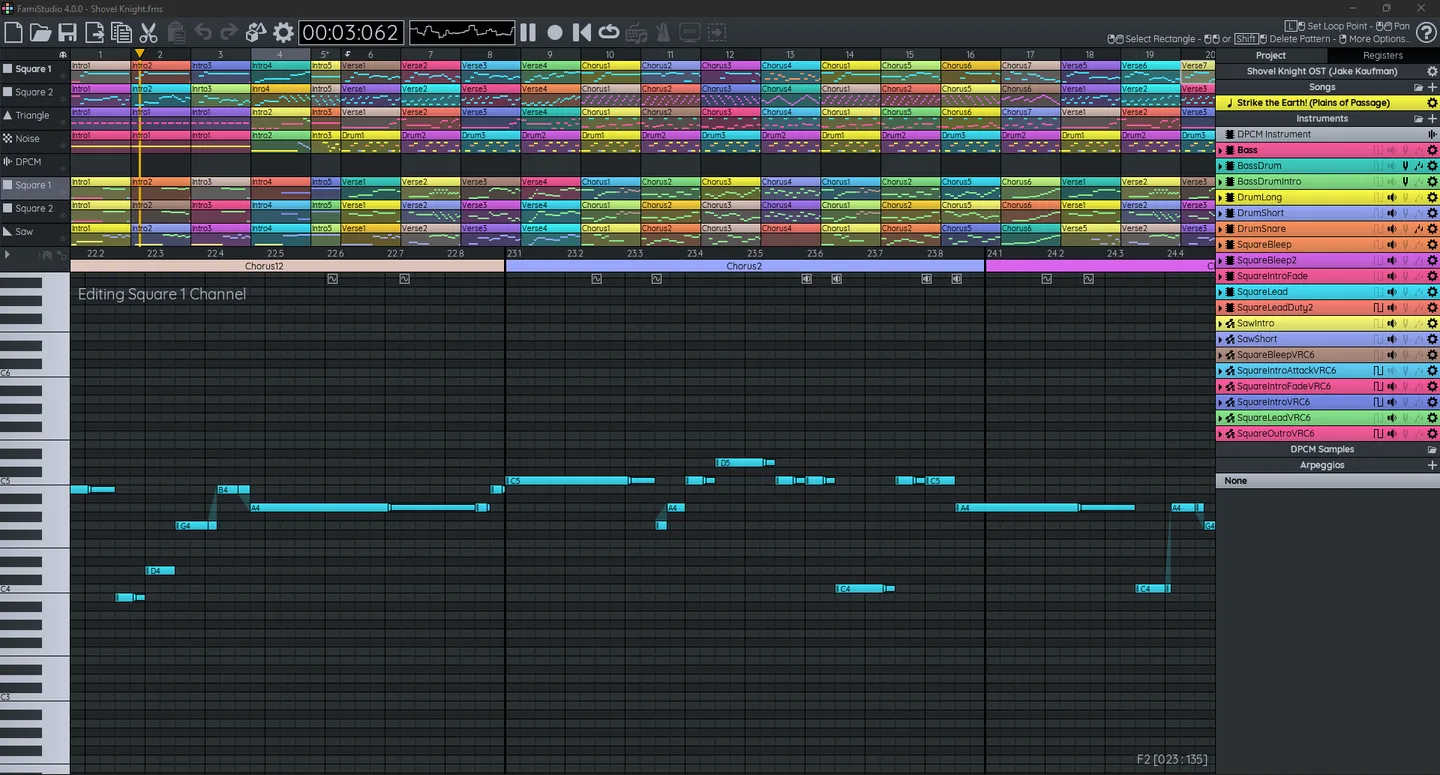
FamiStudio is a free, open-source NES and Famicom music editor for chiptune composers and homebrew developers. Its piano roll handles individual notes, while the sequencer arranges repeating patterns into songs. A project explorer keeps songs, instruments, DPCM samples and arpeggios together, and instrument envelopes shape pitch and volume.
For sharing a track, export WAV, MP3 or OGG Vorbis audio. NSF/NSFe and ROM/FDS output serve NES-focused projects, although projects using multiple audio expansions cannot be exported to ROM/FDS. Video export is also available but needs a separate FFmpeg installation.
The linked Mac download is the publisher’s 4.5.3 application bundle in a ZIP archive. The documentation lists macOS 10.15 Catalina or newer, .NET Runtime 8.0 and OpenGL 3.0 support. Choose the .NET runtime that matches your Intel or Apple Silicon hardware. The app is unsigned, so macOS may block its first launch; this entry does not establish notarization or successful execution on a particular Mac.
The screenshot below comes from the publisher’s desktop documentation. It shows an older 4.0.0 interface with Windows window controls, not a capture of the current Mac build.
What it offers
- Write notes in a piano roll and arrange patterns across NES channels.
- Manage songs, instruments, DPCM samples and arpeggios within one project.
- Shape instrument pitch and volume with envelopes.
- Export WAV, MP3 or OGG Vorbis audio, plus NSF/NSFe and ROM/FDS music output.
- Create song videos after installing FFmpeg separately.
Good to know
- The Mac app is unsigned and may be blocked by GateKeeper on first launch. It requires .NET Runtime 8.0 and OpenGL 3.0 support.
- Projects using multiple audio expansions cannot be exported to ROM/FDS.
- WAV, MP3 and OGG Vorbis export processes one song at a time; video export requires a separate FFmpeg installation.
Product images
Sources
References used for this listing. Retrieval dates do not indicate hands-on testing.
- FamiStudio - NES Music Editor ↗Retrieved
- Installation - FamiStudio Documentation ↗Retrieved
- Basics - FamiStudio Documentation ↗Retrieved
- Exporting Songs - FamiStudio Documentation ↗Retrieved
- FamiStudio MIT License ↗Retrieved
More in multimedia & graphics
View category ↗
1by1 2.17
Play music directly from folders with 1by1, a free Windows audio player with resume, gapless playback and file tools. Formats beyond MP3 need additional decoders.
3DVista Virtual Tour Pro
Build interactive 360° virtual tours from panoramas, videos and 3D models with 3DVista Virtual Tour Pro for Windows. Commercial software with a 30-day trial.

4DDiG Video Repair
Repair corrupted or unplayable videos in batches with the Video Repair tool in 4DDiG File Repair for Windows. A free trial is available; advanced features require a paid license.