
Multimedia & graphics Windows
FastStone Image Viewer for Windows
Browse, compare and edit photos with FastStone Image Viewer for Windows, with batch conversion and renaming. Free for personal and educational use; commercial use requires a license.
- Operating system
- Windows 11, 10, 8.x, 7, Vista and XP, as listed by the publisher
- Architecture
- Not specified on the publisher download page
- Download package
- EXE installer
Separate ZIP installer and portable packages are listed by the publisher. HEIC support requires WIC codecs on Windows 10 or 11.
Link checked · Download guidance
What is FastStone Image Viewer?
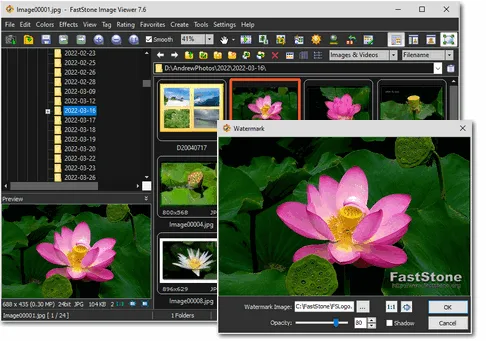
FastStone Image Viewer combines a folder-based photo browser with viewing, editing and conversion tools. Use thumbnails to browse a collection, compare up to four images side by side, or open a photo full screen with edge-triggered panels for tools and EXIF information. Batch conversion and renaming help process groups of files without opening each one separately.
Editing tools include cropping, resizing, lighting and color adjustments, red-eye correction, a clone stamp and a healing brush. The publisher lists support for common image formats and camera RAW files, as well as PDF viewing. HEIC support depends on Windows Imaging Component codecs on Windows 10 or 11.
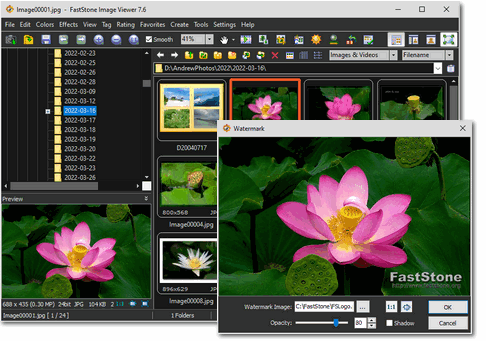
The linked download is the publisher-listed version 8.5 EXE installer. A portable package is available separately from the publisher. Personal and educational use is free, but commercial use requires a license. The publisher screenshot below shows version 7.6, so it illustrates the interface rather than documenting the current release.
What it offers
- Browse image folders with thumbnails and view photos full screen with edge-triggered tool panels.
- Compare up to four images side by side and inspect EXIF metadata.
- Crop, resize, adjust colors and lighting, remove red-eye, and retouch with clone and healing tools.
- Batch-convert and rename image collections.
- View supported camera RAW files and PDFs, and create slideshows with music.
Good to know
- Free use is limited to personal and educational purposes; commercial use requires a license.
- HEIC support depends on Windows Imaging Component codecs on Windows 10 or 11.
Product images
Sources
References used for this listing. Retrieval dates do not indicate hands-on testing.
- FastStone Image Viewer — publisher downloads ↗Retrieved
- FastStone Image Viewer — publisher features and release history ↗Retrieved
- FastStone — publisher products and Windows compatibility ↗Retrieved
- FastStone — software licensing ↗Retrieved
- FastStone Image Viewer — publisher interface screenshot ↗Retrieved
More in multimedia & graphics
View category ↗
1by1 2.17
Play music directly from folders with 1by1, a free Windows audio player with resume, gapless playback and file tools. Formats beyond MP3 need additional decoders.
3DVista Virtual Tour Pro
Build interactive 360° virtual tours from panoramas, videos and 3D models with 3DVista Virtual Tour Pro for Windows. Commercial software with a 30-day trial.

4DDiG Video Repair
Repair corrupted or unplayable videos in batches with the Video Repair tool in 4DDiG File Repair for Windows. A free trial is available; advanced features require a paid license.