

Multimedia & graphics Windows
FBX Game Recorder for Windows
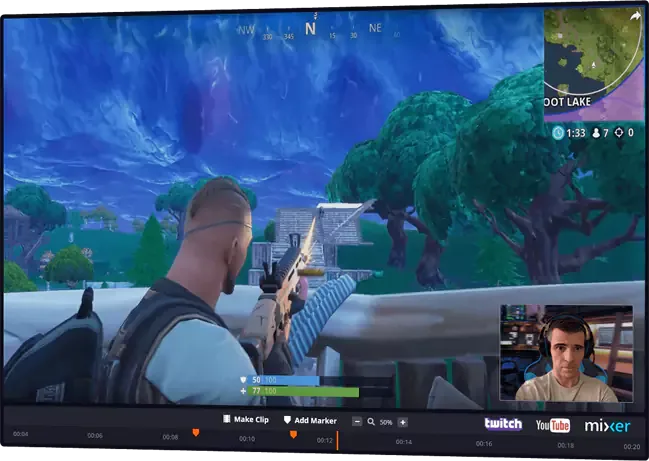
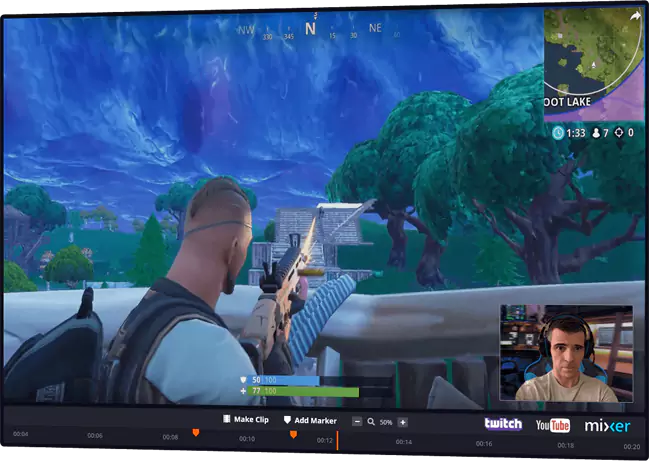
Record gameplay, save highlight clips and live stream with FBX Game Recorder for Windows. Edit recordings with captions, stickers and slow-motion effects; removing the video watermark requires a paid license.
- Operating system
- Windows 10 and 11 for publisher-documented version 3.20
- Architecture
- x64, as listed in the community WinGet installer manifest
- Download package
- EXE installer (Nullsoft, per WinGet manifest)
Windows 7 and 8 require the older 3.19 release. This rolling package was HEAD-verified only; its embedded version and architecture were not independently inspected.
Link checked · Download guidance
What is FBX Game Recorder?
FBX Game Recorder captures gameplay and the Windows desktop, saves short highlights with a hotkey and supports continuous DVR-style recording. It suits players who want to keep a full session, mark useful moments and turn them into clips rather than record only a single planned take. Live streams can also be saved to disk.
The built-in editor adds captions, GIFs, animated stickers, sound effects and slow motion to recordings. The publisher lists Nvidia, AMD and Intel hardware acceleration, but its performance claims are not a guarantee for a particular PC or game.
FBX can be used without payment, while paid annual or lifetime licenses remove its video watermark. The publisher documents version 3.20 for Windows 10 and 11; version 3.19 was the final release for Windows 7 and 8. The linked EXE is the rolling x64 installer listed by the community WinGet manifest. Its availability was checked with HEAD only, not by downloading or running it.
What it offers
- Record gameplay or the Windows desktop, including browser and older games.
- Save short highlights with a hotkey or keep a continuous DVR-style recording.
- Live stream and save streams to disk for later clips.
- Add captions, stickers, GIFs, sound effects and slow motion in the built-in editor.
- Use supported Nvidia, AMD or Intel hardware acceleration for capture.
Good to know
- Removing the FBX video watermark requires a paid annual or lifetime license.
- Windows 7 and 8 support ends with version 3.19; newer releases require Windows 10 or later.
Product images
Sources
References used for this listing. Retrieval dates do not indicate hands-on testing.
- FBX game recorder and live streaming - easy to use, powerful, free ↗Retrieved
- Upgrade FBX - Level UP ↗Retrieved
- Terms - FBX ↗Retrieved
- Version 3.20 is available - FBX ↗Retrieved
- FBX End of support for Windows 7 and 8 ↗Retrieved
- Microsoft community WinGet manifest — Blueberry.FBX installer ↗Retrieved
More in multimedia & graphics
View category ↗
1by1 2.17
Play music directly from folders with 1by1, a free Windows audio player with resume, gapless playback and file tools. Formats beyond MP3 need additional decoders.
3DVista Virtual Tour Pro
Build interactive 360° virtual tours from panoramas, videos and 3D models with 3DVista Virtual Tour Pro for Windows. Commercial software with a 30-day trial.

4DDiG Video Repair
Repair corrupted or unplayable videos in batches with the Video Repair tool in 4DDiG File Repair for Windows. A free trial is available; advanced features require a paid license.