
Multimedia & graphics Windows
FileBot
Rename and organize movies, TV episodes and anime with FileBot for Windows. Match files to online databases, customize names and fetch subtitles with this paid media utility.
- Operating system
- Windows; minimum Windows version is not established by the cited homepage
- Architecture
- x64
- Download package
- MSI installer
The publisher lists a separate Windows ARM64 installer. This entry links only to the x64 package; no installation or build compatibility test was performed.
Link checked · Download guidance
What is FileBot?
FileBot turns a folder of loosely named media files into a more consistent library. It matches movies and episodes against online databases such as TheMovieDB, TheTVDB and AniDB, then applies a naming scheme to the results. You can customize that scheme or use the publisher's Plex naming standard for a media-server library.
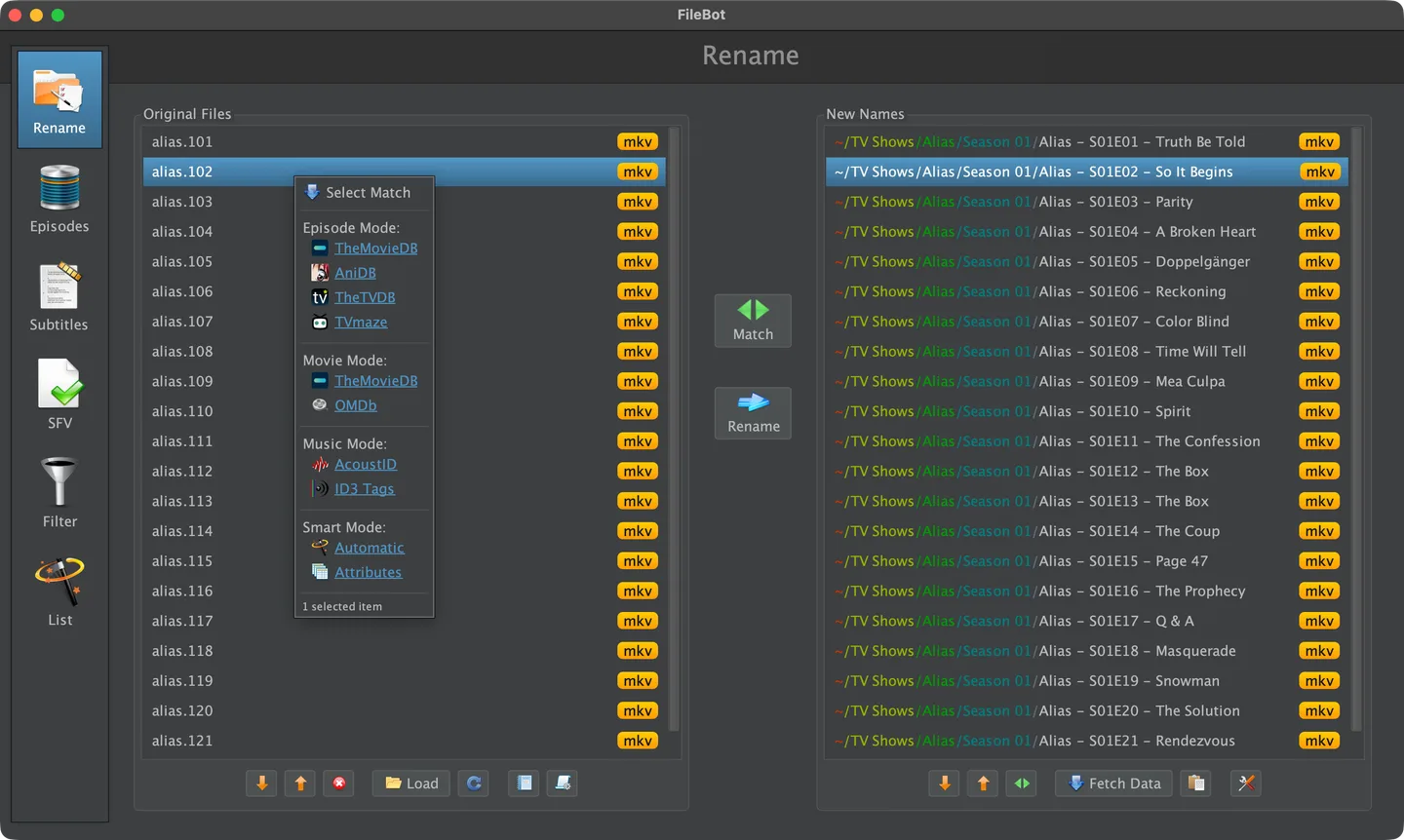
The publisher's basic workflow starts by dragging episodes or movies into Original Files, choosing a data source from the New Names area and using Rename. The two lists show the original filenames and proposed names side by side. Check that the matches refer to the intended titles before committing a batch; the publisher also provides an internal history for reverting rename operations.
Beyond renaming, FileBot can fetch artwork and OpenSubtitles subtitles, preview subtitles and change their format or character encoding. Its command-line interface and scripting engine support automated workflows. These are publisher-documented capabilities, not results from an installation or hands-on software test.
FileBot is commercial software, not a free renamer. The publisher offers annual and lifetime universal licenses for a single user across platforms and multiple machines; Microsoft Store purchases use a separate licensing arrangement. Online matching and subtitle lookup depend on external services. The linked package is the Windows x64 MSI installer, not the separate ARM64 build. The screenshot is the publisher's cross-platform Rename example with macOS window controls, not a Windows capture.
What it offers
- Match movie, TV episode and anime files against online information from TheMovieDB, TheTVDB or AniDB.
- Customize output filenames and folder structures, including the publisher's Plex naming standard.
- Fetch artwork and OpenSubtitles subtitles; preview subtitles and convert subtitle formats or character encodings.
- Revert rename operations through FileBot's internal history.
- Use the command-line interface and scripting engine for media organization workflows.
Good to know
- Paid software: universal licenses are sold for annual or lifetime use; Store purchases follow a separate licensing arrangement.
- Online database matching and subtitle lookup rely on internet access and third-party services whose availability is not guaranteed.
- The selected installer is x64, not ARM64; the cited homepage does not establish the minimum Windows version.
Product images
Sources
References used for this listing. Retrieval dates do not indicate hands-on testing.
More in multimedia & graphics
View category ↗
1by1 2.17
Play music directly from folders with 1by1, a free Windows audio player with resume, gapless playback and file tools. Formats beyond MP3 need additional decoders.
3DVista Virtual Tour Pro
Build interactive 360° virtual tours from panoramas, videos and 3D models with 3DVista Virtual Tour Pro for Windows. Commercial software with a 30-day trial.

4DDiG Video Repair
Repair corrupted or unplayable videos in batches with the Video Repair tool in 4DDiG File Repair for Windows. A free trial is available; advanced features require a paid license.