
Multimedia & graphics Windows
FontTwister
Create styled text for logos, banners and video thumbnails with FontTwister for Windows. Combine templates, textures, bevels and shadows; the trial requires a paid license to unlock the full version.
- Operating system
- Windows 11, 10 and 7
- Architecture
- Not specified on the publisher pages inspected
- Download package
- Windows EXE installer
Publisher also offers a ZIP for use without installation. This entry links to the EXE. Mac and Linux instructions use CrossOver rather than native packages.
Link checked · Download guidance
What is FontTwister?
FontTwister is a Windows text-effects editor for turning a heading into a graphic for a logo, banner, presentation or video thumbnail. Start with a text-effect template, replace the wording and adjust the appearance rather than building every effect from scratch. Its controls cover text and background fills, gradients, textures, deformation, outlines, 3D bevels, shadows and frames.
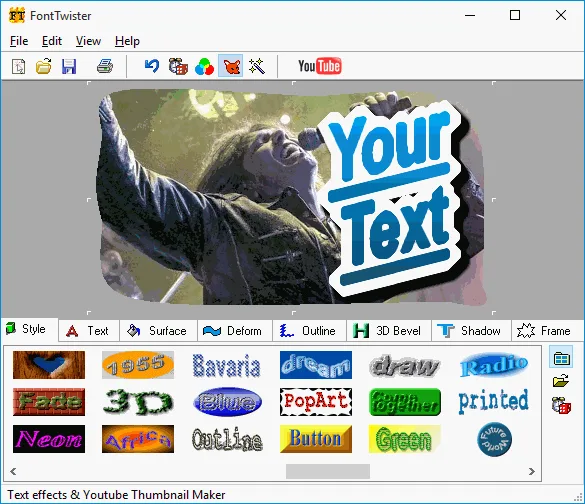
The publisher's tutorial describes editable text and adjustable effects: you can change the words, reshape the lettering or alter a shadow's color, transparency, blur and position. That makes it useful when the same title needs several visual treatments. The official gallery shows a thumbnail composition above a strip of style presets, with separate tabs for the effect controls.
FontTwister is commercial software, not a free full-version download. Neuber Software says a purchased registration code unlocks the trial, with a one-time payment and no subscription fees. The pages inspected do not establish the trial's duration or all evaluation restrictions. The publisher lists Windows 11, 10 and 7; its Mac and Linux route uses CrossOver, not a separate native edition. The linked Windows EXE was checked with HEAD only: the software was not downloaded, installed or tested.
What it offers
- Start with text-effect templates and edit the wording later.
- Fill text and backgrounds with colors, gradients or image textures.
- Stretch, rotate, shear, deform or twist lettering.
- Adjust outlines, bevel profiles and shadow color, transparency, blur and position.
- Create styled headings, logos, banners, buttons and video-thumbnail graphics.
Good to know
- The full version requires a paid license; the publisher pages inspected do not specify the trial duration or every trial restriction.
- Native support listed here is Windows only; the publisher's Mac and Linux instructions require CrossOver.
Product images
Sources
References used for this listing. Retrieval dates do not indicate hands-on testing.
- FontTwister creates 3D text effects for web graphics, buttons, video titles and custom youtube thumbnails ↗Retrieved
- FontTwister screenshots ↗Retrieved
- Download FontTwister to create 3D text effects and custom youtube thumbnails ↗Retrieved
- Buy text effect software and video thumbnail maker ↗Retrieved
- FontTwister version history ↗Retrieved
- FontTwister text-effect tutorial ↗Retrieved
More in multimedia & graphics
View category ↗
1by1 2.17
Play music directly from folders with 1by1, a free Windows audio player with resume, gapless playback and file tools. Formats beyond MP3 need additional decoders.
3DVista Virtual Tour Pro
Build interactive 360° virtual tours from panoramas, videos and 3D models with 3DVista Virtual Tour Pro for Windows. Commercial software with a 30-day trial.


4DDiG Video Repair
Repair corrupted or unplayable videos in batches with the Video Repair tool in 4DDiG File Repair for Windows. A free trial is available; advanced features require a paid license.