
Multimedia & graphics Windows
Fotosizer for Windows
Resize, rotate and rename batches of photos on Windows with Fotosizer Standard Edition, free for personal and commercial use.
- Operating system
- Windows XP, Vista, 7, 8, 8.1, 10 and 11, as listed by the publisher
- Architecture
- 32-bit and 64-bit Windows; shared installer URL listed for x86 and x64
- Download package
- EXE installer
Publisher requirements: 2GB RAM, 50MB free disk space, 800×600 display and Microsoft .NET Framework 2.0 or higher. Administrator rights are required for installation.
Link checked · Download guidance
What is Fotosizer?
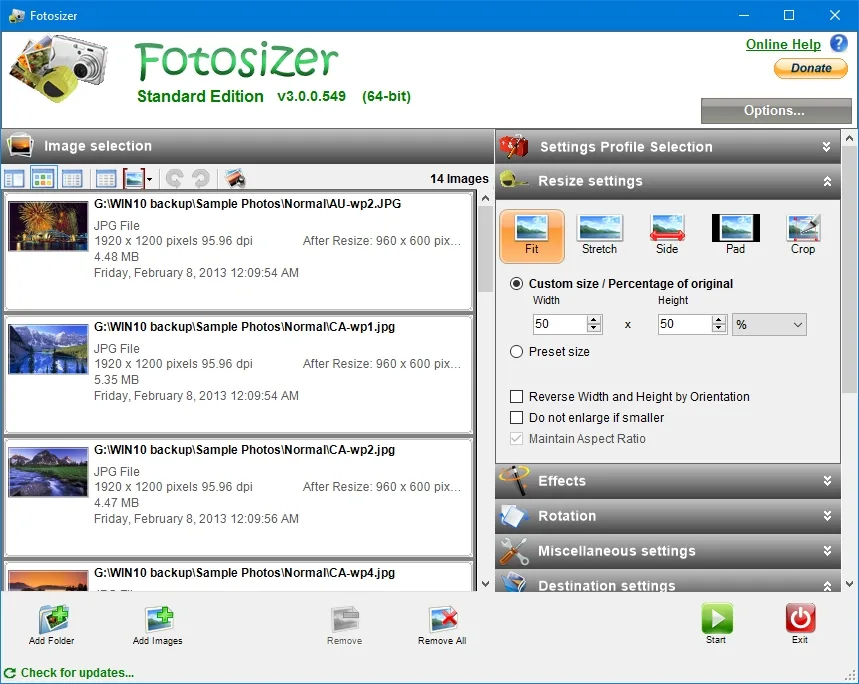
Fotosizer applies the same resize settings to a selection of photos or a folder of images. Add individual files, include subfolders or send pictures from the Windows Explorer context menu, then choose dimensions, an output folder and a filename pattern. Fit, Stretch, Side, Pad and Crop modes cover different ways to handle image size and aspect ratio.
Standard Edition includes batch resizing and rotation, image effects, settings profiles and a live preview. It suits preparing a photo collection for sharing or producing consistently sized copies without editing each picture separately. The publisher lists common input and output formats including JPEG, PNG, TIFF, GIF, WebP and HEIC.
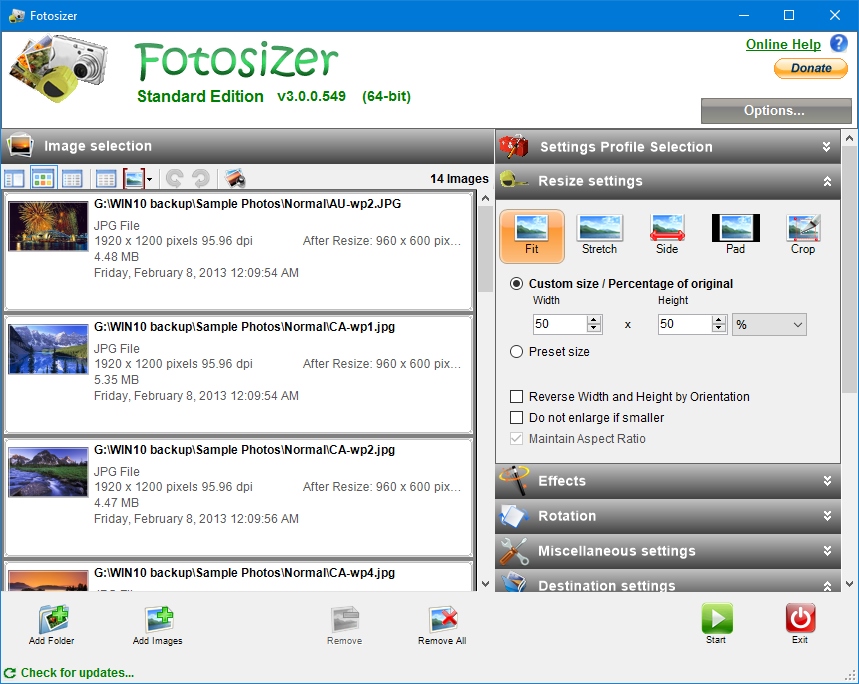
The free edition does not include text or image watermarks, colour adjustment or rounded corners; those require Professional Edition. Fotosizer also cannot resize to a chosen target file size, so it is not a direct solution for an upload form with an exact kilobyte limit. The publisher's preview can show the resulting file size after settings are applied. The screenshot below is the publisher's older Standard Edition interface, not a capture of version 3.24.
What it offers
- Resize batches by pixel dimensions or percentage using Fit, Stretch, Side, Pad or Crop modes.
- Add images or folders, include subfolders, or select pictures through Windows Explorer integration.
- Rotate or flip pictures and apply effects such as black and white, sepia or negative.
- Save reusable settings profiles, preview changes and rename output files with parameterized filename patterns.
- Import and export supported formats including JPEG, PNG, TIFF, GIF, WebP and HEIC.
Good to know
- Text and image watermarks, colour adjustment and rounded corners require the paid Professional Edition.
- Cannot resize images to a specified target file size; preview reports file size after processing settings are chosen.
- Windows only; the publisher offers no macOS, Linux, Android, iOS or Chromebook version.
Product images
Sources
References used for this listing. Retrieval dates do not indicate hands-on testing.
- Fotosizer - Download — normally observed Windows product page ↗Retrieved
- Fotosizer - Home ↗Retrieved
- Fotosizer - Features ↗Retrieved
- Fotosizer - Download ↗Retrieved
- Fotosizer - Help ↗Retrieved
- Fotosizer - Eula (Standard) ↗Retrieved
- Fotosizer - Screenshots ↗Retrieved
- Microsoft WinGet community manifest — FutureFiniti.Fotosizer 3.24.0.596 installer ↗Retrieved
More in multimedia & graphics
View category ↗
1by1 2.17
Play music directly from folders with 1by1, a free Windows audio player with resume, gapless playback and file tools. Formats beyond MP3 need additional decoders.
3DVista Virtual Tour Pro
Build interactive 360° virtual tours from panoramas, videos and 3D models with 3DVista Virtual Tour Pro for Windows. Commercial software with a 30-day trial.

4DDiG Video Repair
Repair corrupted or unplayable videos in batches with the Video Repair tool in 4DDiG File Repair for Windows. A free trial is available; advanced features require a paid license.