
Multimedia & graphics Windows
Free Color Video
Adjust video brightness, contrast and saturation with Free Color Video, a freeware Windows tool with a preview and output-format settings.
- Operating system
- Windows XP, Vista, 7, 8 and 10
- Architecture
- Publisher lists 32-bit and 64-bit Windows for Vista, 7, 8 and 10; installer architecture unspecified
- Download package
- EXE installer
The product page does not list Windows 11. Supported Windows bitness does not establish the executable's native architecture.
Link checked · Download guidance
What is Free Color Video?
Free Color Video adjusts the appearance of a video before rendering a new file. It is aimed at straightforward color changes: brighten a clip, change its contrast or alter saturation. The publisher's guide shows a file-list workflow rather than a timeline: add a video with the red plus button, select it and open Color Adjust.
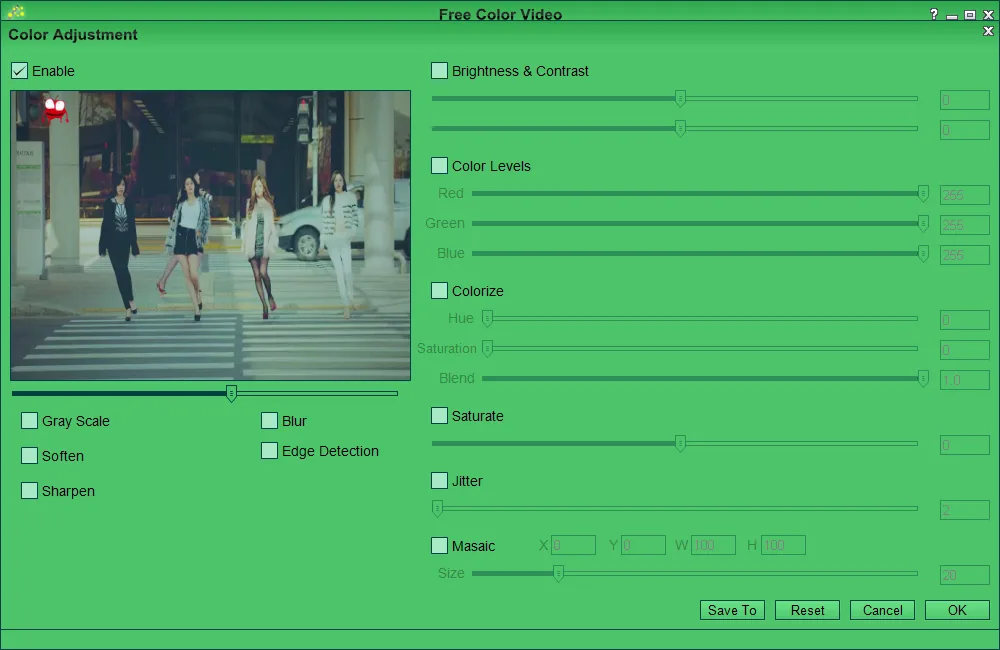
The color-adjustment window includes a preview alongside brightness and contrast, RGB color levels and colorizing controls. After choosing the adjustments, use Settings to select an output format and Render to produce the new video.
The publisher lists version 1.08 and Windows XP, Vista, 7, 8 and 10. It does not list Windows 11 on this product page, so compatibility with Windows 11 is unconfirmed. The listed version is publisher information, not a verified release date or a claim that this is the newest build.
What it offers
- Adjust video brightness, contrast and saturation.
- Use the Color Adjust window's preview and RGB color-level controls.
- Apply colorizing adjustments through hue, saturation and blend controls.
- Choose an output format in Settings and render a new video file.
Good to know
- The publisher's documented Windows support stops at Windows 10; Windows 11 compatibility is unconfirmed.
Product images
Sources
References used for this listing. Retrieval dates do not indicate hands-on testing.
More in multimedia & graphics
View category ↗
1by1 2.17
Play music directly from folders with 1by1, a free Windows audio player with resume, gapless playback and file tools. Formats beyond MP3 need additional decoders.
3DVista Virtual Tour Pro
Build interactive 360° virtual tours from panoramas, videos and 3D models with 3DVista Virtual Tour Pro for Windows. Commercial software with a 30-day trial.

4DDiG Video Repair
Repair corrupted or unplayable videos in batches with the Video Repair tool in 4DDiG File Repair for Windows. A free trial is available; advanced features require a paid license.