
Multimedia & graphics Windows
Free Resize Video
Change video width and height with Free Resize Video, a freeware Windows tool with per-file dimensions and output-format settings.
What is Free Resize Video?
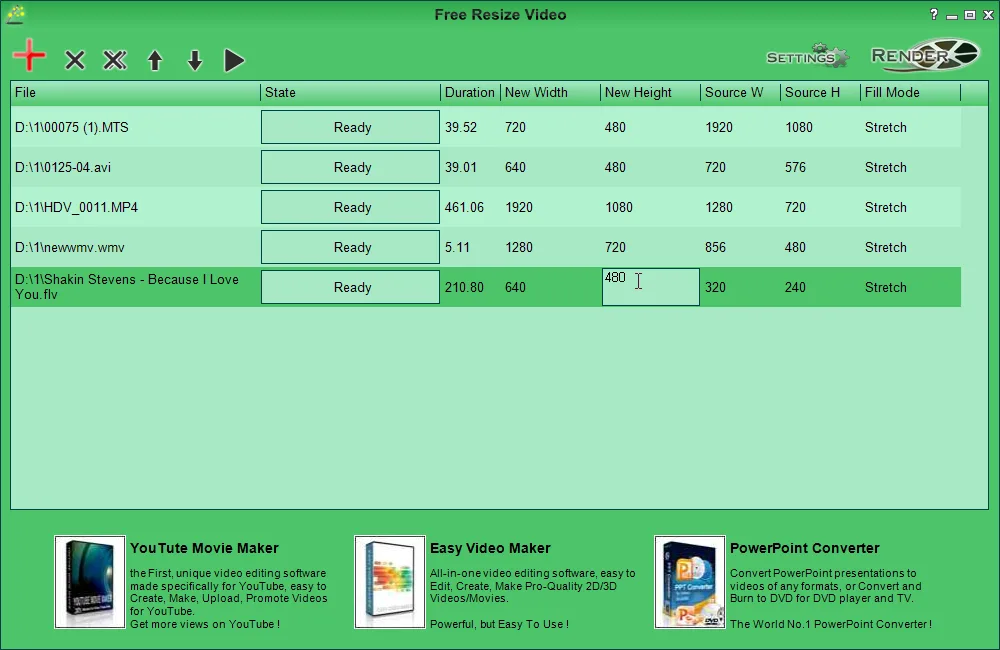
Free Resize Video changes the dimensions of video files. Add clips with the red plus button, enter a new width and height for each entry, choose an output format in Settings and use Render to create the resized files. Its table keeps the source dimensions beside the new dimensions, so you can see which values you are changing.
This is a focused resizing utility rather than a full video editor. Softonic's review notes its limited editing features, and the publisher points users to Easy Video Maker for broader editing work. The publisher lists version 1.08 and Windows XP, Vista, 7, 8, 10 and 11; those are published compatibility claims, not results of an installation or rendering test.
What it offers
- Set a new width and height separately for each video in the file list.
- Compare source dimensions with the requested output dimensions in the same table.
- Choose an output format through Settings before rendering resized files.
- Add multiple source videos to the resizing list.
Good to know
- Focused on resizing; it lacks the broader editing features of a full video editor.
Product images
Sources
References used for this listing. Retrieval dates do not indicate hands-on testing.
More in multimedia & graphics
View category ↗
1by1 2.17
Play music directly from folders with 1by1, a free Windows audio player with resume, gapless playback and file tools. Formats beyond MP3 need additional decoders.
3DVista Virtual Tour Pro
Build interactive 360° virtual tours from panoramas, videos and 3D models with 3DVista Virtual Tour Pro for Windows. Commercial software with a 30-day trial.

4DDiG Video Repair
Repair corrupted or unplayable videos in batches with the Video Repair tool in 4DDiG File Repair for Windows. A free trial is available; advanced features require a paid license.