

Multimedia & graphics Windows
FreeCAD for Windows
Build dimensioned 3D parts from constrained sketches, revise designs through model history and create technical drawings with FreeCAD for Windows.
- Operating system
- Windows 10 or later
- Architecture
- x86_64 (64-bit Intel/AMD)
- Download package
- EXE installer, version 1.1.4 (py311 package)
The publisher specifies Windows 10 as the minimum. This link selects the x86_64 installer, not the separate portable 7z package.
Link checked · Download guidance
What is FreeCAD?
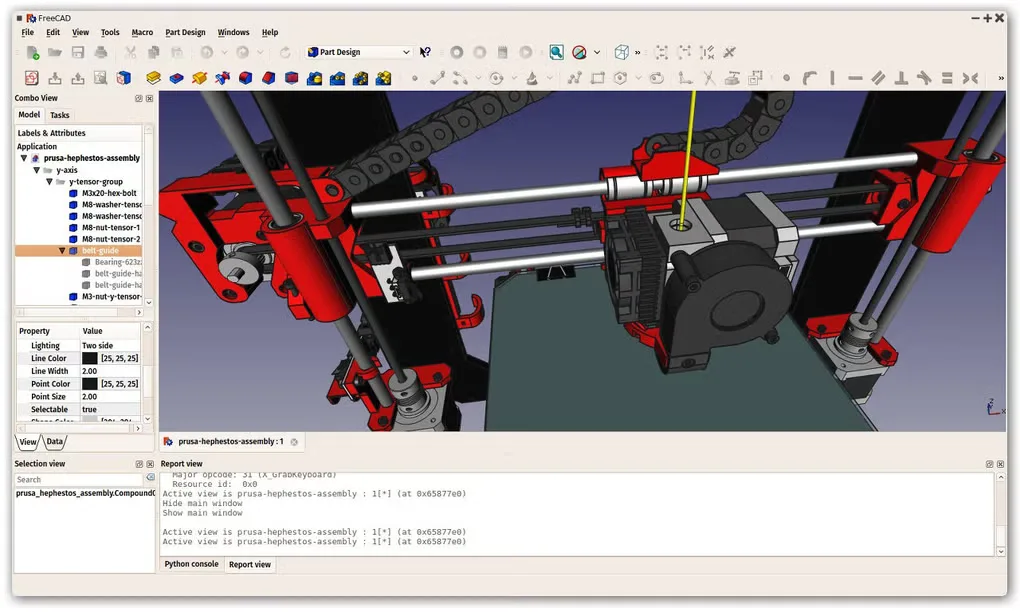
FreeCAD is a free, open-source parametric CAD application for designing physical objects. Start with a dimensioned 2D sketch, turn it into a solid model and adjust its parameters as the design changes. It suits mechanical parts, furniture and models intended for 3D printing, with tools for extracting drawings from the same design.
Dedicated workbenches cover assembly, building design and other engineering tasks. STEP, IGES and STL support helps move models between tools, while Python macros can automate repeated work. DWG exchange needs a separately installed converter; it is not a built-in, direct file workflow.
What it offers
- Create constrained 2D sketches as the basis for dimensioned 3D models.
- Revise model parameters and use the modeling history to adjust a design.
- Generate 2D drawings and exchange models in formats including STEP, IGES and STL.
- Use built-in Assembly and BIM workbenches for parts and building projects.
- Automate tasks with Python macros or extend FreeCAD with additional workbenches.
Good to know
- DWG import and export require an external converter, installed and configured separately; FreeCAD does not directly support the DWG format.
Product images
Sources
References used for this listing. Retrieval dates do not indicate hands-on testing.
- FreeCAD official downloads — Windows package and minimum OS ↗Retrieved
- FreeCAD official overview — parametric CAD and use cases ↗Retrieved
- FreeCAD official features — sketches, workbenches and automation ↗Retrieved
- FreeCAD documentation — software license ↗Retrieved
- FreeCAD documentation — DWG conversion requirement ↗Retrieved
- FreeCAD - Download — Windows listing screenshot gallery ↗Retrieved
More in multimedia & graphics
View category ↗
1by1 2.17
Play music directly from folders with 1by1, a free Windows audio player with resume, gapless playback and file tools. Formats beyond MP3 need additional decoders.
3DVista Virtual Tour Pro
Build interactive 360° virtual tours from panoramas, videos and 3D models with 3DVista Virtual Tour Pro for Windows. Commercial software with a 30-day trial.

4DDiG Video Repair
Repair corrupted or unplayable videos in batches with the Video Repair tool in 4DDiG File Repair for Windows. A free trial is available; advanced features require a paid license.