
Multimedia & graphics Windows
Gihosoft Free Video Cutter
Trim a video to a selected time range with Gihosoft Free Video Cutter for Windows. Preview the clip, adjust its start and end points, and save a new file in the original format.
What is Gihosoft Free Video Cutter?
Gihosoft Free Video Cutter is a free desktop tool for extracting a shorter clip from a video. It suits removing an unwanted opening or ending, or keeping one passage from a longer recording. The publisher lists formats including MP4, AVI, MOV, WMV, MKV and WEBM, as well as audio formats such as MP3 and AAC.
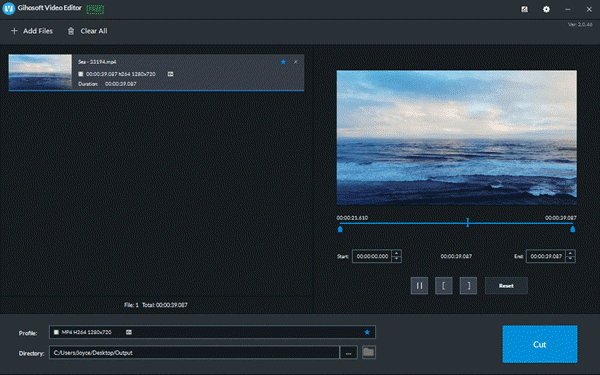
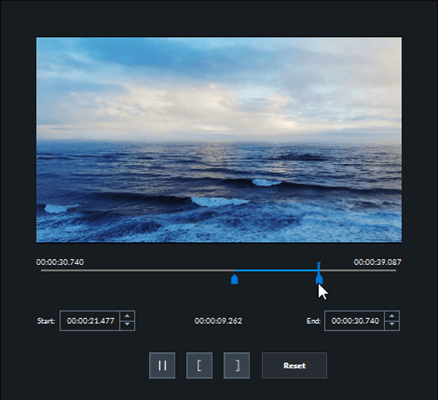
The official guide shows an interface titled Gihosoft Video Editor FREE. Add a file or drag it into the media area, move the blue range handles to choose what to keep, and preview the selection. Start and end time fields provide another way to adjust the range. Reset clears the range settings; Cut writes the selected passage to the chosen output folder.
The product page describes saving a new video in the same format as the input. Treat this as a trimming workflow, not a promise of format conversion or a complete editing suite. The publisher claims original-quality output; that claim has not been independently tested here.
The Windows download offered by the publisher resolves to JJSVideoEditor_V2.exe. The linked endpoint was checked with HEAD only, not downloaded or run. A current version number, processor architecture and exact supported Windows releases were not established from the inspected publisher pages.
What it offers
- Choose a clip using blue start and end handles or the time fields, with a video preview.
- Import through Add Files or drag a video into the media area.
- Work with publisher-listed video formats including MP4, AVI, MOV, WMV, MKV and WEBM, plus audio formats including MP3 and AAC.
- Reset the selection, choose an output folder and save the cut clip as a new file.
Good to know
- The publisher describes output in the same format as the source; this entry does not promise format conversion.
- Exact supported Windows releases, processor architecture and the current installer version were not established from the inspected publisher pages.
- The original-quality output claim comes from the publisher, not an independent encoding or playback test.
Product images


Sources
References used for this listing. Retrieval dates do not indicate hands-on testing.
More in multimedia & graphics
View category ↗
1by1 2.17
Play music directly from folders with 1by1, a free Windows audio player with resume, gapless playback and file tools. Formats beyond MP3 need additional decoders.
3DVista Virtual Tour Pro
Build interactive 360° virtual tours from panoramas, videos and 3D models with 3DVista Virtual Tour Pro for Windows. Commercial software with a 30-day trial.

4DDiG Video Repair
Repair corrupted or unplayable videos in batches with the Video Repair tool in 4DDiG File Repair for Windows. A free trial is available; advanced features require a paid license.