

Multimedia & graphics Windows
GIMP for Windows
Retouch photos and build layered artwork in GIMP, with masks, editable filters and vector layers for compositions that need more than a quick crop.
- Operating system
- Windows 10 version 1903 or newer
- Architecture
- x64 (x86_64) and ARM64
- Download package
- EXE installer
Combined x64/ARM64 installer; not 32-bit x86 or the Store package.
Link checked · Download guidance
What is GIMP?
GIMP is an image editor for photo retouching, layered compositions and original artwork. It suits combining images, adjusting selected areas and keeping text or shapes editable while a design changes. Layer masks control visibility without erasing pixels; link layers can keep a composition connected to images edited elsewhere. Vector layers and non-destructive filters offer further ways to revise a design.
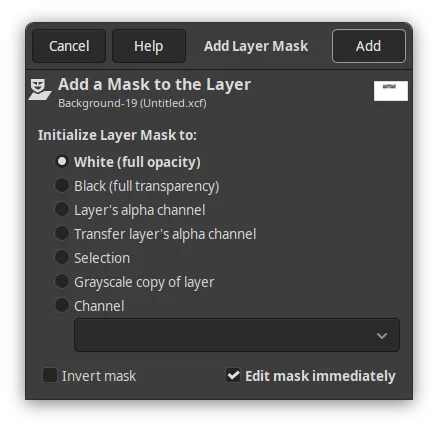
Save an XCF project as the working master and export a separate image for delivery. Export formats can lose editable information, and even XCF does not retain undo history. Camera RAW work needs an external editor integration such as darktable, RawTherapee or ART. Destructive painting on text, link or vector layers also requires rasterization. The gallery illustrates a 3.2.0 dialog, not the selected 3.2.6 package.
What it offers
- Retouch photographs, combine images and create original graphics in a free desktop image editor.
- Use layer masks to control visibility; the Add Layer Mask dialog can make a new mask immediately active for editing.
- Keep external images connected through link layers that update when the referenced file changes.
- Create editable vector layers with path-based shapes, fills and strokes, including non-destructive transformations.
- Apply non-destructive filters to layers, layer groups and channels, and revisit their settings later.
- Save an editable XCF project and export a separate delivery image in another supported format.
Good to know
- Camera RAW editing relies on an external editor integration such as darktable, RawTherapee or ART.
- Export formats can discard editable project information. Keep an XCF master; even XCF does not retain undo history.
- Text, link and vector layers must be rasterized before destructive painting or merging filters; reverting rasterization clears those destructive edits.
Product images
Sources
References used for this listing. Retrieval dates do not indicate hands-on testing.
More in multimedia & graphics
View category ↗
1by1 2.17
Play music directly from folders with 1by1, a free Windows audio player with resume, gapless playback and file tools. Formats beyond MP3 need additional decoders.
3DVista Virtual Tour Pro
Build interactive 360° virtual tours from panoramas, videos and 3D models with 3DVista Virtual Tour Pro for Windows. Commercial software with a 30-day trial.

4DDiG Video Repair
Repair corrupted or unplayable videos in batches with the Video Repair tool in 4DDiG File Repair for Windows. A free trial is available; advanced features require a paid license.