
Multimedia & graphics Windows
GoPlay Video Editor
Record your Windows screen and edit clips with GoPlay Video Editor, combining a timeline, subtitles, audio mixing and picture-in-picture. The free tier has watermarks and five-minute limits.
- Operating system
- Windows; Softonic lists Windows 8
- Architecture
- Not identified for the linked publisher EXE
- Download package
- EXE download
Windows 10/11 compatibility is unconfirmed. Softonic lists 1.2.7.0, but the publisher does not tie a version to this download; no installation or runtime compatibility test performed.
Link checked · Download guidance
What is GoPlay Video Editor?
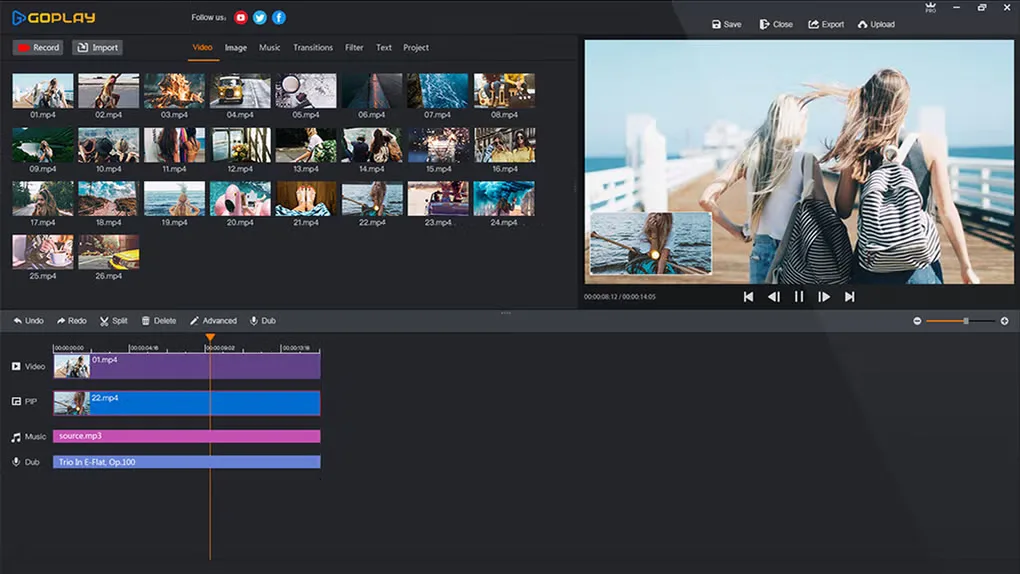
GoPlay Video Editor combines screen recording with a timeline-based video editor for Windows. Capture the whole screen or a selected area, include webcam footage and voice narration, then trim, crop or merge clips in the same application. Its editing tools include transitions, filters, text, subtitles and per-track audio adjustments. This makes it an option for assembling short screen demonstrations or gameplay clips with commentary.
The publisher's Free/Professional comparison is important before choosing the download. It lists watermarked recordings, a GoPlay opener on exports, 720p recording and uploads, and five-minute recording and export limits for the free tier. Paid Professional plans remove the listed watermark, opener and duration restrictions and offer additional output settings and effects. The headline recording capabilities on the homepage should not be read as features available without these restrictions.
The linked EXE is the Windows download exposed on the publisher's website. Softonic lists version 1.2.7.0 and Windows 8, but the publisher pages inspected do not identify the version or architecture of that EXE or establish Windows 10/11 compatibility. The publisher site also retains a 2017–2018 copyright footer. Current maintenance and compatibility with newer Windows releases remain unconfirmed; this entry does not claim the installer was run or tested.
What it offers
- Record the full screen or a selected area with optional webcam picture-in-picture and voice narration.
- Trim and crop video clips, merge scenes and arrange media on a timeline.
- Add transitions, filters, text and picture-in-picture video overlays.
- Add subtitles, import caption files and adjust caption timing with a preview.
- Adjust the audio of individual timeline tracks with the audio mixer.
Good to know
- The publisher lists five-minute recording and export limits for the free tier, with recording and uploads limited to 720p.
- Free recordings include a watermark, exports include a GoPlay opener, and some features display ads; removing these restrictions requires a paid Professional plan.
- The publisher does not identify the linked EXE's version or architecture on the inspected pages; Windows 10/11 compatibility and current maintenance are unconfirmed.
Product images
Sources
References used for this listing. Retrieval dates do not indicate hands-on testing.
More in multimedia & graphics
View category ↗
1by1 2.17
Play music directly from folders with 1by1, a free Windows audio player with resume, gapless playback and file tools. Formats beyond MP3 need additional decoders.
3DVista Virtual Tour Pro
Build interactive 360° virtual tours from panoramas, videos and 3D models with 3DVista Virtual Tour Pro for Windows. Commercial software with a 30-day trial.

4DDiG Video Repair
Repair corrupted or unplayable videos in batches with the Video Repair tool in 4DDiG File Repair for Windows. A free trial is available; advanced features require a paid license.