
Multimedia & graphics Windows
Greenfish Icon Editor Pro
Create Windows icons, edit animated cursors and manage icon libraries with Greenfish Icon Editor Pro, a free image editor with layers and a portable option.
- Operating system
- Windows 7 or newer
- Architecture
- 64-bit
- Download package
- EXE installer
Selected download: version 4.5 installer. Portable ZIP is separate. Publisher lists 3.6 as the last version for Windows XP or 32-bit Windows.
Link checked · Download guidance
What is Greenfish Icon Editor Pro?
Greenfish Icon Editor Pro turns existing artwork into Windows icons and provides editing tools for cursors, animations and icon libraries. An icon can contain several sizes of the same design, so you can adjust small versions instead of relying on one large image to scale down cleanly. The publisher offers the program free for personal and commercial use.
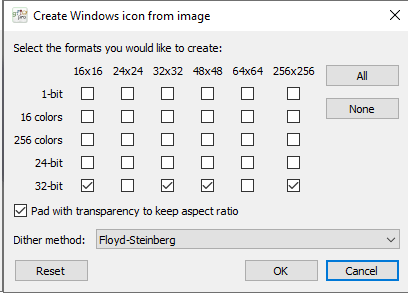
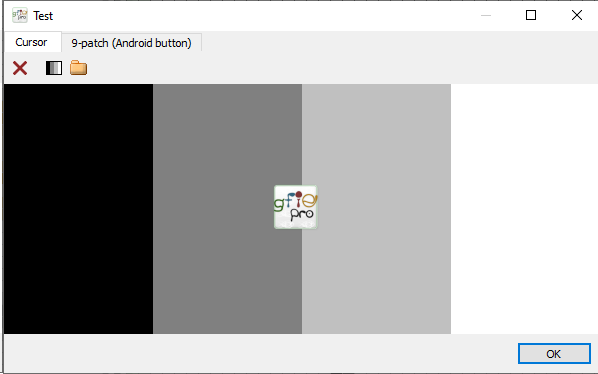
For an image-to-icon workflow, open your artwork and choose Icon | Create Windows icon from image (Ctrl+Shift+I). Select the sizes and color depths you need. Enable Pad with transparency for non-square artwork to avoid stretching it into a square. The Icon | Test command previews the selected icon against different backgrounds.
Keep an editable .GFIE copy when using layers: exported formats such as PNG store a flattened image rather than the layer structure. Version 4.5 requires 64-bit Windows 7 or newer; the publisher identifies 3.6 as the last release for Windows XP or 32-bit Windows. The linked download is the Windows installer, not the separate portable ZIP.
What it offers
- Create multi-size Windows icons from an existing image, with optional transparent padding.
- Edit static and animated cursors, GIF and WebP animations, and icon libraries.
- Organize artwork in layers with opacity and blend-mode controls.
- Preview an icon against different backgrounds with Icon | Test.
- Use a separate portable Windows package when an installer is not wanted.
Good to know
- Version 4.5 requires 64-bit Windows 7 or newer; it is not the Windows XP or 32-bit build.
- Layers are retained only in .GFIE files; exporting to formats such as PNG flattens the artwork.
- Downscaling detailed artwork to 16x16 or 32x32 can lose detail, so small icon pages may need manual adjustment.
Product images


Sources
References used for this listing. Retrieval dates do not indicate hands-on testing.
More in multimedia & graphics
View category ↗
1by1 2.17
Play music directly from folders with 1by1, a free Windows audio player with resume, gapless playback and file tools. Formats beyond MP3 need additional decoders.
3DVista Virtual Tour Pro
Build interactive 360° virtual tours from panoramas, videos and 3D models with 3DVista Virtual Tour Pro for Windows. Commercial software with a 30-day trial.

4DDiG Video Repair
Repair corrupted or unplayable videos in batches with the Video Repair tool in 4DDiG File Repair for Windows. A free trial is available; advanced features require a paid license.