

Multimedia & graphics Windows
Helicon Focus for Windows
Combine photos taken at different focus distances into one detailed image with Helicon Focus, a Windows focus-stacking application with a 30-day trial.
- Operating system
- Windows 10 and Windows 11
- Architecture
- 64-bit
- Download package
- EXE installer
Selected Helicon Focus 8 installer, not the separately listed Focus 9 beta. The download catalog lists 8 GB RAM and a 1600 × 1200 screen as minimum requirements.
Link checked · Download guidance
What is Helicon Focus?
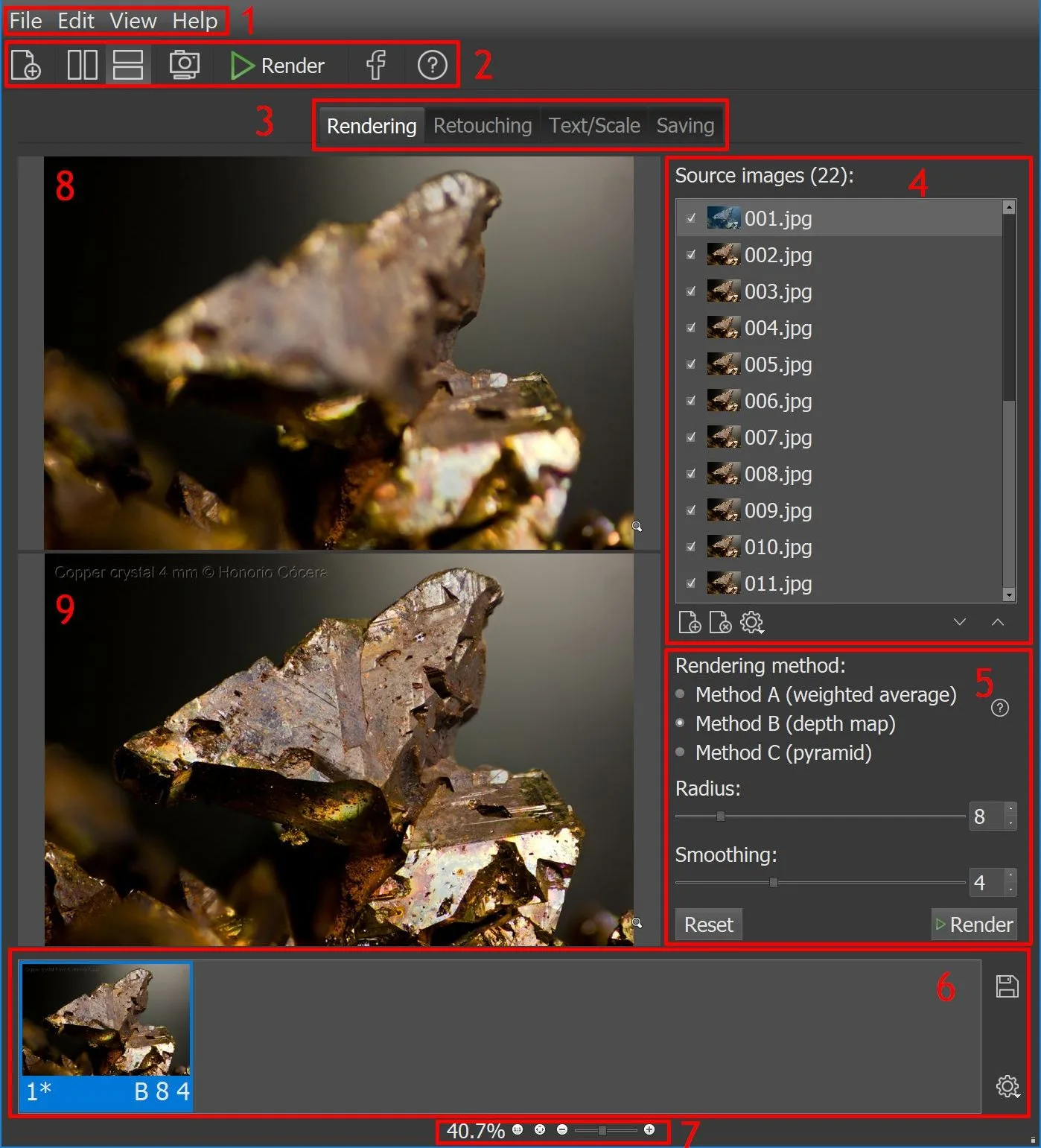
Helicon Focus combines the sharp areas of a sequence of photos into a single image with greater depth of field. It is designed for work such as macro, microscope, jewelry and product photography, where one exposure may leave parts of the subject out of focus. Load a stack, choose a rendering method and compare the output before saving it.
The application offers three main stacking methods, adjustable radius and smoothing controls, and a Preview mode for comparing settings. It can open RAW, JPEG and TIFF images. Retouching tools can copy detail from aligned source frames to repair parts of a rendered image, though Lite limits retouching strokes to evaluation use.
This entry links to the publisher's Helicon Focus 8 Windows installer, listed as version 8.3.11 for 64-bit Windows 10 and 11 when checked. Helicon Focus 9 is listed separately as a beta. The fully featured trial lasts 30 days; afterward, unregistered Demo mode adds promotional text to saved images and limits output to 4 megapixels. A paid license unlocks the corresponding edition.
What it offers
- Merge photos taken at different focus distances into a focus-stacked image.
- Compare the three main rendering methods and adjust radius and smoothing with Preview mode.
- Open RAW, JPEG and 8-bit or 16-bit TIFF source images.
- Copy detail from aligned source frames with specialized retouching tools; Lite restricts retouching to evaluation strokes.
Good to know
- After the 30-day trial, unregistered Demo mode adds promotional text to saved images and limits output to 4 megapixels.
- Lite provides limited retouching strokes for evaluation; unrestricted specialized retouching requires Pro or Premium.
- Stack quality and shooting order affect the result; movement or alignment problems can produce artifacts requiring retouching.
Product images
Sources
References used for this listing. Retrieval dates do not indicate hands-on testing.
- Helicon Focus - Helicon Soft ↗Retrieved
- Downloads - Helicon Soft ↗Retrieved
- Choosing the right license - Helicon Soft ↗Retrieved
- Helicon Focus 8 User Guide ↗Retrieved
More in multimedia & graphics
View category ↗
1by1 2.17
Play music directly from folders with 1by1, a free Windows audio player with resume, gapless playback and file tools. Formats beyond MP3 need additional decoders.
3DVista Virtual Tour Pro
Build interactive 360° virtual tours from panoramas, videos and 3D models with 3DVista Virtual Tour Pro for Windows. Commercial software with a 30-day trial.


4DDiG Video Repair
Repair corrupted or unplayable videos in batches with the Video Repair tool in 4DDiG File Repair for Windows. A free trial is available; advanced features require a paid license.