

Multimedia & graphics Windows
Helio Workstation for Windows
Sketch MIDI compositions, edit notes in a piano roll and arrange patterns with Helio Workstation, a free, open-source music sequencer for Windows.
Version 3.18 · Direct publisher file
Link checked · Download guidance
What is Helio Workstation?
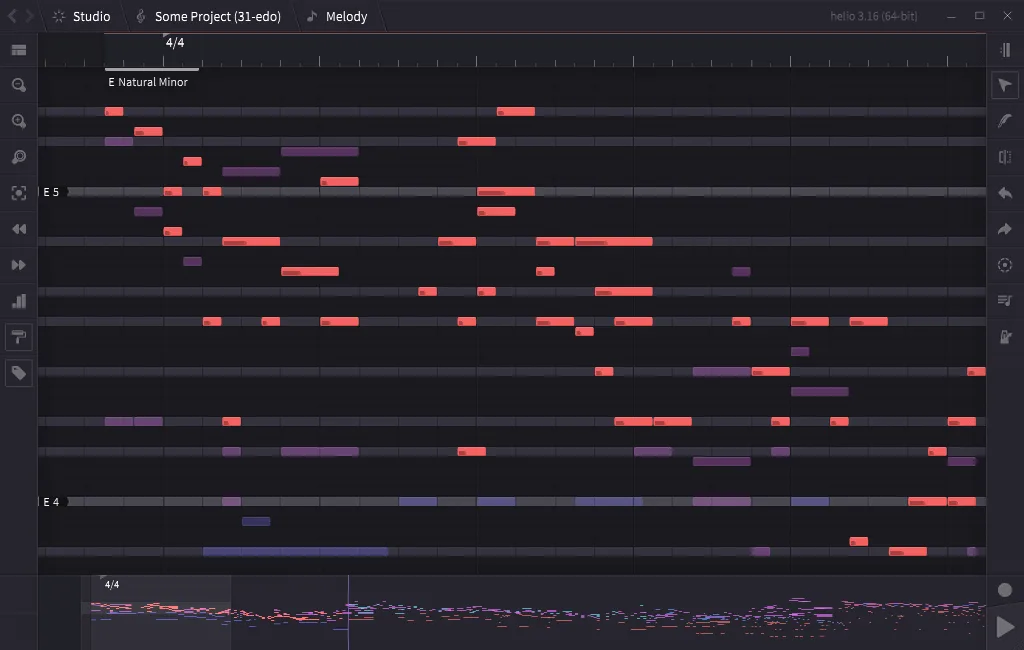
Helio Workstation is a music sequencer for developing musical ideas through MIDI editing and arrangement. Its piano roll edits the active track while showing other tracks as translucent notes; the pattern roll provides a separate view for arranging clips. The publisher emphasizes an uncluttered interface and experimentation with scales and microtonal temperaments.
The instrument workflow is important when deciding whether Helio fits your projects. Instruments are configured in the shared Orchestra Pit workspace, while project files store references to them rather than the instrument settings themselves. This suits reusing one instrument setup across sketches, but is less convenient when every project needs a self-contained set of instrument settings.
This entry links to the publisher's Windows 3.18 EXE installer. The publisher also offers separate 32-bit and 64-bit portable archives. Plugin bitness must match the chosen build: Helio does not host 32-bit and 64-bit plugins together or provide plugin sandboxing. The screenshot is the publisher's Helio 3.16 desktop example, not a capture of the linked 3.18 installer.
What it offers
- Edit MIDI notes in the piano roll with other tracks visible as translucent reference notes.
- Arrange clips in the pattern roll and switch back to the piano roll for note editing.
- Explore scales and microtonal temperaments in a composition-focused interface.
- Configure shared instruments and audio/MIDI routing through the Orchestra Pit workspace.
Good to know
- Instrument settings belong to the application workspace, not individual project files; projects store instrument references instead.
- Plugins must match the build's 32-bit or 64-bit architecture. Mixed-bitness plugin hosting and plugin sandboxing are not supported.
Product images
Sources
References used for this listing. Retrieval dates do not indicate hands-on testing.
- helio.fm — publisher description and Windows packages ↗Retrieved
- Intro - Helio 101 ↗Retrieved
- Getting Started - Helio 101 ↗Retrieved
- Helio sequencer — GNU General Public License ↗Retrieved
- Helio Workstation - Download ↗Retrieved
More in multimedia & graphics
View category ↗
1by1 2.17
Play music directly from folders with 1by1, a free Windows audio player with resume, gapless playback and file tools. Formats beyond MP3 need additional decoders.
3DVista Virtual Tour Pro
Build interactive 360° virtual tours from panoramas, videos and 3D models with 3DVista Virtual Tour Pro for Windows. Commercial software with a 30-day trial.

4DDiG Video Repair
Repair corrupted or unplayable videos in batches with the Video Repair tool in 4DDiG File Repair for Windows. A free trial is available; advanced features require a paid license.