
Multimedia & graphics Windows
Image Tuner
Resize, rename, convert and watermark batches of photos with Image Tuner for Windows. The publisher offers a seven-day trial; this download is the 64-bit installer.
- Operating system
- Windows 7, 8, 10 and 11
- Architecture
- x64 (selected download); publisher also lists 32-bit support
- Download package
- EXE installer
The publisher lists both 32-bit and 64-bit Windows support and provides a separate standard installer. This link selects the catalog's 64-bit package. No installation was performed.
Link checked · Download guidance
What is Image Tuner?
Image Tuner applies repeatable changes to groups of images on Windows. It combines batch resizing, file renaming, format conversion and watermarking, making it useful when a collection of photos needs consistent dimensions or naming. Folder and subfolder searches help gather files, while image-list and task-list import and export support recurring jobs.
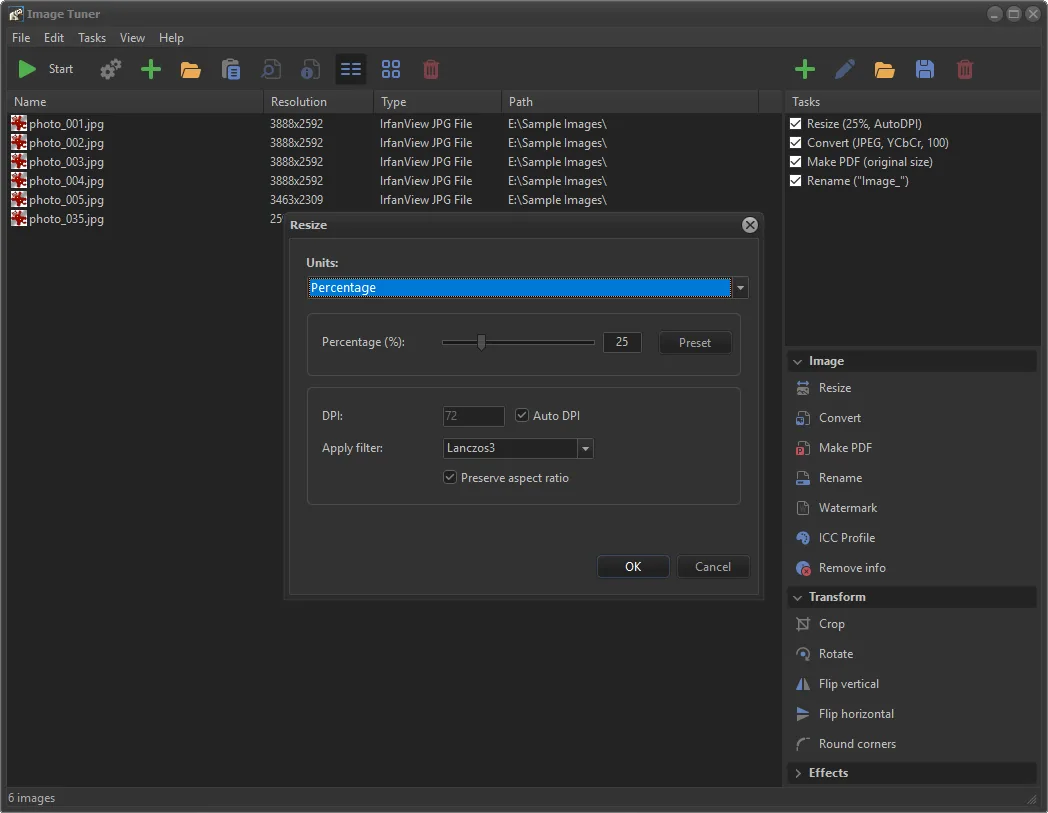
The publisher also lists cropping, rotation, sharpening, color adjustments and rounded corners, plus PDF creation from original or processed images. Supported formats include JPEG, BMP, PNG, GIF, TIFF and PCX, alongside listed camera RAW formats such as CR2 and NEF. The publisher screenshot shows a file list next to a checked task queue, with a Resize dialog offering percentage sizing and an aspect-ratio option.
Image Tuner 10.3 is offered as a free seven-day trial, not unrestricted freeware. Continued use requires a purchased license. The linked EXE is the publisher's 64-bit Windows installer; a separate standard download is available in its catalog. These details come from publisher documentation and screenshot inspection, not an installation or hands-on processing test.
What it offers
- Resize, rename, convert and watermark multiple images in a batch.
- Create PDF documents from original or processed images.
- Crop, rotate, sharpen, colorize and round photo corners.
- Search folders and subfolders for pictures; preview, import and export an image list.
- Import and export a task list for recurring processing jobs.
- Work with listed common image formats and camera RAW formats, including JPEG, PNG, TIFF, CR2 and NEF.
Good to know
- The publisher's free trial lasts seven days; continued use requires a paid license.
- The linked 64-bit installer is not the separate package needed for 32-bit Windows.
Product images
Sources
References used for this listing. Retrieval dates do not indicate hands-on testing.
More in multimedia & graphics
View category ↗
1by1 2.17
Play music directly from folders with 1by1, a free Windows audio player with resume, gapless playback and file tools. Formats beyond MP3 need additional decoders.
3DVista Virtual Tour Pro
Build interactive 360° virtual tours from panoramas, videos and 3D models with 3DVista Virtual Tour Pro for Windows. Commercial software with a 30-day trial.


4DDiG Video Repair
Repair corrupted or unplayable videos in batches with the Video Repair tool in 4DDiG File Repair for Windows. A free trial is available; advanced features require a paid license.