
Multimedia & graphics Windows
ImageJ for Windows
Measure image regions, process stacks and automate scientific image analysis with ImageJ. This Windows download includes 64-bit Java 8.
- Operating system
- Windows
- Architecture
- 64-bit Java bundle
- Download package
- ZIP archive with ImageJ launcher and Java 8
Publisher-selected Windows bundle; exact minimum Windows version and bundled ImageJ patch version are not established by the download page. The screenshot uses historical macOS window styling.
Link checked · Download guidance
What is ImageJ?
ImageJ is a public-domain application for processing and measuring scientific images. Use selections to measure areas, pixel intensities, lengths and angles, then inspect histograms or line profile plots. It handles 8-bit, 16-bit and 32-bit image data as well as RGB color, with filters for smoothing, sharpening, edge detection and thresholding.
Related images can be opened as a stack and processed together. Macros and the command recorder help automate repeated work, while plugins add capabilities beyond the core program. This entry covers the original ImageJ, not the Fiji distribution or the ImageJ2 redesign.
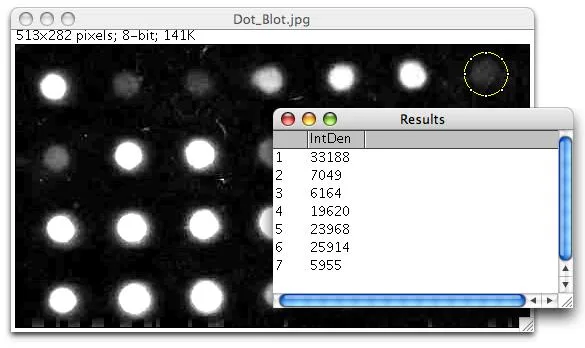
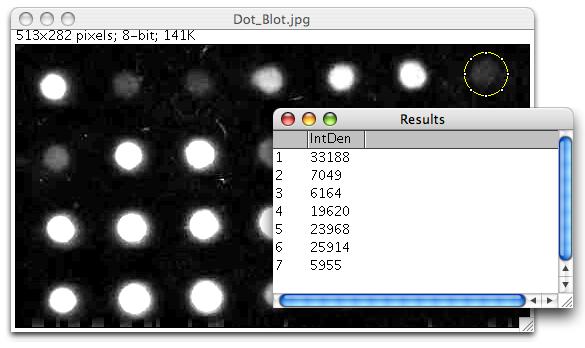
The linked publisher ZIP contains the Windows package bundled with 64-bit Java 8. ImageJ’s core updater changes ij.jar; it does not update installed plugins. Keep plugin maintenance separate, and use a writable ImageJ folder if you need to change its memory configuration. The screenshot is a historical publisher example of dot-blot analysis with macOS window styling, illustrating ImageJ’s image and measurement windows rather than a current Windows capture.
What it offers
- Measure selected areas, pixel-value statistics, lengths and angles, including calibrated real-world units.
- Generate histograms and line profile plots from image data.
- Apply smoothing, sharpening, edge detection and thresholding, or crop, resize and rotate images.
- Process related images as stacks and save multi-image TIFF files.
- Automate repeated tasks with macros and the command recorder, or extend the application with plugins.
Good to know
- Help > Update ImageJ updates the core ij.jar file, not installed plugins; plugins need separate maintenance.
- Changing memory settings requires write access to ImageJ.cfg in the application folder.
Product images
Sources
References used for this listing. Retrieval dates do not indicate hands-on testing.
- ImageJ — original ImageJ project ↗Retrieved
- ImageJ Features ↗Retrieved
- ImageJ Download — Windows bundle ↗Retrieved
- ImageJ Windows Installation ↗Retrieved
- ImageJ User Guide — Installing and Maintaining ImageJ ↗Retrieved
- ImageJ Dot Blot Analysis — publisher screenshot ↗Retrieved
- ImageJ Disclaimer ↗Retrieved
- ImageJ - Download — Windows discovery page ↗Retrieved
More in multimedia & graphics
View category ↗
1by1 2.17
Play music directly from folders with 1by1, a free Windows audio player with resume, gapless playback and file tools. Formats beyond MP3 need additional decoders.
3DVista Virtual Tour Pro
Build interactive 360° virtual tours from panoramas, videos and 3D models with 3DVista Virtual Tour Pro for Windows. Commercial software with a 30-day trial.

4DDiG Video Repair
Repair corrupted or unplayable videos in batches with the Video Repair tool in 4DDiG File Repair for Windows. A free trial is available; advanced features require a paid license.