
Multimedia & graphics Windows
JACK2
Route audio and MIDI between music applications with JACK2 for Windows, a free, open-source audio server with native JACK connections and an ASIO bridge.
- Operating system
- Windows 7 or higher, as listed by the publisher
- Architecture
- x64 installer; mixed 32/64-bit client support
- Download package
- EXE installer
Separate 32-bit installer available. JACK-Router must be selected during installation for the ASIO bridge; audio configuration depends on the device drivers.
Link checked · Download guidance
What is JACK2?
JACK2 connects music applications to each other and to audio hardware. It can send audio from one program into another for processing or recording, while providing a shared audio and MIDI connection system. Also known as jackdmp, it is the C++ JACK server implementation designed to support multiprocessor audio workflows.
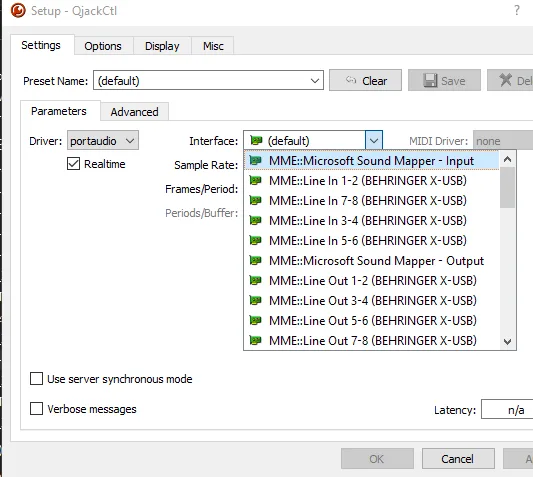
On Windows, native JACK applications connect directly to the server. ASIO-capable applications can use the JACK-Router driver when that component is installed. The publisher’s setup guide uses QjackCtl to select the audio interface, set the sample rate and buffer parameters, start the server and manage connections in Graph. PortAudio provides access to supported Windows audio drivers; available choices depend on the soundcard’s drivers.
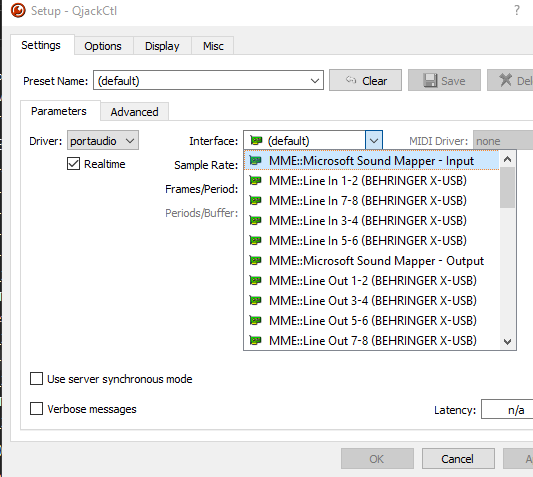
The linked package is the publisher’s 1.9.22 Windows 64-bit EXE installer. The publisher lists Windows 7 or higher and mixed 32/64-bit client support for the 64-bit build. JACK-Router requires the JACK server to be running, and multichannel routing may need additional configuration. The screenshot is a historical Windows QjackCtl Setup view posted with JACK2 1.9.21, not a capture of this download or proof that an audio setup works.
What it offers
- Route audio and MIDI between applications using JACK connections.
- Connect ASIO-capable Windows applications through the optional JACK-Router component.
- Use QjackCtl Setup and Graph to configure the server and manage application connections.
- Support simultaneous execution of parallel audio clients on multiprocessor systems.
Good to know
- JACK-Router is unavailable to ASIO applications unless the JACK server is running.
- Audio-driver choices depend on the soundcard’s driver support; multichannel setups may need extra configuration.
Product images
Sources
References used for this listing. Retrieval dates do not indicate hands-on testing.
- Home | JACK Audio Connection Kit ↗Retrieved
- Downloads | JACK Audio Connection Kit ↗Retrieved
- Using JACK on Windows | JACK Audio Connection Kit ↗Retrieved
- jackaudio/jack2 — project README and license ↗Retrieved
- Release v1.9.22 · jackaudio/jack2-releases ↗Retrieved
- JACK2 - Download ↗Retrieved
- Qjackctl crash immediatly after clicking on interface dropdown Win10 · Issue #872 ↗Retrieved
More in multimedia & graphics
View category ↗
1by1 2.17
Play music directly from folders with 1by1, a free Windows audio player with resume, gapless playback and file tools. Formats beyond MP3 need additional decoders.
3DVista Virtual Tour Pro
Build interactive 360° virtual tours from panoramas, videos and 3D models with 3DVista Virtual Tour Pro for Windows. Commercial software with a 30-day trial.

4DDiG Video Repair
Repair corrupted or unplayable videos in batches with the Video Repair tool in 4DDiG File Repair for Windows. A free trial is available; advanced features require a paid license.