
Multimedia & graphics Windows
JamTaba
Join NINJAM music rooms with JamTaba for Windows, preview other musicians and play interval-based jams using audio or MIDI inputs and VST plugins.
- Operating system
- Windows 7 or later, according to the publisher FAQ
- Architecture
- x64 (64-bit Windows package)
- Download package
- EXE installer
Selected release v2.1.16 has separate 32-bit and 64-bit Windows installers. Requires ASIO-compatible audio and Internet access. Windows 10/11 operation was not tested.
Link checked · Download guidance
What is JamTaba?
JamTaba connects musicians through NINJAM servers for online jam sessions. Its room browser lets you listen before entering a session, while local channel controls let you prepare your input and levels. The Windows standalone application can use audio and MIDI devices and host VST plugins; a Windows VST version also lets you work from a compatible DAW.
The timing model matters more than a promise of low latency. NINJAM exchanges complete musical intervals, so you play along with the other musicians' previous interval rather than hearing everyone perform the same moment together. Follow the room's metronome, tempo and beats-per-interval setting. This suits repeating musical structures, not a claim of zero-delay rehearsal.
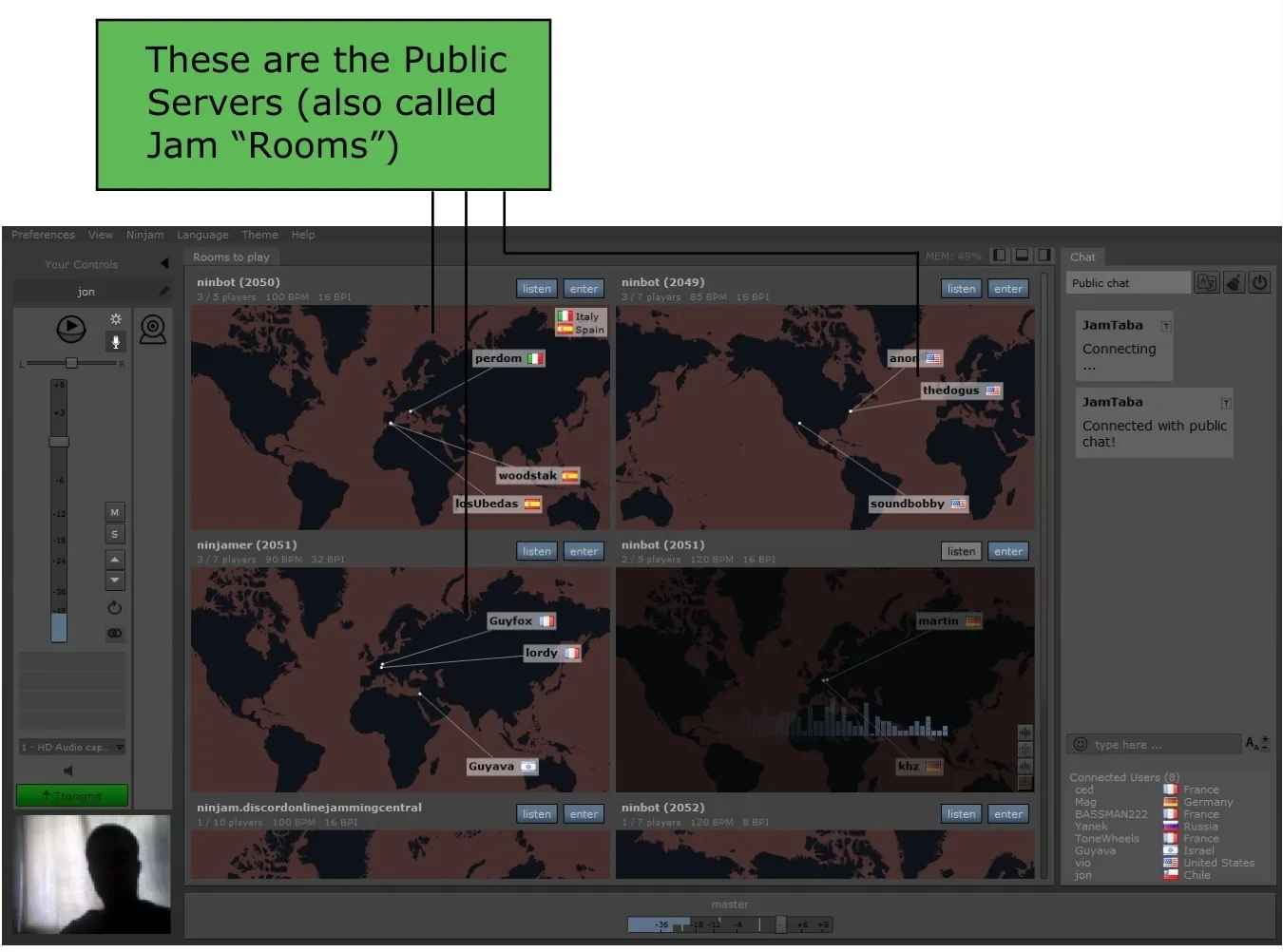
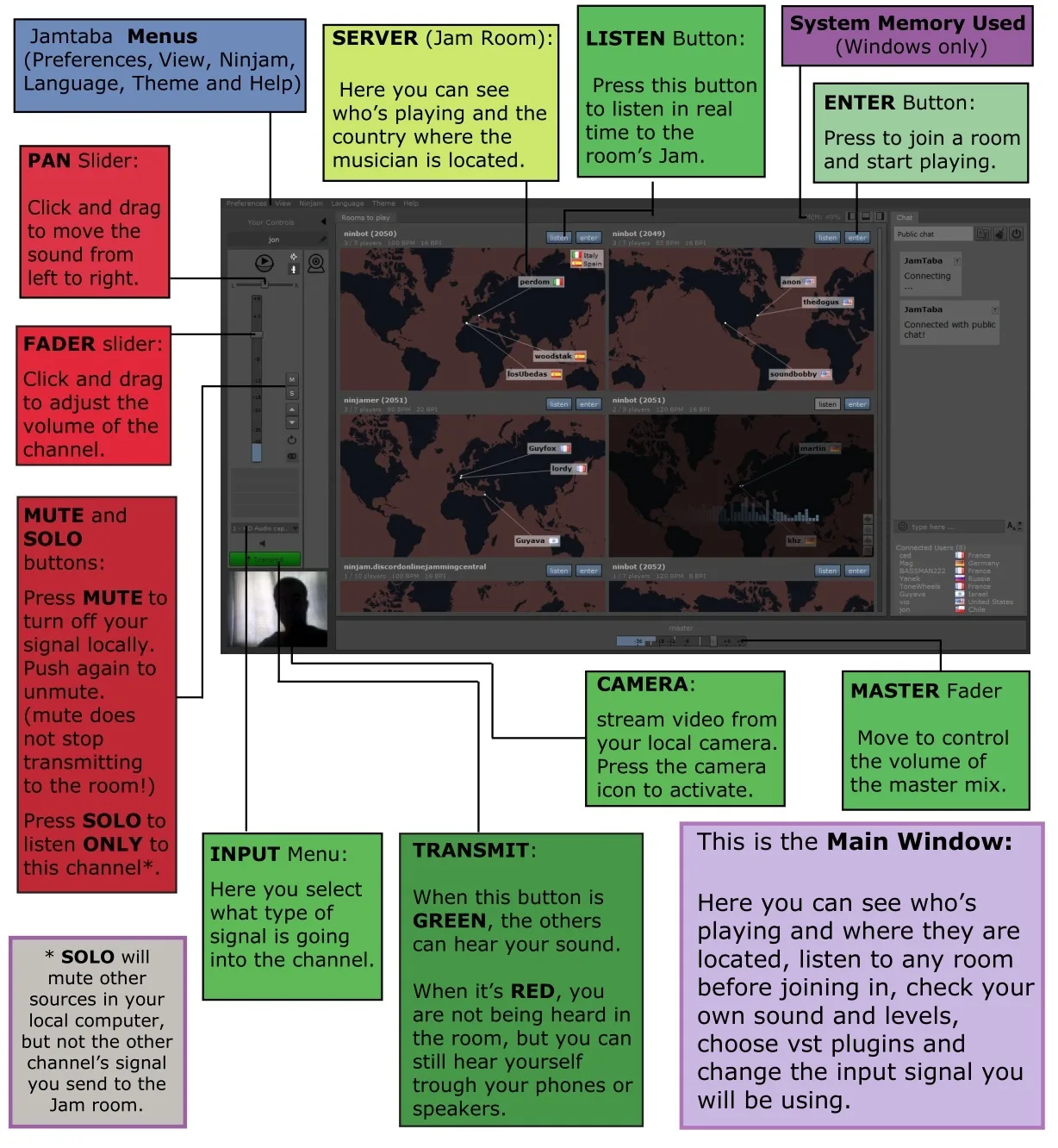
The linked package is the publisher's 64-bit Windows EXE installer from release v2.1.16. The publisher FAQ lists Windows 7 or later with ASIO-compatible audio and an Internet connection. The README warns that its precompiled Windows audio libraries require an ASIO driver; without one, JamTaba produces no sound. Current Windows 10/11 operation and public-room availability have not been tested here. The screenshots are historical publisher-manual images, not captures of a new installation.
What it offers
- Preview a public jam with LISTEN before joining its room with ENTER.
- Use audio and MIDI devices and host VST plugins in the standalone application.
- Use the Windows VST version within a compatible DAW.
- Follow room BPM and beats-per-interval settings with the built-in metronome.
- Synchronize external MIDI equipment in the standalone version, as described in the v2.1.16 release notes.
Good to know
- NINJAM is interval-based: you hear other participants' previous musical interval, not true real-time synchronized performance.
- The publisher's precompiled Windows audio libraries require an ASIO driver; the README warns that no sound is produced without one.
- Windows XP is unsupported from version 2.1.0 onward. The published Windows 7+ requirement does not establish tested Windows 10/11 compatibility.
- The linked v2.1.16 Windows asset was uploaded in 2020; current public-server availability and installation behavior were not tested.
Product images
Sources
References used for this listing. Retrieval dates do not indicate hands-on testing.
- JamTaba — official README ↗Retrieved
- JamTaba v2.1.16 — official release and explicit asset URLs ↗Retrieved
- JamTaba FAQ — minimum requirements ↗Retrieved
- JamTaba user guide — Windows packages and VST setup ↗Retrieved
- JamTaba user guide — NINJAM timing ↗Retrieved
- JamTaba user guide — previewing and joining rooms ↗Retrieved
- JamTaba user guide — annotated Windows main window ↗Retrieved
- JamTaba user guide — project origin and public rooms screenshot ↗Retrieved
- JamTaba 2 - Download — Windows discovery listing ↗Retrieved
More in multimedia & graphics
View category ↗
1by1 2.17
Play music directly from folders with 1by1, a free Windows audio player with resume, gapless playback and file tools. Formats beyond MP3 need additional decoders.
3DVista Virtual Tour Pro
Build interactive 360° virtual tours from panoramas, videos and 3D models with 3DVista Virtual Tour Pro for Windows. Commercial software with a 30-day trial.



4DDiG Video Repair
Repair corrupted or unplayable videos in batches with the Video Repair tool in 4DDiG File Repair for Windows. A free trial is available; advanced features require a paid license.