
Multimedia & graphics Windows
JuceVLC
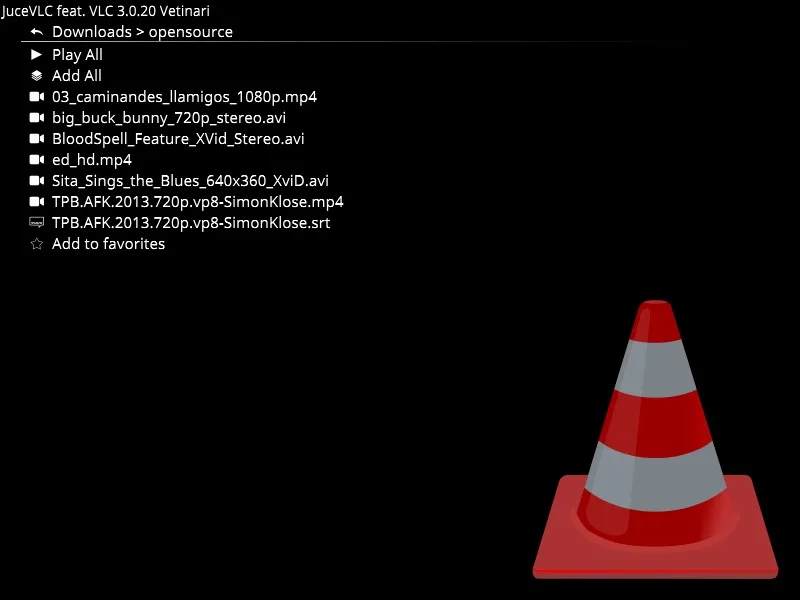
Browse local videos and control VLC playback through a fullscreen, media-center-style interface with large text and on-screen subtitle adjustments.
- Operating system
- Windows; exact minimum version not specified by the inspected publisher sources
- Architecture
- 64-bit Windows build; native ARM64 support not established
- Download package
- EXE installer
Publisher build files use lib64 libraries; its site says 64-bit is the default. The standalone ZIP separately requires VLC 3.0.20 files. No installer was downloaded or run.
Link checked · Download guidance
What is JuceVLC?
JuceVLC puts a fullscreen interface around VLC's playback engine for watching local movies from a couch with a wireless mouse. Its file browser and on-screen controls replace small file-selection dialogs with larger text and menus. It is a focused video-player frontend rather than a complete media-center replacement.
The publisher documents favorite folders, remembered playback positions for the last thirty videos, adjustable font sizes and subtitle selection and synchronization through on-screen sliders. These features suit a collection of local video files when browsing and adjusting playback from a distance matter more than a conventional desktop toolbar.
The linked Windows installer is release 0.9.6, published on October 22, 2024. Its release notes add an Explore action for opening a folder in Windows Explorer and state that holding Space fast-forwards playback. Choose the installer rather than confusing it with the separate executable-only ZIP: the publisher says that standalone executable needs the original VLC 3.0.20 files alongside it. Exact minimum Windows versions are not specified in the inspected publisher material. Online subtitle-service availability has not been verified.
What it offers
- Browse local video files through a fullscreen interface with large, customizable text.
- Select subtitles and adjust their synchronization using on-screen sliders.
- Keep favorite video folders and resume positions for the last thirty videos, as documented by the publisher.
- Use the 0.9.6 Explore action to reveal a folder in Windows Explorer.
- Hold Space to fast-forward video in release 0.9.6.
Good to know
- The executable-only ZIP is not a self-contained player; the publisher requires VLC 3.0.20 files alongside that executable. This entry links to the installer instead.
- Exact minimum Windows versions are not specified in the inspected publisher material; Windows 10 or 11 compatibility has not been tested here.
- Online subtitle search and download depend on an external service; current service operation has not been verified.
Product images
Sources
References used for this listing. Retrieval dates do not indicate hands-on testing.
- JuceVLC — publisher repository and README ↗Retrieved
- JuceVLC 0.9.6 — publisher release metadata ↗Retrieved
- JuceVLC 0.9.6 — release-pinned installer source ↗Retrieved
- JuceVLC 0.9.6 — release-pinned build configuration ↗Retrieved
- JuceVLC — publisher's legacy site source ↗Retrieved
- JuceVLC — repository license metadata ↗Retrieved
- JuceVLC — publisher screenshot directory ↗Retrieved
More in multimedia & graphics
View category ↗
1by1 2.17
Play music directly from folders with 1by1, a free Windows audio player with resume, gapless playback and file tools. Formats beyond MP3 need additional decoders.
3DVista Virtual Tour Pro
Build interactive 360° virtual tours from panoramas, videos and 3D models with 3DVista Virtual Tour Pro for Windows. Commercial software with a 30-day trial.

4DDiG Video Repair
Repair corrupted or unplayable videos in batches with the Video Repair tool in 4DDiG File Repair for Windows. A free trial is available; advanced features require a paid license.