

Multimedia & graphics Windows
Karakan for Windows
Create MIDI karaoke files from song lyrics and an existing MIDI track with Karakan, a free Windows editor with lyric playback, automatic hyphenation and Unicode support.
What is Karakan?
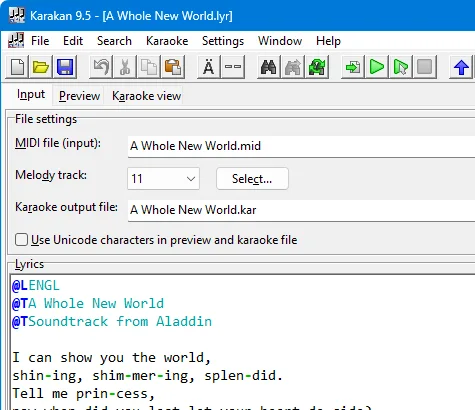
Karakan turns an existing MIDI file and lyrics into a karaoke file. Enter the words in Song Text Format, select the MIDI input and melody track, and create a Soft Karaoke (.kar) file or a MIDI file with lyrics for a keyboard. It is aimed at preparing lyric-based MIDI arrangements rather than working from a recorded vocal track.
The editor can play from the beginning or the current lyric line, helping you check the song while editing. Automatic hyphenation supports several languages; Unicode and right-to-left karaoke support extend the range of lyrics you can prepare. Part-songs can contain up to four vocal parts, and Yamaha XF chord information can be included and displayed.
Choose a compatible player when sharing Unicode karaoke files: the publisher notes that vanBasco’s Karaoke Player does not support Unicode files created with Karakan. The linked publisher download is the version 9.6 setup ZIP; its headers were verified without downloading or running the package. The screenshot illustrates the publisher’s version 9.5 interface, not a separately tested 9.6 installation.
What it offers
- Create Soft Karaoke (.kar) files or MIDI files with lyrics from a MIDI source and Song Text Format lyrics.
- Automatically hyphenate song text in several languages.
- Play from the beginning of the song or the current text line while checking lyrics.
- Create and play part-songs with up to four vocal parts.
- Use Unicode and right-to-left karaoke, and include or display Yamaha XF chords.
Good to know
- The documented creation workflow requires an existing MIDI file plus lyrics; it is not a workflow for turning a vocal recording into karaoke.
- Part-songs are limited to four vocal parts.
- Unicode karaoke files need a compatible player; the publisher specifically notes that vanBasco’s Karaoke Player does not support Karakan’s Unicode files.
Product images
Sources
References used for this listing. Retrieval dates do not indicate hands-on testing.
More in multimedia & graphics
View category ↗
1by1 2.17
Play music directly from folders with 1by1, a free Windows audio player with resume, gapless playback and file tools. Formats beyond MP3 need additional decoders.
3DVista Virtual Tour Pro
Build interactive 360° virtual tours from panoramas, videos and 3D models with 3DVista Virtual Tour Pro for Windows. Commercial software with a 30-day trial.

4DDiG Video Repair
Repair corrupted or unplayable videos in batches with the Video Repair tool in 4DDiG File Repair for Windows. A free trial is available; advanced features require a paid license.