
Multimedia & graphics Windows
LameXP
Batch-convert audio files to MP3, Opus, Ogg Vorbis or FLAC with LameXP, a free Windows encoder front-end with metadata editing and optional AAC support.
- Operating system
- Windows 11, Windows 10, Windows 7 SP1 and Windows XP SP3 are listed as Tier 1 in the official manual
- Architecture
- 32-bit and 64-bit Windows supported; no ARM-native package established
- Download package
- EXE setup program; ZIP distribution separately available
Windows 8.1, Vista SP2 and XP x64 SP2 are Tier 2, not extensively tested by the publisher. Linux requires Wine. Portable mode needs a writable program directory. No local installation or compatibility test was performed.
Link checked · Download guidance
What is LameXP?
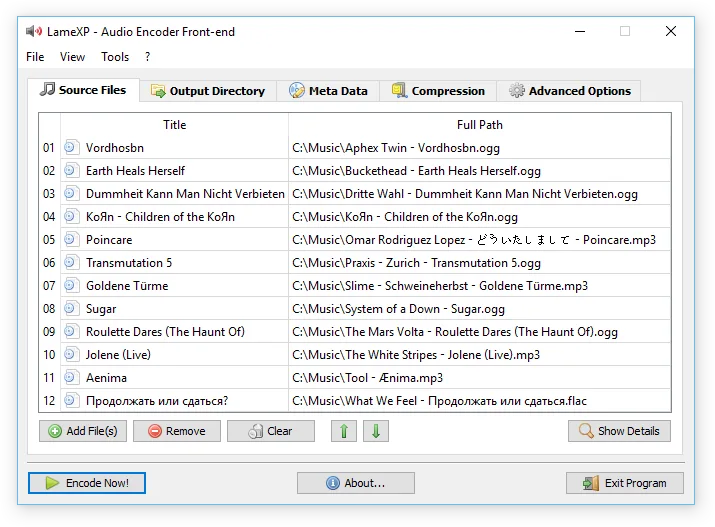
LameXP converts a queue of audio files into a chosen output format through a Windows graphical interface. It is useful for making MP3 copies of a lossless collection, preparing Opus files or converting mixed input formats without running individual command-line encoders. Multiple files can be processed concurrently, and the application includes a metadata editor, Unicode filename support and audio filters such as resampling, normalization and down-mixing.
Most supported encoders and decoders are bundled, but AAC encoding is an exception: it requires a separately installed compatible encoder. Metadata and artwork are retained where the output format permits, rather than guaranteed unchanged for every conversion. The download here is the official 4.21 Final build 2382 Windows EXE setup, released on 29 December 2023; it is not the newer beta build listed on the project homepage. The publisher also documents a ZIP package and a portable configuration mode.
What it offers
- Convert batches of audio files with concurrent processing across multiple CPU cores.
- Encode MP3, Opus, Ogg Vorbis, FLAC and WAV using included tools; additional output formats are documented in the manual.
- Edit metadata and preserve existing tags and cover artwork where supported by the chosen format.
- Apply resampling, normalization, tone adjustment and down-mixing filters.
- Use Unicode filenames and tags, with a multilingual interface and an optional portable configuration mode.
Good to know
- AAC encoding requires a separately obtained compatible encoder; it is not included in the standard distribution.
- Tag and cover-art preservation depends on the output format and is not guaranteed for every conversion.
- The linked package is 4.21 Final build 2382 from 2023, not the project's newer beta. Compatibility statements are publisher documentation, not a hands-on test.
Product images
Sources
References used for this listing. Retrieval dates do not indicate hands-on testing.
- LameXP - Audio Encoder Front-End ↗Retrieved
- LameXP — official manual ↗Retrieved
- LameXP — official release history ↗Retrieved
- MuldeR's OpenSource Projects ↗Retrieved
- Official LameXP release and package inventory ↗Retrieved
More in multimedia & graphics
View category ↗
1by1 2.17
Play music directly from folders with 1by1, a free Windows audio player with resume, gapless playback and file tools. Formats beyond MP3 need additional decoders.
3DVista Virtual Tour Pro
Build interactive 360° virtual tours from panoramas, videos and 3D models with 3DVista Virtual Tour Pro for Windows. Commercial software with a 30-day trial.


4DDiG Video Repair
Repair corrupted or unplayable videos in batches with the Video Repair tool in 4DDiG File Repair for Windows. A free trial is available; advanced features require a paid license.