
Multimedia & graphics Windows
LunarCell
Generate planets, moons and texture maps inside Photoshop with LunarCell, a commercial Windows plug-in available as a free trial.
- Operating system
- Windows Vista or later, according to the publisher's general plug-in requirements
- Architecture
- Not specified in the consulted publisher pages
- Download package
- ZIP archive containing a Windows plug-in
Requires a compatible host; publisher lists Photoshop CS2 or later and provides separate instructions for Photoshop 2018 or later. RGB-mode images required. Exact modern Windows/Photoshop build compatibility has not been tested.
Link checked · Download guidance
What is LunarCell?
LunarCell is a Flaming Pear plug-in for creating planets and moons in a compatible image editor. It is aimed at space illustrations, fantasy mapmaking and texture-map work for 3D animation, rather than viewing astronomical observations. The publisher describes fractal and reality-based worlds, a terraformable Moon and hypsometric maps.
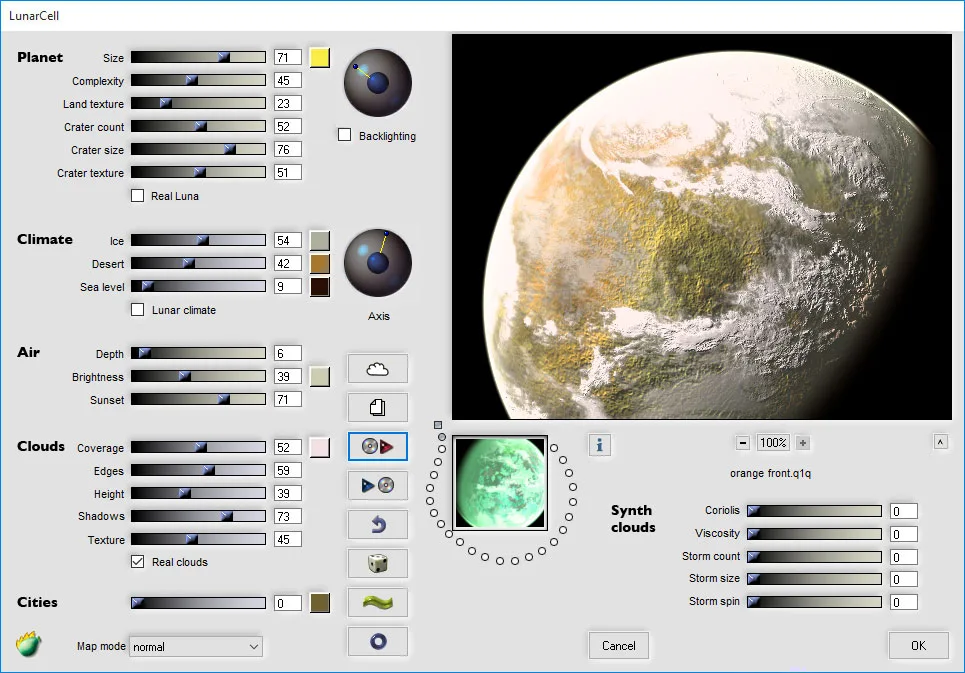
Its illustrated interface groups controls into Planet, Climate, Air, Clouds and Cities. Land texture and crater settings shape the surface; ice, desert and sea-level controls change its appearance. A large preview shows the resulting world alongside the controls. The publisher also lists exporting all texture maps together to multi-layer files. The screenshot is a publisher-provided Windows-style interface illustration, not evidence of a locally tested installation or the appearance of a particular build.
This is not a standalone planet generator: a compatible host is required. Flaming Pear's general Windows requirements list Windows Vista or later and Photoshop CS2 or later. These are publisher requirements, not confirmation of compatibility with every current Photoshop or Windows build. The Windows trial catalog identifies version 1.992; the separately listed Mac version is different.
For Photoshop 2018 or later, the publisher's installation instructions say to extract the Windows ZIP, move the plug-in into C:\Program Files\Common Files\Adobe\Plug-Ins\CC and restart Photoshop. Use an RGB-mode image and access the plug-in through the Filter menu. Flaming Pear's support page says its filters do not work on indexed-color or CMYK images. To remove a plug-in, the publisher directs users to delete the plug-in file and restart Photoshop. The free trial is a way to evaluate commercial software, not a freeware license; purchase supplies an unlocking code.
What it offers
- Generate fractal or reality-based planets and moons inside a compatible image-editor host.
- Adjust surface texture, craters, climate, atmosphere and clouds using the illustrated control groups.
- Create a terraformable Moon and hypsometric maps, as described by the publisher.
- Export all texture maps together to multi-layer files.
- Generate maps intended for 3D animation and fantasy mapmaking.
Good to know
- Not a standalone application; requires Photoshop or another compatible plug-in host.
- Commercial software with a free trial, not unrestricted freeware. The consulted product and trial pages do not specify a LunarCell trial duration.
- Publisher support says the filters require RGB-mode images; indexed-color and CMYK images must be converted.
- CPU architecture and exact current Windows/Photoshop build compatibility are not established by the consulted pages.
Product images
Sources
References used for this listing. Retrieval dates do not indicate hands-on testing.
- LunarCell - Flaming Pear Software ↗Retrieved
- Free trials - Flaming Pear Software ↗Retrieved
- Support - Flaming Pear Software ↗Retrieved
- Windows installation - Flaming Pear Software ↗Retrieved
More in multimedia & graphics
View category ↗
1by1 2.17
Play music directly from folders with 1by1, a free Windows audio player with resume, gapless playback and file tools. Formats beyond MP3 need additional decoders.
3DVista Virtual Tour Pro
Build interactive 360° virtual tours from panoramas, videos and 3D models with 3DVista Virtual Tour Pro for Windows. Commercial software with a 30-day trial.


4DDiG Video Repair
Repair corrupted or unplayable videos in batches with the Video Repair tool in 4DDiG File Repair for Windows. A free trial is available; advanced features require a paid license.